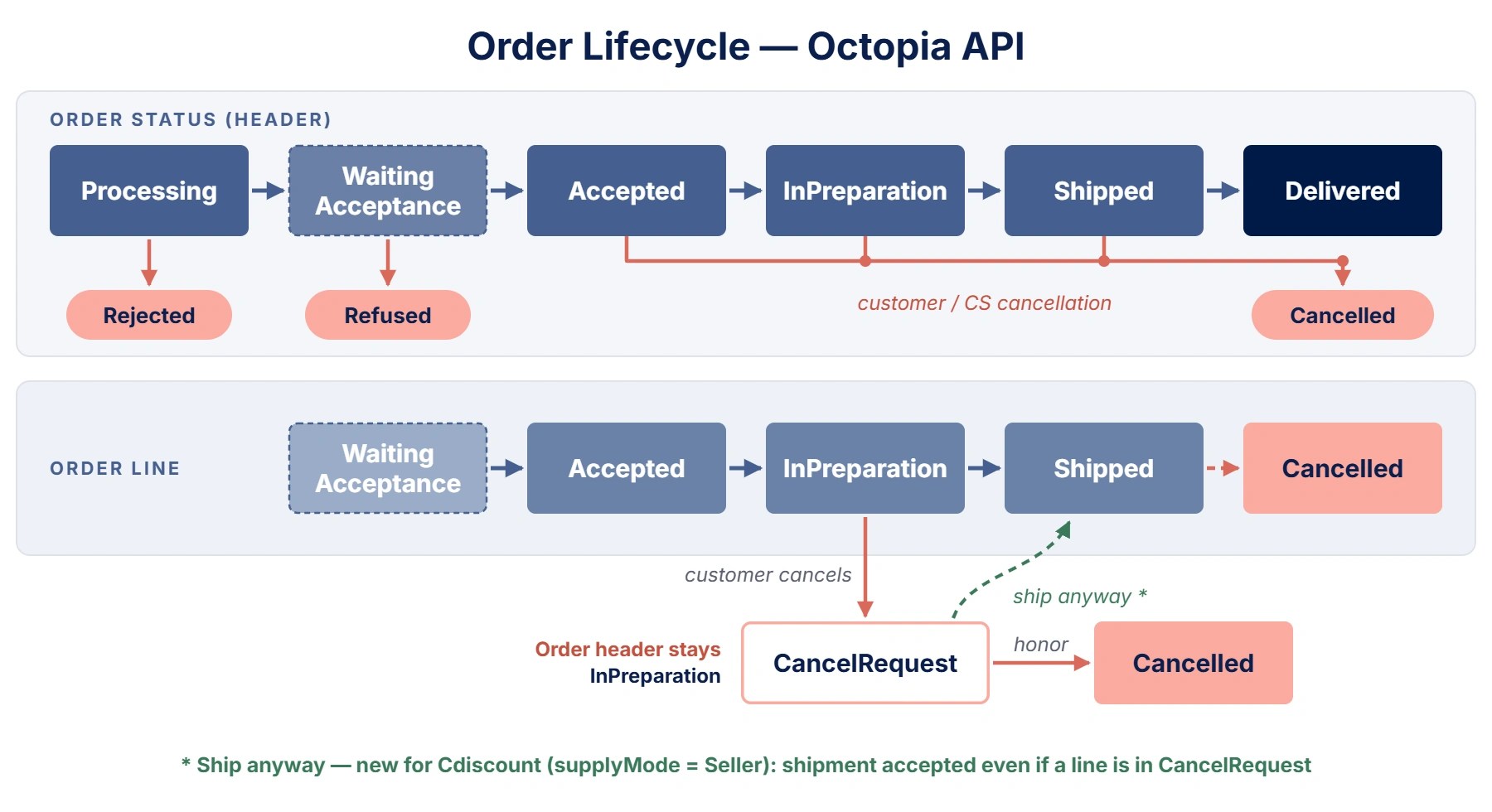
Managing orders can feel daunting at first: the workflow looks complex, statuses follow one another, and the right action often depends on context — sales channel, supply mode, and whether you manage orders at the line level.
To make it simple, we’ve mapped out the complete order lifecycle, from the moment an order reaches you all the way to financial settlement:
Our new step-by-step guide walks you through every stage so you don’t miss a thing: retrieving and tracking your orders, validating them, understanding the shipping address and delivery modes, shipping (including multiline, multi-parcel and large parcels), making a commercial gesture, cancelling orders, managing customer discussions, sending invoices, and retrieving your financial data. Each use case comes with a clear goal, key notes, and direct links to the relevant API documentation.
🛒 Black Friday 2026: get ready across Cdiscount and Octopia sales channels
The end-of-year season is the busiest of the year — lower your prices during these high-traffic periods to make the most of the peak.
On Cdiscount — 2 to 30 November
Successive waves (Black Month, Black Week, then Black Friday on 26 November at 5pm CET). A leading Black Friday player since 2013, Cdiscount sees its biggest day of the year: up to 5× normal traffic and sales, and up to 7× more parcels shipped. Toys, high-tech, phone and home appliances lead, but every category performs — and the Christmas operation runs on until end of December.
How to take part: send your discounted price in the <Price> attribute via your usual offer feed, at the dates/times given by your account manager, and keep it until the operation ends. An automated tool detects and highlights promotional offers.
🌍 On other Octopia sales channels — 27 October to 27 December
Selling on additional Octopia channels is a chance for extra visibility: they run their own events, with peaks on 27 November (Black Friday) and 30 November (Cyber Monday), and discounted products get promotional badges against competing offers.
How to take part: unlike Cdiscount, you schedule discounts in advance per channel — each needs its own submission. Go to “Products” → “Sell products in bulk”, pick the channel, click “Submit promotions in bulk”, then check the “Promotion submission report”. Each channel has its own calendar.
⚠️ Keep in mind: these operations have eligibility criteria — check your offers meet them before updating prices. If you have a dedicated account manager, follow the participation options they send you. Our support team is also available through the Help Center.
📋 GPSR: declare your manufacturer data, safety warnings and Responsible Economic Operator
Under the EU General Product Safety Regulation (GPSR), three things must be declared for your products. Manufacturer data and safety warnings are handled through the Product API using the property references below.
1. Manufacturer data (name, postal address, email)
For the Toys category, also fill the “Age from” property (11335, predefined list) in addition to one of the two fields above. For any other category, use the free-text “Safety warnings” field with a warning suited to the product; attaching a document (manual, regulatory pictogram…) is optional.
The Responsible Economic Operator (OER) — an EU-based entity responsible for product compliance — cannot be declared via the API: sellers must declare it themselves in their Octopia back office, under “Settings” → “Declare economic and responsible operators”. Full guidance is in the Help Center.
📊 External competing offers now available in GET /offers
GET /offers now returns the best competing offer found on external marketplaces for each of your offers — competitive pricing data without leaving the API.
A new externalCompetingOffer object exposes the competitor’s marketplaceName (e.g. Amazon), price, deliveryCost, totalPrice, an updatedAt timestamp, and a priceIndex — your total price as a percentage of the competitor’s: above 100 means you’re more expensive, below 100 means you’re cheaper. The field is absent when no competing offer is detected.
You can now feed competitive pricing signals straight into your repricing, ERP or OMS workflows — no separate market-monitoring tool needed — and quickly spot offers losing ground on price.
Good news for FaaS sellers: carrier tracking data for your outbound shipments is now available via API — no carrier portals or notification parsing needed. The new GET /parcel-trackings endpoint exposes the full delivery timeline, from hand-over to final delivery or return.
You can retrieve a parcel’s current status and its full history, filter by tracking number, order reference or status, and get the carrier tracking URL to share with customers. Statuses range from CarrierInfoReceived and InTransit to Delivered, PostponedDelivery, AvailableForPickup, ReturnToSender and more.
A few things to keep in mind: tracking is available once the parcel reaches Shipped, data refreshes every 8 hours (no real-time), each parcel of a multi-parcel shipment is tracked independently, and a NotFound status may simply mean the carrier hasn’t registered the parcel yet — retry after the next refresh.