
Orders Invoices
- Home
- Orders Invoices
Introduction

Last update :
Toolbox / Tips
-
Download the Postman collection
-
Download the YAML / See full technical documentation
-
Don’t forget to check the authentication documentation
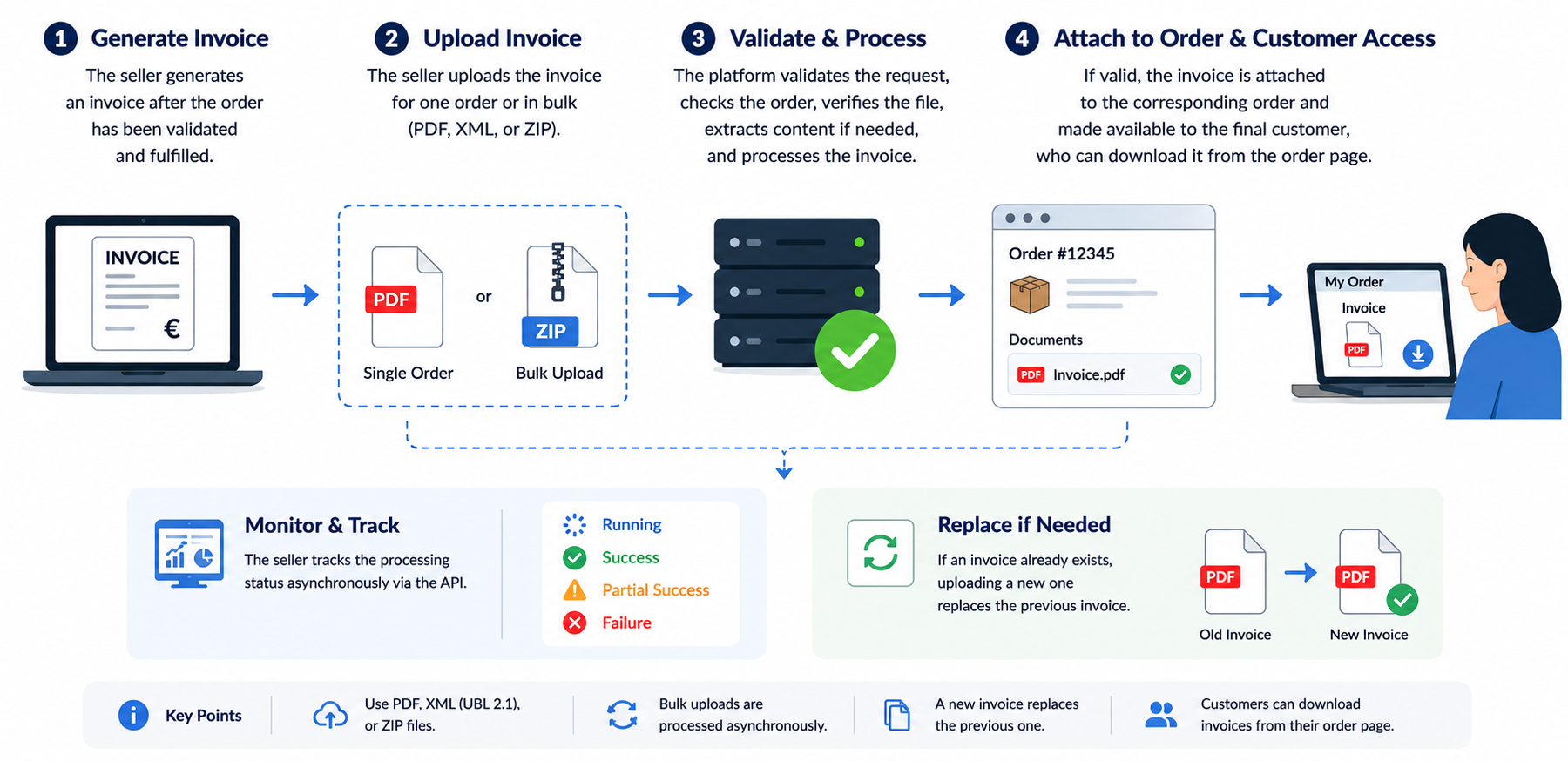
This feature allows a seller to upload an order invoice so it can be attached to the corresponding order and made available to the final customer.
In the marketplace order lifecycle, this step happens after the order has been validated and fulfilled, when the seller is ready to provide the final invoice. The API does not generate invoices. It only lets the seller submit invoice files that have already been produced.
The feature supports two main usage patterns: uploading an invoice for a single order, or sending several invoices in bulk. In both cases, the platform validates the request, checks the order reference, verifies the file format, and processes the document asynchronously before attaching it to the order.
This API is therefore both an upload mechanism and a control point. It confirms whether an invoice can actually be linked to the expected order, and it also supports correction flows since a newly uploaded invoice can replace an existing one.
Key States & Attributes
|
Field / Term |
Description |
Business Rules |
|---|---|---|
|
|
Identifier of the order that should receive the invoice |
Required for the single-order upload endpoint. In bulk upload, the order is identified from the file name instead of a request field. |
|
|
Unique identifier of an invoice upload operation |
Returned as soon as the upload request is accepted. Used to monitor asynchronous processing and investigate failures. |
|
|
Name of the uploaded file |
In bulk upload, the file name must be a valid order identifier. In ZIP uploads, inner file names must also match valid order identifiers. |
|
|
Overall result of an import, or result of a single file |
Main values are |
|
|
Technical step reached during invoice processing |
Values include |
|
|
List of files attached to one import |
The list can evolve during processing, especially when a ZIP archive is unpacked and inner files appear individually in the result. |
|
PDF / XML / ZIP |
Supported invoice file formats |
Accepted formats are PDF, XML in UBL 2.1 format, and ZIP archives containing supported invoice files. |
|
Invoice replacement |
Behavior when an invoice already exists for the order |
Uploading a new invoice replaces the existing invoice document for that order. This supports correction and resubmission scenarios. |
Seller Workflow

Generate the Invoice File
Prerequisites
-
The order must already exist in the platform
-
The seller must be able to retrieve the related order and financial data
-
The seller must have a process to generate a PDF or UBL 2.1 XML invoice file
Before uploading an invoice, the seller must first generate the invoice document from marketplace data. This step consists in collecting the customer billing information, the ordered items, the quantities, the prices, and the taxes needed to build the final invoice.
GET /orders is the main source for invoice content. GET /operations can then be used to enrich or verify financial amounts and reconciliation data.
Functional Rules
-
GET /ordersprovides the main business data used to generate the customer invoice:-
order identifier
-
purchase date
-
currency
-
billing address
-
product lines & quantities
-
unit prices
-
shipping costs
-
taxes
-
order total
-
-
Invoice line content should mainly be built from
lines[]inGET /orders -
Billing identity should be built from
billingAddress -
currencyCodeshould be used as the invoice currency -
GET /operationsprovides complementary financial data such as:-
product amount
-
shipping fees amount
-
processing fees amount
-
VAT amounts
-
total amount
-
currency
-
invoice identifier
-
-
GET /operationsshould be used as a reconciliation source, not as the primary source for customer invoice structure -
Commission data and settlement-related amounts should be handled carefully, as they are useful for seller financial control but are not necessarily part of the customer-facing invoice
-
The invoice file must be generated by the seller system before being uploaded
-
The generated file must be in one of the supported formats:
-
PDF
-
XML in UBL 2.1 format
-
Endpoint to use
Use this method to retrieve a list of orders using a set of filters.
Functional Rules:
-
You may filter your search by adding the following criteria in your request body:
-
A list of order
status -
An order reference
-
Is a business order
-
A shipping country
-
A supply mode
-
A sales channel identifier
-
A time range on order creation using
createdAtMin/createdAtMax -
A time range on order update using
updatedAtMin/updatedAtMax -
A time range on order shipping using
shippedAtMin/shippedAtMax
-
-
You may also sort your search by date using the following fields:
-
createdAt -
updatedAt -
shippedAtMax
-
-
To ensure a faster answer, the number of items retrieved per page is limited to 100 items maximum.
-
For Fulfillment orders, the shipping address of the order lines will only be available after the order has been shipped by our Fulfillment service.
-
For Seller orders, the shipping address of the order lines will only be available once the line is ready to be shipped (InPreparation).
Examples:
-
Retrieve orders without filters:
/orders?pageIndex=1&pageSize=100 -
Retrieve orders sorted by
createdAtby ascending order:/orders?pageIndex=1&pageSize=100&sort=createdAt -
Retrieve orders sorted by
createdAtby ascending order,updatedAtby descending order and filtered using a list of status:/orders?pageIndex=1&pageSize=100&sort=createdAt&desc=updatedAt&status=Accepted,Shipped
Endpoint full URL: https://api.octopia-io.net/seller/v2/orders
Parameters - Headers
| Name | In | Type | Description |
|---|---|---|---|
| SellerId* | header |
string
|
Octopia Seller Identifier. Example : 98979 |
Parameters - Query
| Name | In | Type | Description |
|---|---|---|---|
| reference | query |
string
|
Seller reference for the ressource. Example : 0223258 |
| salesChannelId | query |
string|null
|
The Identifier of the sales channel Example : TEST |
| businessOrder | query |
boolean
|
Gets whether order is for business |
| status | query |
string|enum|null
|
The status of the ressource. Example : InPreparation Available values : ["Processing", "WaitingAcceptance", "Accepted", "Refused", "InPreparation", "Shipped", "Delivered", "Cancelled", "Rejected"] |
| supplyMode | query |
string|enum
|
The identifies the logistic process used to ship the order item.
Example : Seller Available values : ["Seller", "Fulfillment", "Xdock"] |
| shippingCountry | query |
string
|
The shipping country code. Example : FR |
| updatedAtMin | query |
string
|
The updated at minimum date of orders. Example : 2023-12-25T14:30:00Z |
| updatedAtMax | query |
string
|
The updated at maximum date of orders. Example : 2023-12-25T15:30:00Z |
| createdAtMin | query |
string
|
The created at minimum date of the ressource. Example : 2023-12-25T14:30:00Z |
| createdAtMax | query |
string
|
The created at maximum date of the ressource. Example : 2023-12-25T15:30:00Z |
| shippedAtMin | query |
string
|
The shipped at minimum date of orders. Example : 2023-12-25T14:30:00Z |
| shippedAtMax | query |
string
|
The shipped at maximum date of orders. Example : 2023-12-25T15:30:00Z |
| pageIndex | query |
integer
|
The index of the current page of items Default : 1 Example : 1 |
| pageSize | query |
integer
|
Maximum number of items to return per page. Default : 50 Example : 50 |
| sort | query |
string
|
Ascending sort Example : asc:createdAt |
| desc | query |
string
|
Descending sort Example : desc:createdAt |
Response codes
200 - Successapplication/json
|
||||||||||||||||||||||||||||||||||||||||||||||||||||||||||||||||||||||||||||||||||||||||||||||||||||||||||||||||||||||||||||||||||||||||||||||||||||||||||||||||||||||||||||||||||||||||||||||||||||||||||||||||||||||||||||||||||||||||||||||||||||||||||||||||||||||||||||||||||||||||||||||||||||||||||||||||||||||||||||||||||||||||||
400 - Bad Requestapplication/problem+json |
||||||||||||||||||||||||||||||||||||||||||||||||||||||||||||||||||||||||||||||||||||||||||||||||||||||||||||||||||||||||||||||||||||||||||||||||||||||||||||||||||||||||||||||||||||||||||||||||||||||||||||||||||||||||||||||||||||||||||||||||||||||||||||||||||||||||||||||||||||||||||||||||||||||||||||||||||||||||||||||||||||||||||
401 - Unauthorizedapplication/problem+json |
||||||||||||||||||||||||||||||||||||||||||||||||||||||||||||||||||||||||||||||||||||||||||||||||||||||||||||||||||||||||||||||||||||||||||||||||||||||||||||||||||||||||||||||||||||||||||||||||||||||||||||||||||||||||||||||||||||||||||||||||||||||||||||||||||||||||||||||||||||||||||||||||||||||||||||||||||||||||||||||||||||||||||
403 - Forbiddenapplication/problem+json |
||||||||||||||||||||||||||||||||||||||||||||||||||||||||||||||||||||||||||||||||||||||||||||||||||||||||||||||||||||||||||||||||||||||||||||||||||||||||||||||||||||||||||||||||||||||||||||||||||||||||||||||||||||||||||||||||||||||||||||||||||||||||||||||||||||||||||||||||||||||||||||||||||||||||||||||||||||||||||||||||||||||||||
500 - An internal server error occurredapplication/problem+json |
Allows you to:
-
Retrieve all financial informations related to a payment (order, commissions, invoices, guarantee reserve...).
-
Search for a financial operation (order/refund) and retrieves its details.
Functional Rules:
-
Default
PageSize: 20 -
At least one of these filters is required:
orderReference,invoiceId, or a full date range (paidAtMin+paidAtMaxorchangedAtMin+changedAtMax). -
Recommended call frequency:
On each payout in order to reconcile accouting items.
-
The following fields display the gross amount (VAT included): sales, refunds, commissions, and service financial flow.
Examples:
-
Retrieve all operations paid between two dates:
/operations?paidAtMin=2021-09-01&paidAtMax=2021-09-15 -
Retrieve all operations linked to a specific order:
/operations?orderReference=1601302358PGI56 -
Retrieve all operations linked to a specific invoice and a specific event type:
/operations?invoiceId=1400178408&eventType=Refund,Commission
Endpoint full URL: https://api.octopia-io.net/seller/v2/operations
Parameters - Headers
| Name | In | Type | Description |
|---|---|---|---|
| SellerId* | header |
string
|
Octopia Seller Identifier. Example : 98979 |
Parameters - Query
| Name | In | Type | Description |
|---|---|---|---|
| pageIndex | query |
integer
|
The index of the page (Min: 1 / Max: 100) Default : 1 Example : 1 |
| pageSize | query |
number
|
The maximum number of elements in a page. (Min: 1 / Max: 100) Default : 20 Example : 10 |
| orderReference | query |
string
|
External reference of the order used by the sales channel to communicate with the customer. Example : 1601302358PGI56 |
| paidAtMin | query |
string
|
Minimum payment date - Expected date-time at ISO 8601 format (UTC as default time-zone) It also requests to complete the filter Example : 2024-05-27T00:00:00Z |
| paidAtMax | query |
string
|
Maximum payment date - Expected date-time at ISO 8601 format (UTC as default time-zone) It also requests to complete the filter Example : 2024-09-27T23:59:59Z |
| eventTypes | query |
array[string|enum]
|
Operation type Example : List: ["Refund"] Available values : ["Sale", "Commission", "Refund", "CommissionRestitution", "Subscription", "CdiscountServices", "LogisticFee", "SecurityDeposit", "FfmOrdersReturns", "FfmStorage", "FfmShippingCost", "SplittedPaymentFees", "TradeMarketingFees", "AgecLawFees"] |
| states | query |
array[string|enum]
|
Payment status of the financial operation Example : List: ["Paid"] Available values : ["NotPayable", "Estimated", "Paid", "Blocked", "InProcess"] |
| invoiceId | query |
integer
|
Invoice ID Example : 1801067043 |
| changedAtMin | query |
string
|
Minimum date of last change - Expected date-time at ISO 8601 format (UTC as default time-zone). It also requests to complete the filter Please combine this filter with another to secure the request performance. Example : 2024-05-27T00:00:00Z |
| changedAtMax | query |
string
|
Maximum date of last change - Expected date-time at ISO 8601 format (UTC as default time-zone). It also requests to complete the filter Please combine this filter with another to secure the request performance. Example : 2024-09-27T23:59:59Z |
| salesChannelId | query |
string
|
The Unique identifier of the sales channel the data comes from Example : CDISFR |
Response codes
200 - Successapplication/json
|
||||||||||||||||||||||||||||||||||||||||||||||||||||||||||||||||||||||||||||||||||||||||||||||||||||||||||||||||||||||||||||||||||
400 - Bad Requestapplication/problem+json |
||||||||||||||||||||||||||||||||||||||||||||||||||||||||||||||||||||||||||||||||||||||||||||||||||||||||||||||||||||||||||||||||||
401 - Unauthorizedapplication/problem+json |
||||||||||||||||||||||||||||||||||||||||||||||||||||||||||||||||||||||||||||||||||||||||||||||||||||||||||||||||||||||||||||||||||
403 - Forbiddenapplication/problem+json |
||||||||||||||||||||||||||||||||||||||||||||||||||||||||||||||||||||||||||||||||||||||||||||||||||||||||||||||||||||||||||||||||||
404 - Not Foundapplication/problem+json |
||||||||||||||||||||||||||||||||||||||||||||||||||||||||||||||||||||||||||||||||||||||||||||||||||||||||||||||||||||||||||||||||||
500 - Internal Server Errorapplication/problem+json |
Important notes
Use GET /orders as the main invoice source. It contains the customer, address, line, and pricing data needed to build the document.
Use GET /operations for financial checks. It is useful to confirm totals, VAT-related figures, and invoice references, but it should not replace order data.
Keep customer invoice data and seller settlement data separate. Fields such as commissions or processing fees may be relevant for reconciliation without being displayed on the final customer invoice.
Upload Invoices for a Specific Order
Prerequisites
-
The target order must exist in the platform
-
The seller must have generated the invoice file beforehand
-
The file must be provided in
multipart/form-dataformat
This endpoint allows a seller to upload one or more invoice files for a specific order. It is typically used in operational flows where the order is already known, such as after shipment or during a customer service interaction.
It is also the preferred option for correcting an invoice, as uploading a new file replaces the existing invoice attached to the order.
Functional Rules
-
The upload is asynchronous: the response confirms acceptance, not final success
-
Supported formats are PDF, XML (UBL 2.1), and ZIP containing those formats
-
Multiple files can be uploaded in one request
-
Each file is processed independently and has its own status
-
The platform validates the order before attaching the invoice
-
A new upload replaces any existing invoice for the same order
-
Processing steps are visible through
integrationStatus(e.g. order check, file validation, upload)
Endpoint to use
Please note: Availability of this feature is currently limited and not compatible with all saleschannels or order types.
Upload file(s) as the invoice for a given order.
Functional rules:
-
The files may be in the following format: PDF, XML (UBL2.1 format), ZIP containing the above
-
If an order already had invoice documents, they will be replaced with the newly provided files.
-
This route will return
201and create an invoice report as long as the request is valid, the detail of whether or not the upload succeed will be returned in the response body.
Example:
To upload invoice documents for the order with orderId SCID123456789:
/orders/SCID123456789/invoice-documents
Endpoint full URL: https://api.octopia-io.net/seller/v2/orders/{orderId}/invoice-documents
Parameters - Headers
| Name | In | Type | Description |
|---|---|---|---|
| SellerId* | header |
string
|
Octopia Seller Identifier. Example : 98979 |
Parameters - Path
| Name | In | Type | Description |
|---|---|---|---|
| orderId* | path |
string
|
The order unique identifier in Octopia's system. Example : SCID123456789 |
Response codes
201 - Successful response after uploading invoice documents for an order, import will begin shortlyapplication/json |
||||||||||||||||||||||||||||||||||||||
400 - The payload does not match the expected format or no order exists for the specified idapplication/problem+json |
||||||||||||||||||||||||||||||||||||||
401 - Unauthorizedapplication/problem+json |
||||||||||||||||||||||||||||||||||||||
403 - Forbiddenapplication/problem+json |
||||||||||||||||||||||||||||||||||||||
500 - Internal server errorapplication/problem+json |
This endpoint uses multipart/form-data rather than JSON. A typical request looks like this:
POST /orders/SCID01210525142759UT8E/invoice-documents?sellerId=123
Content-Type: multipart/form-data
Authorization: Bearer
Form-data payload example:
file1 = SCID01210525142759UT8E.pdf
file2 = SCID01210525142759UT8E.xml
Important notes
Use for targeted corrections. This endpoint is ideal when only one order needs to be fixed without impacting other invoices.
Do not rely on immediate success. Always check the returned status before considering the invoice as available.
ZIP files may expand into multiple entries. Each inner file will appear separately in the processing result.
Upload Invoices in Bulk
Prerequisites
-
Invoice files must be named using valid order identifiers
-
For ZIP uploads, inner file names must also match valid order identifiers
-
Files must be provided in
multipart/form-data
This endpoint allows a seller to upload multiple invoices in a single request. It is designed for batch processing from ERP or back-office systems, typically after a mass invoice generation.
The order is not provided explicitly. It is inferred from each file name, making naming conventions a key part of the integration.
Functional Rules
-
The upload is asynchronous and creates an import identified by
importId -
Supported formats are PDF, XML (UBL 2.1), and ZIP archives
-
Each file is matched to an order based on its file name
-
ZIP files are unpacked and processed file by file
-
Each file has its own result (success or failure)
-
The global import status can be
Success,PartialSuccess, orFailure -
Existing invoices are replaced if a new one is successfully processed
Endpoint to use
Please note: Availability of this feature is currently limited and not compatible with all saleschannels or order types.
Upload file(s) as the invoice for multiple orders.
Functional Rules:
-
The files may be in the following format: PDF, XML (UBL2.1 format), ZIP containing the above
-
If an order already had invoice documents, they will be replaced with the newly provided files.
-
This route will return
201and create an import report as long as the request is valid, the detail of whether or not the upload succeed will be available via the/order-invoice-importsendpoint. -
The file name must be a valid order identifier. If a zip is provided, then the inner file name must be a valid order identifier.
Example:
-
To upload invoice files for multiple orders:
/order-invoice-imports
Endpoint full URL: https://api.octopia-io.net/seller/v2/order-invoice-imports
Parameters - Headers
| Name | In | Type | Description |
|---|---|---|---|
| SellerId* | header |
string
|
Octopia Seller Identifier. Example : 98979 |
Response codes
201 - The result of the upload. Each file will have an entry with the name property matching the multipart request name property.application/json |
||||||||||||||||||||||||||||||||||||||
400 - Bad Requestapplication/problem+json |
||||||||||||||||||||||||||||||||||||||
401 - Unauthorizedapplication/problem+json |
||||||||||||||||||||||||||||||||||||||
403 - Forbiddenapplication/problem+json |
||||||||||||||||||||||||||||||||||||||
500 - Internal server errorapplication/problem+json |
This endpoint uses multipart/form-data rather than JSON. A typical request looks like this:
POST /order-invoice-imports?sellerId=135
Content-Type: multipart/form-data
Authorization: Bearer
Form-data payload example:
file1 = MARJMA24031215601SELLER.pdf
file2 = BULK_INVOICES_20251212.zip
Important notes
File naming drives the integration. An incorrect file name means the invoice cannot be linked to an order.
Expect partial results. A valid batch can still contain failed files that must be corrected.
Monitor systematically. Bulk uploads require follow-up via the import status endpoints.
Monitor Bulk Import Results
Prerequisites
-
Used after a bulk upload to track processing results
This endpoint provides a list of invoice imports for a seller. It is mainly used to monitor batch processing and identify imports that are still running or require action.
It helps detect incomplete or failed batches and supports operational follow-up.
Functional Rules
-
Imports are returned from most recent to oldest
-
Each import includes global status and file-level results
-
Statuses indicate whether processing is ongoing, successful, or partially failed
-
File-level errors must be used to understand and fix issues
Endpoint to use
Please note: Availability of this feature is currently limited and not compatible with all saleschannels or order types.
Use this endpoint to retrieve the status of your previously uploaded invoices.
Functional Rules:
-
The response will always be sorted by
createdAtdate in descending order. -
You can use the pagination token to navigate through the data.
Example:
-
To retrieve the second page of invoice imports:
/order-invoice-imports?cursor=c29ydDpkZXNjJmluY2x1ZGVfaXRlbT10cnVlJmlkPTE2ODIwNzA2Mzk=
Endpoint full URL: https://api.octopia-io.net/seller/v2/order-invoice-imports
Parameters - Headers
| Name | In | Type | Description |
|---|---|---|---|
| SellerId* | header |
string
|
Octopia Seller Identifier. Example : 98979 |
Parameters - Query
| Name | In | Type | Description |
|---|---|---|---|
| pageSize | query |
integer
|
Maximum number of items to return per page. Default : 100 Example : 100 |
| cursor | query |
string
|
Pagination cursor. Use together with Example : eyJDdXJzb3JUeXBlIjoyLE9mZmVyVGVjaG5pY2FsSWQiOiIxMjM0NTZfQUFBQkI2MTEyM182X0NESVNGUiJ9 |
Response codes
200 - The list of importsapplication/json
|
||||||||||||||||||||||||||||||||||||||||||||||||||||||||||||||||||
401 - Unauthorizedapplication/problem+json |
||||||||||||||||||||||||||||||||||||||||||||||||||||||||||||||||||
403 - Forbiddenapplication/problem+json |
||||||||||||||||||||||||||||||||||||||||||||||||||||||||||||||||||
500 - Internal server errorapplication/problem+json |
Important notes
Use it as a monitoring tool. This endpoint is essential to track asynchronous processing.
Always check file-level results. A successful import does not guarantee all files succeeded.
Drive recovery from this view. Identify failed files and trigger resubmission flows.
Check a Specific Import Result
Prerequisites
-
The
importIdmust be known
This endpoint retrieves the detailed result of a single import. It is typically used after identifying an issue in a batch to understand exactly what failed.
It allows sellers to isolate problematic files and prepare targeted corrections.
Functional Rules
-
Returns one import with all associated file results
-
Each file includes its status, associated order (if resolved), and error details if any
-
Works for both bulk uploads and single-order uploads (both generate an import)
-
The response reflects the latest processing state
Endpoint to use
Please note: Availability of this feature is currently limited and not compatible with all saleschannels or order types.
Retrieve a single invoice import via its unique identifier
Functional Rules:
- The
importIdis an id that is returned when you upload an invoice file using thePOST /order-invoice-imports.
Example:
-
Get the order invoice import with id
738abbf4-320c-4689-bf88-d40bff03fb36:/order-invoice-imports/738abbf4-320c-4689-bf88-d40bff03fb36
Endpoint full URL: https://api.octopia-io.net/seller/v2/order-invoice-imports/{importId}
Parameters - Headers
| Name | In | Type | Description |
|---|---|---|---|
| SellerId* | header |
string
|
Octopia Seller Identifier. Example : 98979 |
Parameters - Path
| Name | In | Type | Description |
|---|---|---|---|
| importId* | path |
string
|
The unique invoice import identifier Example : 4ee9e071-7c3b-4494-be14-662f9c1af793 |
Response codes
200 - Successful response with a single invoice import detailsapplication/json |
||||||||||||||||||||||||||||||||||||||
401 - Unauthorizedapplication/problem+json |
||||||||||||||||||||||||||||||||||||||
403 - Forbiddenapplication/problem+json |
||||||||||||||||||||||||||||||||||||||
404 - Not foundapplication/problem+json |
||||||||||||||||||||||||||||||||||||||
500 - Internal server errorapplication/problem+json |
Important notes
Best endpoint for troubleshooting. Use it to understand why a file failed.
Check all files, not just one. ZIP uploads often produce multiple entries.
Keep track of importId. It is required for any detailed investigation.
Detect Invoice Upload Errors
Prerequisites
-
The seller must have performed at least one invoice upload (single or bulk)
-
An
importIdor access to import history is available
This use case focuses on identifying issues after an invoice upload. Since processing is asynchronous, errors are not always visible at upload time and must be retrieved afterward.
It allows sellers to detect failed files, understand what went wrong, and decide whether corrective action is required.
Functional Rules
-
Upload requests may succeed technically but fail during processing
-
Errors are always returned at file level, not only at import level
-
Each file includes:
-
a
status(SuccessorFailure) -
an optional
errorobject withcodeanddetail
-
-
Import-level status (
PartialSuccess,Failure) is only a summary -
Typical error cases include:
-
invalid file format
-
order not found
-
duplicate invoice already provided
-
-
ZIP files may generate multiple file entries, each with its own result
Endpoint to use
Please note: Availability of this feature is currently limited and not compatible with all saleschannels or order types.
Use this endpoint to retrieve the status of your previously uploaded invoices.
Functional Rules:
-
The response will always be sorted by
createdAtdate in descending order. -
You can use the pagination token to navigate through the data.
Example:
-
To retrieve the second page of invoice imports:
/order-invoice-imports?cursor=c29ydDpkZXNjJmluY2x1ZGVfaXRlbT10cnVlJmlkPTE2ODIwNzA2Mzk=
Endpoint full URL: https://api.octopia-io.net/seller/v2/order-invoice-imports
Parameters - Headers
| Name | In | Type | Description |
|---|---|---|---|
| SellerId* | header |
string
|
Octopia Seller Identifier. Example : 98979 |
Parameters - Query
| Name | In | Type | Description |
|---|---|---|---|
| pageSize | query |
integer
|
Maximum number of items to return per page. Default : 100 Example : 100 |
| cursor | query |
string
|
Pagination cursor. Use together with Example : eyJDdXJzb3JUeXBlIjoyLE9mZmVyVGVjaG5pY2FsSWQiOiIxMjM0NTZfQUFBQkI2MTEyM182X0NESVNGUiJ9 |
Response codes
200 - The list of importsapplication/json
|
||||||||||||||||||||||||||||||||||||||||||||||||||||||||||||||||||
401 - Unauthorizedapplication/problem+json |
||||||||||||||||||||||||||||||||||||||||||||||||||||||||||||||||||
403 - Forbiddenapplication/problem+json |
||||||||||||||||||||||||||||||||||||||||||||||||||||||||||||||||||
500 - Internal server errorapplication/problem+json |
Please note: Availability of this feature is currently limited and not compatible with all saleschannels or order types.
Retrieve a single invoice import via its unique identifier
Functional Rules:
- The
importIdis an id that is returned when you upload an invoice file using thePOST /order-invoice-imports.
Example:
-
Get the order invoice import with id
738abbf4-320c-4689-bf88-d40bff03fb36:/order-invoice-imports/738abbf4-320c-4689-bf88-d40bff03fb36
Endpoint full URL: https://api.octopia-io.net/seller/v2/order-invoice-imports/{importId}
Parameters - Headers
| Name | In | Type | Description |
|---|---|---|---|
| SellerId* | header |
string
|
Octopia Seller Identifier. Example : 98979 |
Parameters - Path
| Name | In | Type | Description |
|---|---|---|---|
| importId* | path |
string
|
The unique invoice import identifier Example : 4ee9e071-7c3b-4494-be14-662f9c1af793 |
Response codes
200 - Successful response with a single invoice import detailsapplication/json |
||||||||||||||||||||||||||||||||||||||
401 - Unauthorizedapplication/problem+json |
||||||||||||||||||||||||||||||||||||||
403 - Forbiddenapplication/problem+json |
||||||||||||||||||||||||||||||||||||||
404 - Not foundapplication/problem+json |
||||||||||||||||||||||||||||||||||||||
500 - Internal server errorapplication/problem+json |
Important notes
Always check file-level results. Import status alone is not sufficient to detect all issues.
Use import detail for investigation. It provides the most precise view of failures.
Do not assume immediate availability. A file marked as Running still requires follow-up.
Retry Failed Invoice Uploads
Prerequisites
-
Failed files must have been identified from a previous import
-
Corrected invoice files must be available
This use case describes how to correct and resubmit failed invoice uploads. Once an error is identified, the seller must fix the issue and resend only the impacted invoices.
It ensures that each order eventually receives a valid invoice without duplicating successful uploads.
Functional Rules
-
Only files with
Failurestatus should be retried -
The root cause must be fixed before resubmission:
-
regenerate the file if the format is invalid
-
correct the order identifier if it does not match an existing order
-
validate business intent in case of duplicate uploads
-
-
Resubmission can be done:
-
per order (single upload)
-
or in batch (bulk upload)
-
-
A successful retry replaces any previously attached invoice
-
Retried files go through the same asynchronous processing lifecycle
Endpoint to use
Please note: Availability of this feature is currently limited and not compatible with all saleschannels or order types.
Upload file(s) as the invoice for a given order.
Functional rules:
-
The files may be in the following format: PDF, XML (UBL2.1 format), ZIP containing the above
-
If an order already had invoice documents, they will be replaced with the newly provided files.
-
This route will return
201and create an invoice report as long as the request is valid, the detail of whether or not the upload succeed will be returned in the response body.
Example:
To upload invoice documents for the order with orderId SCID123456789:
/orders/SCID123456789/invoice-documents
Endpoint full URL: https://api.octopia-io.net/seller/v2/orders/{orderId}/invoice-documents
Parameters - Headers
| Name | In | Type | Description |
|---|---|---|---|
| SellerId* | header |
string
|
Octopia Seller Identifier. Example : 98979 |
Parameters - Path
| Name | In | Type | Description |
|---|---|---|---|
| orderId* | path |
string
|
The order unique identifier in Octopia's system. Example : SCID123456789 |
Response codes
201 - Successful response after uploading invoice documents for an order, import will begin shortlyapplication/json |
||||||||||||||||||||||||||||||||||||||
400 - The payload does not match the expected format or no order exists for the specified idapplication/problem+json |
||||||||||||||||||||||||||||||||||||||
401 - Unauthorizedapplication/problem+json |
||||||||||||||||||||||||||||||||||||||
403 - Forbiddenapplication/problem+json |
||||||||||||||||||||||||||||||||||||||
500 - Internal server errorapplication/problem+json |
Please note: Availability of this feature is currently limited and not compatible with all saleschannels or order types.
Upload file(s) as the invoice for multiple orders.
Functional Rules:
-
The files may be in the following format: PDF, XML (UBL2.1 format), ZIP containing the above
-
If an order already had invoice documents, they will be replaced with the newly provided files.
-
This route will return
201and create an import report as long as the request is valid, the detail of whether or not the upload succeed will be available via the/order-invoice-importsendpoint. -
The file name must be a valid order identifier. If a zip is provided, then the inner file name must be a valid order identifier.
Example:
-
To upload invoice files for multiple orders:
/order-invoice-imports
Endpoint full URL: https://api.octopia-io.net/seller/v2/order-invoice-imports
Parameters - Headers
| Name | In | Type | Description |
|---|---|---|---|
| SellerId* | header |
string
|
Octopia Seller Identifier. Example : 98979 |
Response codes
201 - The result of the upload. Each file will have an entry with the name property matching the multipart request name property.application/json |
||||||||||||||||||||||||||||||||||||||
400 - Bad Requestapplication/problem+json |
||||||||||||||||||||||||||||||||||||||
401 - Unauthorizedapplication/problem+json |
||||||||||||||||||||||||||||||||||||||
403 - Forbiddenapplication/problem+json |
||||||||||||||||||||||||||||||||||||||
500 - Internal server errorapplication/problem+json |
Important notes
Retry selectively. Do not resend the entire batch if only a few files failed.
Fix before retrying. Re-sending the same invalid file will lead to the same error.
Track retries via new importId. Each retry creates a new processing cycle that must be monitored.
FAQ
You should upload the invoice once the order is confirmed and the invoice has been generated in your system. This typically happens after shipment or when the invoice becomes legally available.
Yes. You can use the bulk upload endpoint to send multiple invoices in a single request, including ZIP files containing several invoice documents.
The API supports:
-
PDF
-
XML (UBL 2.1 format)
-
ZIP archives containing PDF and/or XML files
In bulk uploads, the order is identified from the file name. Each file name must match a valid order identifier. The same rule applies to files inside ZIP archives.
The new invoice replaces the existing one. This allows you to correct or update a previously submitted invoice.
No. The upload is asynchronous. A successful API response only confirms that the request was accepted. You must check the import status to confirm that the invoice was successfully processed.
You can retrieve the import status using the import endpoints. Always check file-level results to confirm whether each invoice was successfully attached to its order.
It means that some files in your upload were successfully processed, while others failed. You should review the failed files and resubmit only those.
Common causes include:
-
invalid file format
-
incorrect file naming (especially in bulk uploads)
-
order not found
-
duplicate invoice already submitted
No. You should only correct and resend the failed files. Resubmitting successful invoices is unnecessary and may lead to duplicates.
No. The API does not generate invoices. You must create the invoice document in your system and then upload it using this API.