Octopia allows sellers to create, modify and enrich product sheets before associating commercial offers (see Offer Management).
Product creation is separated from offer management, allowing sellers :
to propose new product sheets
to enrich the content of an existing product sheet (e.g., images, descriptions)
This feature is critical for maintaining a high-quality product catalog that aligns with marketplaces taxonomy, brand requirements, and sales channel standards.
Product Sheet
A product sheet is composed of data common to all categories and data specific to the given category.
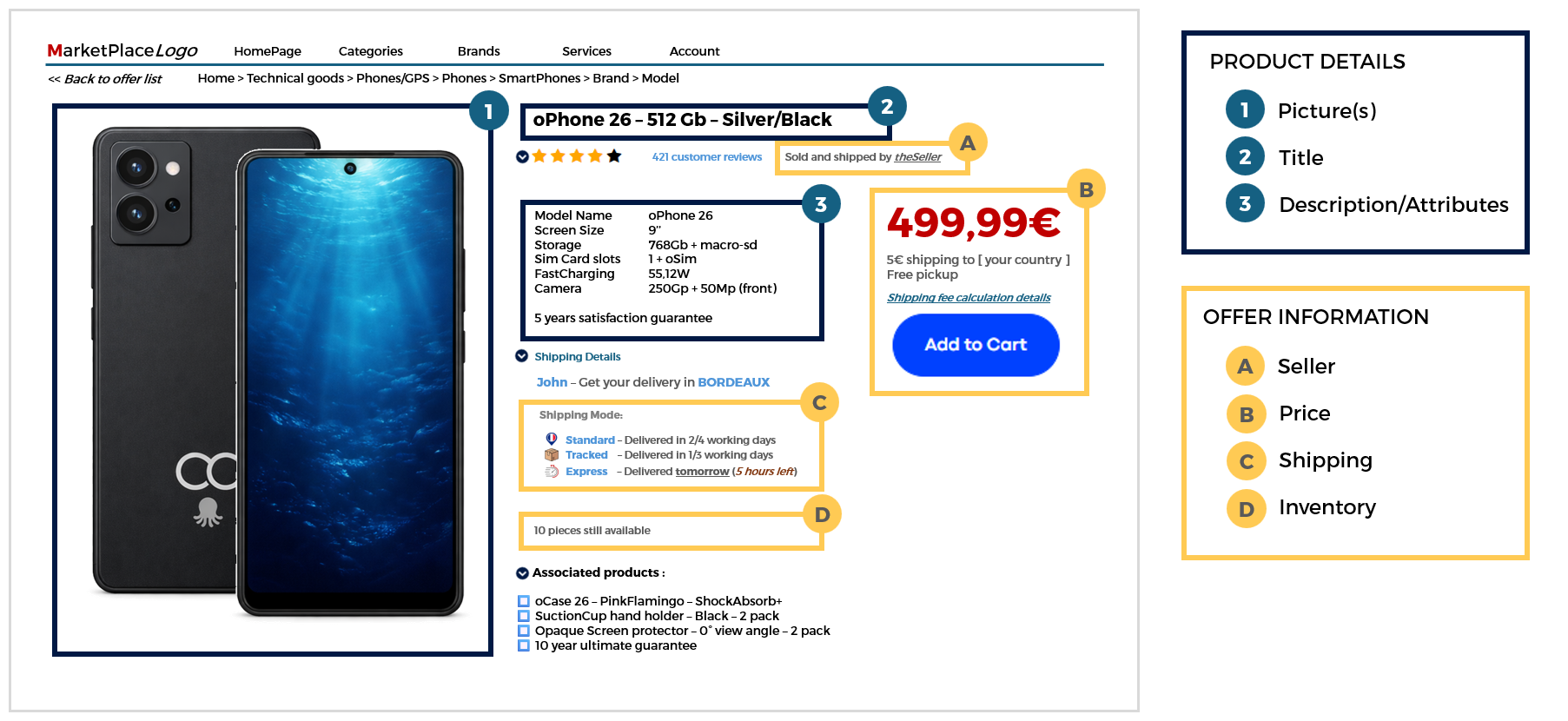
Common data: gtin, title, description, first image, brand, category.
Category specific data: properties only availble for some categories, related to product type. Examples include: size, color, storage size, material, features …
Additional information: non product oriented additional information (legal, certifications, licensing, …)
and depending on category:
attributes which can be Mandatory, Recommended or Optional
brand can be mandatory on some categories
color, size and variantGroupReference are mandatory for Variant Products (not for standard products)
To be able to sell a product, all mandatory data must be correctly filled in. (necessity:”Mandatory”) It is strongly advised to also provide information on recommended attributes (necessity:”Recommended”)
Here is a sample of product data restitution on a sample marketplace product sheet, with differentiated offer information.
Type of product
There are two types of products in the product catalog:
Standard Product
A standard product is the most common product type across categories.
It is standalone and displayed individually on the websites (as seen in the above example).
It does not belong to any product group and has no variation dimensions.
Variant Product
A variant product belongs to a family of similar products that differ only by specific variation attributes such as size and/or color which are enforced as mandatory properties. All products within the same family are linked through a variantGroupReference, which acts as the identifier of the product family. Only specific categories support product variations (e.g., fashion, footwear, …).
See category properties "isVariant": true/false
Role in Product Creation and Contribution
Octopia stores products in a globally shared catalog. This enables extensive product knowledge and federated base product data, under a single product sheet per GTIN.
Creation precedence applies for each additional information submitted to the catalog.
Unknow products will be created: the active seller account will be considered as the product sheet creator.
Existing products will be completed: the active seller account will be considered as a contributor for added properties
Depending on already known product information, some of the properties you reference will not be taken into account. Therefore Product information restituted can then differ from what was submitted
sellerProductReference remains unique for any given seller.
Permission levels are readable at the product level, in the product item (see permissions node) on GET /products calls.
Key attributes
Attribute
Description
gtin
Global Trade Item Number. Mandatory for creation.
productReference
Octopia reference for the product. Generated automatically upon creation, recommended when updating.
sellerProductReference
Seller’s own identifier. Useful for reconciliation and integration feedback.
It is recommended to put the same on products and offers and inventory updates on other endpoints.
Product attributes
Marketplaces websites use these to provide endcustomers with filters and navigation facets
Each category has a set of properties. Each property may be Mandatory, Recommended, or Optional. It may be ranged, multiple value, numeric, unit‑based, allow file types, etc.
Brand
The brand may be mandatory for certain categories.
variantGroupReference
Identifier to link a family of variants (e.g., same product in different sizes/colors).
Size, Color
These properties are mandatory to create a family of variants
richMarketingDescription
HTML-rich content block (optional). Can include styled content and media.
permissions.edit, permissions.enrich
Flags indicating whether the seller can edit or enrich the product.
Workflow
In this section we will look at how to manage the following cases and ensure maximum control of your products:
This endpoint returns the full list of brands available in the Octopia product referential. This referential is essential for sellers wishing to submit or enrich product sheets, as every product must be associated with a valid brand.
Each brand object includes:
A brandReference (numeric string)
A name (localized string)
Functional Rules
Paginated response controlled by:
pageIndex — page to retrieve (default: 1)
pageSize — number of results per page (default: 25)
Optional filter fields=name limits response to brand name only (without reference)
Only validated and published brands are returned
Endpoint to use
This route allows you to retrieve all the brands with a paginated result.
Examples:
Retrieve the first page of results with a maximum of 25 brands:
/brands?pageIndex=1&pageSize=25
Retrieve only the name of the first page of results with a maximum of 25 brands:
/brands?pageIndex=1&pageSize=25&fields=name
Endpoint full URL:https://api.octopia-io.net/seller/v2/brands
Parameters - Query
Name
In
Type
Description
pageIndex
query
number
The pageIndex parameter is a positive integer that allows you to paginate the results.
Default value: 1
Example : 1
pageSize
query
number
The pageSize parameter is a positive integer that allows you to limit the number of brands per page.
Default value: 25
Example : 25
fields
query
string
The fields parameter allows you to precise which brand fields should be return in the result. By default, only the brand reference is returned.
The brand unique identifier with numeric characters.
name: string
The brand name.
}
]
}
Headers:
Name
Type
Description
Link
string
Link to get the next page.
Example : /brands?pageIndex=2
400 - Bad Request
application/problem+json
{
  "errors": [
    {
      "code": "ER400-179",
      "cause": "Fields[0]",
      "reason": "The field 'label' does not exist."
    }
  ],
  "title": "BadRequest",
  "description": "One or more validation errors occurred.",
  "statusCode": 400,
  "traceId": "c0caa86d-96d2-4ae6-b25f-d735b08d9232"
}
{
errors data structure
detail: string|null
A human-readable explanation specific to this occurence of the problem
instance: string|null
A URI reference that identifies the specific occurence of the problem.
traceId: string|null
The response identifier.
status: integer (int32)|null
The HTTP status code generated by the origin server for this occurence of the problem.
title: string|null
A short human-readable summary of the problem type.
type: string (uri)|null
A URI reference that identifies the problem type and provides a human-readable documentation for the problem.
}
401 - Unauthorized
application/problem+json
{
  "title": "Unauthorized",
  "description": "The request has not been completed because it lacks valid authentication credentials.",
  "statusCode": 401,
  "traceId": "84587f83-6720-4f4f-8624-bf5f7cfa4e4a"
}
{
errors data structure
detail: string|null
A human-readable explanation specific to this occurence of the problem
instance: string|null
A URI reference that identifies the specific occurence of the problem.
traceId: string|null
The response identifier.
status: integer (int32)|null
The HTTP status code generated by the origin server for this occurence of the problem.
title: string|null
A short human-readable summary of the problem type.
type: string (uri)|null
A URI reference that identifies the problem type and provides a human-readable documentation for the problem.
A human-readable explanation specific to this occurence of the problem
instance: string|null
A URI reference that identifies the specific occurence of the problem.
traceId: string|null
The response identifier.
status: integer (int32)|null
The HTTP status code generated by the origin server for this occurence of the problem.
title: string|null
A short human-readable summary of the problem type.
type: string (uri)|null
A URI reference that identifies the problem type and provides a human-readable documentation for the problem.
}
Important notes
When creating a product, the brandfield is free text.
Submitted value is matchedagainst existing brands in the referential
capitalization, formatting, variations are analysed
Fully unknown brands will pass validation checks before being added to the referential
Retrieve Categories
Prerequisites
Optional header Accept‑Language to request localization of labels (EN, FR, ES).
See also Recommandation on Product creation Localization
This endpoint allows sellers to retrieve a paginated list of categories available in Octopia’s product referential.
Each category entry includes its reference, label, category level (1‑3), whether it is active, brand presence requirement, and other category specific settings or product management rules.
Sellers use this list to know what categories they can assign to new products and which rules apply.
Usage capabilities
Sorting on properties: reference, label, level, isActive, isBrandMandatory, parentReference.
Returned properties with fields parameter: minimizes payload by specifing which fields to return (e.g. label, isDeleted, etc.).
Output language with Accept‑Language header; defaults to fr‑FR .
Endpoint to use
This route allows you to retrieve all the categories with a paginated result.
Functional Rule
Accept-Language allows you to get the details for one of these three languages (EN, FR, ES)
Example:
Retrieve categories:
/categories
Endpoint full URL:https://api.octopia-io.net/seller/v2/categories
Parameters - Headers
Name
In
Type
Description
Accept-Language
header
string
The Accept-Language header allows you to precise which language to use for the request.
Example : fr-FR
Parameters - Query
Name
In
Type
Description
pageIndex
query
number
The pageIndex parameter is a positive integer that allows you to paginate the results.
Default value: 1.
Example : 2
pageSize
query
number
The pageSize parameter is a positive integer that allows you to limit the number of categories per page.
Default value: 25.
Example : 25
sort
query
string
The sort parameter allows you to sort the categories by the given field(s) which can be multiple and separated by commas.
The category unique identifier with 2, 4 or 6 alphanumeric characters dependent of the category level, respectively 1, 2 or 3.
label: string
The category label.
level: integer (int32)
The category level from 1 to 3.
isActive: boolean
A value indicating whether the category is active.
parentReference: string
The direct category parent reference.
parentReferences: [
A list of the category parent and grandparent references.
string
]
isBrandMandatory: boolean
A value indicating whether the brand of the category is mandatory. Only available on level 3 categories.
isVariant: boolean
A value indicating whether the category is variant.
isTranslated: boolean
A value indicating whether the category is translated.
}
]
}
Headers:
Name
Type
Description
Content-Language
string
The Content-Language header precise which language is used for the response.
Example:fr-FR
400 - Bad Request
application/problem+json
{
  "description": "One or more validation errors occurred.",
  "errors": [
    {
      "cause": "Fields[0]",
      "code": "ER400-179",
      "reason": "The field 'name' does not exist."
    }
  ],
  "statusCode": 400,
  "title": "BadRequest",
  "traceId": "c0caa86d-96d2-4ae6-b25f-d735b08d9232"
}
{
errors data structure
detail: string|null
A human-readable explanation specific to this occurence of the problem
instance: string|null
A URI reference that identifies the specific occurence of the problem.
traceId: string|null
The response identifier.
status: integer (int32)|null
The HTTP status code generated by the origin server for this occurence of the problem.
title: string|null
A short human-readable summary of the problem type.
type: string (uri)|null
A URI reference that identifies the problem type and provides a human-readable documentation for the problem.
}
401 - Unauthorized
application/problem+json
{
  "description": "The request has not been completed because it lacks valid authentication credentials.",
  "statusCode": 401,
  "title": "Unauthorized",
  "traceId": "84587f83-6720-4f4f-8624-bf5f7cfa4e4a"
}
{
errors data structure
detail: string|null
A human-readable explanation specific to this occurence of the problem
instance: string|null
A URI reference that identifies the specific occurence of the problem.
traceId: string|null
The response identifier.
status: integer (int32)|null
The HTTP status code generated by the origin server for this occurence of the problem.
title: string|null
A short human-readable summary of the problem type.
type: string (uri)|null
A URI reference that identifies the problem type and provides a human-readable documentation for the problem.
A human-readable explanation specific to this occurence of the problem
instance: string|null
A URI reference that identifies the specific occurence of the problem.
traceId: string|null
The response identifier.
status: integer (int32)|null
The HTTP status code generated by the origin server for this occurence of the problem.
title: string|null
A short human-readable summary of the problem type.
type: string (uri)|null
A URI reference that identifies the problem type and provides a human-readable documentation for the problem.
}
Important notes
Category trees have parentReferences: you may need to reconstruct hierarchy client‑side.
Active vs inactive categories: some categories may not be available, check isActive.
There are less than 10000 categories.
Retrieve Category by Reference
Prerequisites
Valid categoryReference path parameter (must be string of 2, 4 or 6 alphanumeric uppercase chars).
Accept‑Language header to localize (EN, FR, ES).
This endpoint allows sellers to retrieve the full metadata for a single category, given its reference.
This includes its reference, label, category level (1‑3), whether it is active, brand presence requirement, and other category specific settings or product management rules.
It is essential for building product sheets so that sellers know exactly what rules apply when they pick a category for a new product.
Functional Rules
Validation on categoryReference: wrong format leads to 400.
If category does not exist → 404.
Accept‑Language influences the label.
Response includes parentReference, parentReferences list.
Endpoint to use
This route allows you to get the details of a given category.
Functional Rule:
Accept-Language allows you to get the details for one of these three languages (EN, FR, ES)
Example:
Retrieve category 010H0R:
/categories/010H0R
Endpoint full URL:https://api.octopia-io.net/seller/v2/categories/{categoryReference}
Parameters - Headers
Name
In
Type
Description
Accept-Language
header
string
The Accept-Language header allows you to precise which language to use for the request.
Example : fr-FR
Parameters - Path
Name
In
Type
Description
categoryReference*
path
string
The category reference is a string value and must have:
2 alphanumeric characters for a level-one category
4 alphanumeric characters for a level-two category
6 alphanumeric characters for a level-three category
The category unique identifier with 2, 4 or 6 alphanumeric characters dependent of the category level, respectively 1, 2 or 3.
label: string
The category label.
level: integer (int32)
The category level from 1 to 3.
isActive: boolean
A value indicating whether the category is active.
parentReference: string
The direct category parent reference.
parentReferences: [
A list of the category parent and grandparent references.
string
]
isBrandMandatory: boolean
A value indicating whether the brand of the category is mandatory. Only available on level 3 categories.
isVariant: boolean
A value indicating whether the category is variant.
isTranslated: boolean
A value indicating whether the category is translated.
}
Headers:
Name
Type
Description
Content-Language
string
The Content-Language header precise which language is used for the response.
Example : fr-FR
400 - Bad Request
application/problem+json
{
  "description": "One or more validation errors occurred.",
  "errors": [
    {
      "cause": "Reference",
      "code": "ER400-2108",
      "reason": "The field must be a category reference with 2, 4 or 6 alphanumeric characters."
    }
  ],
  "statusCode": 400,
  "title": "Bad request",
  "traceId": "84587f83-6720-4f4f-8624-bf5f7cfa4e4a"
}
{
errors data structure
detail: string|null
A human-readable explanation specific to this occurence of the problem
instance: string|null
A URI reference that identifies the specific occurence of the problem.
traceId: string|null
The response identifier.
status: integer (int32)|null
The HTTP status code generated by the origin server for this occurence of the problem.
title: string|null
A short human-readable summary of the problem type.
type: string (uri)|null
A URI reference that identifies the problem type and provides a human-readable documentation for the problem.
}
401 - Unauthorized
application/problem+json
{
  "description": "The request has not been completed because it lacks valid authentication credentials.",
  "statusCode": 401,
  "title": "Unauthorized",
  "traceId": "84587f83-6720-4f4f-8624-bf5f7cfa4e4a"
}
{
errors data structure
detail: string|null
A human-readable explanation specific to this occurence of the problem
instance: string|null
A URI reference that identifies the specific occurence of the problem.
traceId: string|null
The response identifier.
status: integer (int32)|null
The HTTP status code generated by the origin server for this occurence of the problem.
title: string|null
A short human-readable summary of the problem type.
type: string (uri)|null
A URI reference that identifies the problem type and provides a human-readable documentation for the problem.
A human-readable explanation specific to this occurence of the problem
instance: string|null
A URI reference that identifies the specific occurence of the problem.
traceId: string|null
The response identifier.
status: integer (int32)|null
The HTTP status code generated by the origin server for this occurence of the problem.
title: string|null
A short human-readable summary of the problem type.
type: string (uri)|null
A URI reference that identifies the problem type and provides a human-readable documentation for the problem.
}
Important notes
On Octopia, product creation requires a level-3 category, which must be a 6-character alphanumeric code (e.g., 1D0903). Categories at level 1 or 2 are not eligible for product submission.
If you pick a category that is variant, you must ensure your product variantGroupReference and variant property values are coherent.
Labels may not exist in all languages; fallback may occur.
Retrieve Category Properties
Prerequisites
Valid categoryReference (formatted correctly).
Accept‑Language header.
This endpoint allows sellers to retrieve the list of properties applicable for a given category, including for each property if it’s Mandatory / Recommended / Optional; whether it’s ranged; allowed choices (for ranged props), units; whether multiple values are allowed; whether it is used as variation axis; allowed file types if file attachments allowed; whether numerical, etc.
This informs sellers what attribute data they must or should fill when creating or enriching a product sheet.
Functional Rules
If categoryReference invalid → 400.
Response includes for each property: propertyReference, index, necessity, label, unit, isRanged, isNumeric, isMultiple, choices (if isRanged:true), allowedFileTypes, isVariation, isSize, isTranslated.
Accept‑Language to localize label.
The number of properties may be large for some categories and not all properties have to be set upon product creation
You may want to filter only those marked as necessity:"Mandatory" or necessity:"Recommended".
Endpoint to use
This route allows you to retrieve the properties information of a given category.
Functional Rules:
If a property is ranged, its possible choices will be filled in.
3 kind of necessities exists and are useful when using Products submission :
Mandatory: These properties must be filled in when creating a product in this category (if not, product creation will be denied)
Recommended: These properties will improve the visibility of the products, in this category, on the sales channels (doesn't impact product creation)
Optional: These properties can be useful for some products in this category (doesn't impact product creation)
Accept-Language allows you to get the details for one of these three languages (EN, FR, ES)
Example:
Retrieve properties of category 010H0R:
/categories/010H0R/properties
Endpoint full URL:https://api.octopia-io.net/seller/v2/categories/{categoryReference}/properties
Parameters - Headers
Name
In
Type
Description
Accept-Language
header
string
The Accept-Language header allows you to precise which language to use for the request.
Example : fr-FR
Parameters - Path
Name
In
Type
Description
categoryReference*
path
string
The category reference is a string value and must have:
2 alphanumeric characters for a level-one category,
4 alphanumeric characters for a level-two category,
6 alphanumeric characters for a level-three category,
A value indicating the importance of the property within the category. Can be *Optional*, *Recommended* or *Mandatory*.
label: string
The property label.
unit: string
The property unit.
isRanged: boolean
A value indicating whether the property values are restricted to a given list of choices.
isNumeric: boolean
A value indicating whether all property choices should be string numeric values.
isMultiple: boolean
A value indicating whether several values can be selected among the given list of choices.
isVariation: boolean
A value indicating whether the property should lead to a variant product.
isSize: boolean
A value indicating whether the property is a size or not.
choices: [
The property choices.
string
]
allowedFileTypes: [
The property allowed file types.
string
]
isTranslated: boolean
A value indicating whether the property is translated.
}
]
}
Headers:
Name
Type
Description
Content-Language
string
The Content-Language header precise which language is used for the response.
Example : fr-FR
400 - Bad Request
application/problem+json
{
  "description": "One or more validation errors occurred.",
  "errors": [
    {
      "cause": "Reference",
      "code": "ER400-2108",
      "reason": "The field must be a category reference with 2, 4 or 6 alphanumeric characters."
    }
  ],
  "statusCode": 400,
  "title": "Bad request",
  "traceId": "84587f83-6720-4f4f-8624-bf5f7cfa4e4a"
}
{
errors data structure
detail: string|null
A human-readable explanation specific to this occurence of the problem
instance: string|null
A URI reference that identifies the specific occurence of the problem.
traceId: string|null
The response identifier.
status: integer (int32)|null
The HTTP status code generated by the origin server for this occurence of the problem.
title: string|null
A short human-readable summary of the problem type.
type: string (uri)|null
A URI reference that identifies the problem type and provides a human-readable documentation for the problem.
}
401 - Unauthorized
application/problem+json
{
  "description": "The request has not been completed because it lacks valid authentication credentials.",
  "statusCode": 401,
  "title": "Unauthorized",
  "traceId": "84587f83-6720-4f4f-8624-bf5f7cfa4e4a"
}
{
errors data structure
detail: string|null
A human-readable explanation specific to this occurence of the problem
instance: string|null
A URI reference that identifies the specific occurence of the problem.
traceId: string|null
The response identifier.
status: integer (int32)|null
The HTTP status code generated by the origin server for this occurence of the problem.
title: string|null
A short human-readable summary of the problem type.
type: string (uri)|null
A URI reference that identifies the problem type and provides a human-readable documentation for the problem.
Products are sorted by most recent update date (descending); no custom sorting is allowed
The filter gtin supports up to 10 comma-separated values
The following fields are shown only if the seller is the creator:
Full marketing description
Rich attributes and variants
Seller picture URLs
If the seller is not the creator, only a subset of read-only fields are returned
The deprecated filters isMarketable and pagination via pageIndex/pageSize are no longer supported
Endpoint to use
This route allows you to get a list of products for a given seller.
The products displayed are the marketable products you created and the non-marketable products you modified.
If a product is marketable and you didn't created it, some fields will not be displayed.
For each product, it is indicated whether it is editable or enrichable (you can only modify data that you created or enrich new data).
You can filter with gtin, EN/ES or FR language (if none FR language by default) and categoryReference.
If you filter by gtin and the seller is not the creator, the following fields will be displayed:
reference
label
gtin
language
category
brand
When using the cursor/limit pagination, products are sorted by update date, with the most recently updated products first. It is not possible to sort otherwise.
IMPORTANT NOTES:
The filter isMarketable has been deprecated due to performance reasons.
The pagination by pageIndex/pageSize has been deprecated due to performance reasons. Use the pagination by cursor/limit.
Examples:
Get a list of products by GTIN (10 GTIN max. separated by comma):
/products?gtin=88381883016,8452136259876
Get a list of products based on their categories:
/products?categoryReference=010101,010102
Get a list of products using pagination by cursor:
A human-readable explanation specific to this occurence of the problem
instance: string|null
A URI reference that identifies the specific occurence of the problem.
traceId: string|null
The response identifier.
status: integer (int32)|null
The HTTP status code generated by the origin server for this occurence of the problem.
title: string|null
A short human-readable summary of the problem type.
type: string (uri)|null
A URI reference that identifies the problem type and provides a human-readable documentation for the problem.
}
Important notes
Products are sorted by updatedAt
Always prefer cursor-based pagination for performance and consistency
Use the fields parameter (e.g. fields=label,brand) to minimize payload size
Combine this endpoint with GET /products/count to pre-calculate total result size
isMarketable, permissions.edit, and permissions.enrichhelp inform UI behaviors
Create / Enrich Product Sheets
Prerequisites
The Accept-Language header must be one of the following:
fr-FR (when selling cross channel – including Cdiscount)
en-US, es-ES (when selling only on localized channels)
See also Recommandations on Product Localization
The request body must be a valid JSON matching the product structure
Use correct:
3rd level categoryCode on 6 characters
brand name
Respect all mandatory fields based on category definition
Provide all necessity:Mandatory attributes based on category properties
This endpoint allows the seller to create or enrich one or more product sheets in the Octopia shared catalog. Product integration refers to the general product description (titles, attributes, images…) and does not include sale value details (pricing, shipping, taxes, promotions) which is managed through offers.
Product integration is necessary when:
A product does not yet exist in Octopia’s catalog
A product needs to be enriched (updated, completed)
A product requires additional media or documents on specific attributes
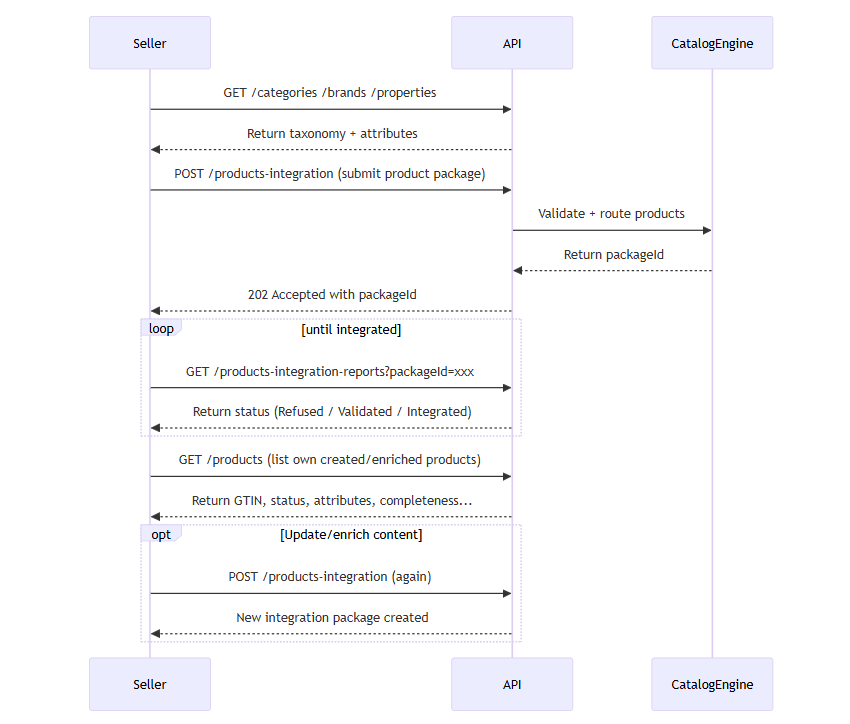
Each submission triggers asynchronous processing, using a packageId used to track results via GET /products-integration-reports.
Functional Rules
Number of products per call: minimum 1, maximum 10,000
For standard products: (see GET /category/{targetCategory}isVariant:false)
Provide gtin, title, brand, categoryCode, attributes
For variant products: (see GET /category/{targetCategory}isVariant:true)
Also include variantGroupReference to link product variants together
{
  "errors": {
    "MyField": [
      "The field is required"
    ]
  },
  "status": 400,
  "title": "One or more validation errors occurred",
  "traceId": "dbb935dd-9884-4513-b22f-38e443632edb",
  "type": "https://tools.ietf.org/html/rfc7231"
}
Unique identifier of the product generated by the Octopia repository.
categoryCode
Alphanumeric
6 characters
YES
Garden furniture
Must be known from Octopia product referential.
title
Alphanumeric
132 characters max
YES
Round wooden table
Long version required.
description
Alphanumeric
2000 characters max
No HTML
YES
Wooden table made of particle board.
Product description.
richMarketingDescription
Alphanumeric
9000 characters max
Some HTML allowed
NO
Wooden TableHigh-quality, sustainable wood.
Highlights product assets.
Pictures
valid url
HTTPS
size 500*500
YES
https://….jpeg
At least one picture required (max 6).
brand
Alphanumeric
50 characters max
Category specific
JohnDoeApparel
Can be mandatory depending on category (isBrandMandatory).
attributes
Free or ranged values
Depends on mandatory attributes per category
Size = 36, Color = Blue
Some are mandatory per category (check category properties endpoint).
Details about marketing description
Unauthorized Links – Certain types of links are not allowed:
Links must be https
Other protocols are forbidden (mailto, ftp, file, …)
Unauthorized Special Characters – Only characters from the following Unicode ranges are permitted:
U+0000 to U+036F – Latin characters extended and spacing symbols
U+2000 to U+206F – common punctuation characters
U+2100 to U+214F – Letterlike Symbols
Any character outside these ranges will be rejected.
Prohibited HTML Tags – The following HTML tags are not allowed, whether opening or closing:
input
html
body
header
iframe
table
Additionally, HTML expressions containing invalid attributes are forbidden:
Tags containing comparison operators like ==
Improper or suspicious href attributes
Prohibited Scripts or Dangerous Behaviors :
Any attempt to inject code or scripts is strictly prohibited, including:
script tags (opening or closing)
CDATA sections
JavaScript event attributes (such as onclick="", onmouseover="", etc.)
Important notes
Monitor the integration result via GET /products‑integration‑reports using the returned packageId.
Partial failures may occur: products in the package may be Refused or Integrated.
Using wrong attributes or attributes values requires processing errors and warnings from the report; those need correction before full re‑submission.
Retrieve product Integration Reports
Prerequisites
The SellerId header is required to identify the product submission context
You must filter using at least one of the following:
packageId (recommended)
gtin (up to 10 comma-separated values)
Help Guide
If you encounter difficulties or errors during product integration, refer to the Help Guide
This endpoint allows the seller to retrieve detailed results of a previously submitted product integration viaPOST /products-integration. Each result entry corresponds to a product submission attempt and includes information about its integration status, type of operation performed, potential errors or warnings.
Typical use cases include:
Reviewing whether products were successfully integrated into the Octopia catalog
Diagnosing failures (with specific error codes and rejected fields)
Monitoring enrichment or variant family status
Auditing content that was ignored, refused, or overwritten
Each item returned includes:
gtin, title, category, language, brand, and attributes
status (Refused, Validated, Integrated)
operationType (Creation, Modification, Identical)
submissionDate, packageId, completeness, and variant metadata
Lists of errors, warnings, infos tied to each product
Functional Rules
You must provide at least one filter: packageId, gtin, or cursor
Pagination supported using:
pageIndex and pageSize (default: 1, 25)
Or cursor and limit (preferred in newer versions)
Supports optional filters:
fields to limit returned fields (e.g., fields=gtin,title,status)
sort, desc to sort ascending/descending
status may be:
Refused: the product failed and was not created
Validated: the product was syntactically valid and processing has started
Integrated: the product is now live in the referential (with possible warnings)
Endpoint to use
This route allows you to obtain technical and functional information about product submissions.
Functional Rules:
The Status field is the result of the integration process:
Refused: Your product cannot be integrated(every element of your submission has been ignored)
Validated: Your product has been validated and is being processed
Integrated: Your product has been successfully integrated(some elements may have been ignored)
The OperationType field is the type of product integration
Creation: New product created
Modification: Existing product modified
Identical: Existing product not modified
If no Accept-language is filled then you will receive your products in all integrated languages.
Examples:
Get a list of information about product submission based on their package:
Endpoint full URL:https://api.octopia-io.net/seller/v2/products-integration-reports
Parameters - Headers
Name
In
Type
Description
SellerId*
header
string
Octopia Seller Identifier.
Example : 98979
Accept-Language
header
string
The Accept-Language header allows you to precise which language to use for the request.
Example : fr-FR
Parameters - Query
Name
In
Type
Description
packageId
query
string
The PackageId parameter allows you to filter the products based on their package
gtin
query
integer
The Gtin parameter allows you to filter the products based on their gtin
pageIndex
query
integer
The PageIndex parameter allows you to precise which page of results should be displayed (default: 1 / min: 1)
Default : 1
pageSize
query
integer
The PageSize parameter allows you to precised the number of elements should be displayed (default: 25 / min: 0 / max: 100)
Default : 25
fields
query
string
The Field parameter allows you to precise which fields should be displayed *(default: )**
sort
query
string
The Sort parameter allows you to precise which fields should be sorted in ascending order
desc
query
string
The Desc parameter allows you to precise which fields should be sorted in descending order
Response codes
200 - Success
application/json
{
  "itemsPerPage": 10,
  "items": [
    {
      "gtin": "1234567890128",
      "gtinReference": "8210987654321",
      "variantGroupReference": "Ref8210987654321",
      "productReference": "AAAAA00148",
      "sellerProductReference": "AGRA39401",
      "title": "My title",
      "description": "My description",
      "richMarketingDescription": "My marketing description",
      "brand": "My brand",
      "categoryCode": "010201",
      "language": "fr-FR",
      "attributes": [
        {
          "files": [
            "https://media.pdf"
          ],
          "propertyReference": "24077",
          "values": [
            "Electrique",
            "Batterie"
          ]
        }
      ],
      "createdAt": "2022-01-14T07:35:19.0000000+00:00",
      "updatedAt": "2021-03-28T08:32:30.0000000+00:00",
      "integratedProductId": "4fdaza6s-4557-3364-sqd4-45qsdq441sqc",
      "packageId": "3fa85f64-5717-4562-b3fc-2c963f66afa6",
      "sellerId": 98979,
      "submissionDate": "2022-05-24T07:38:39.0000000+00:00",
      "submissionType": "Excel",
      "status": "Validated",
      "operationType": "Modification",
      "sellerPictureUrls": [
        {
          "index": 1,
          "url": "https://static.education.francetv.fr/media/img/hd/img.gif"
        }
      ],
      "integrationPictureUrls": [
        {
          "index": 1,
          "url": "https://static.education.francetv.fr/media/img/hd/img.gif"
        }
      ],
      "publicationCompleteness": 30,
      "wasMarketable": false,
      "wasAllowedToEdit": true,
      "wasAllowedToEnrich": true,
      "errors": [
        {
          "code": "IncorrectValue",
          "field": "CategoryReference",
          "message": "Le champ doit contenir au moins une valeur correcte",
          "type": "Exports"
        }
      ],
      "warnings": [
        {
          "code": "IncorrectValue",
          "field": "CategoryReference",
          "message": "Le champ doit contenir au moins une valeur correcte",
          "type": "Exports"
        }
      ],
      "infos": [
        {
          "code": "IncorrectValue",
          "field": "CategoryReference",
          "message": "Le champ doit contenir au moins une valeur correcte",
          "type": "Exports"
        }
      ]
    }
  ]
}
{
itemsPerPage: integer
The number of items per page
items: [
{
The product
gtin: string
The gtin
variantGroupReference: string
The variant group reference
productReference: string
The product reference
sellerProductReference: string
The seller product reference
title: string
The title
description: string
The description
richMarketingDescription: string
The marketing description
brand: string
The brand
categoryCode: string
The category code
language: string
The language
attributes: [
The list of attributes
{
The attribute
files: [
The list of files url
string
]
propertyReference: string
The property reference
values: [
The list of values
string
]
}
]
createdAt: string
The created date
updatedAt: string
The updated date
integratedProductId: string
The integrated product identifier
packageId: string
The package identifier
sellerId: integer
The seller identifier
submissionDate: string
The submission date
submissionType: string|enum
The type of a submissionEnum[2]: [Excel, API]
status: string|enum
The status of a productEnum[3]: [Refused, Validated, Integrated]
operationType: string|enum
The type of a operationEnum[3]: [Identical, Modification, Creation]
sellerPictureUrls: [
The list of seller picture urls
{
The picture
index: integer
The index
url: string
The url
}
]
integrationPictureUrls: [
The list of integration picture urls
{
The picture
index: integer
The index
url: string
The url
}
]
publicationCompleteness: integer
The publication completeness
wasMarketable: boolean
The value indicating whether was marketable
wasAllowedToEdit: boolean
The value indicating whether was allowed to edit
wasAllowedToEnrich: boolean
The value indicating whether was allowed to enrich
errors: [
The list of errors
{
The commentary
code: string
The code
field: string
The field
message: string
The message
type: string
The type
}
]
warnings: [
The list of warnings
{
The commentary
code: string
The code
field: string
The field
message: string
The message
type: string
The type
}
]
infos: [
The list of infos
{
The commentary
code: string
The code
field: string
The field
message: string
The message
type: string
The type
}
]
}
]
}
400 - Bad Request
application/problem+json
{
  "errors": {
    "MyField": [
      "The field is required"
    ]
  },
  "status": 400,
  "title": "One or more validation errors occurred",
  "traceId": "dbb935dd-9884-4513-b22f-38e443632edb",
  "type": "https://tools.ietf.org/html/rfc7231"
}
A human-readable explanation specific to this occurence of the problem
instance: string|null
A URI reference that identifies the specific occurence of the problem.
traceId: string|null
The response identifier.
status: integer (int32)|null
The HTTP status code generated by the origin server for this occurence of the problem.
title: string|null
A short human-readable summary of the problem type.
type: string (uri)|null
A URI reference that identifies the problem type and provides a human-readable documentation for the problem.
}
Important notes
operationType=Identical means the submitted data matched the existing one — no changes made
Use errors[].field, errors[].message to explain why integration failed and warnings[] array for potential notifications
Combine this endpoint with packageId from submission response to build a seamless feedback loop
Reports may take several seconds to generate — check with retry logic if needed
Search by gtin can provide multiple submissions results
FAQ
What is the difference between a product and an offer on Octopia?
A product defines the content of a product sheet: title, description, pictures, attributes, brand, etc. An offer contains the commercial terms for that product: price, quantity, delivery, seller-specific data. You must create a product first, before submitting an offer on it.
What is the minimum required data to create a product?
You must provide:
A valid GTIN code (or EAN-8 EAN-12 EAN-13)
A level-3 category code (6 alphanumeric characters, e.g. 1D0903)
A title, description, and at least one picture
A language (e.g. fr-FR for Cdiscount)
A sellerProductReference
A brand (free text, validated automatically)
Optionally, attributes specific to the category (some may be mandatory)
Product Localization – Can I create/read product data in different languages ?
Retrieving data can be done in 3 languages (FR,EN,ES) passed in queries as an Accept-Language header following RFC5646 as language (ISO 639) and country (ISO 3166-1); e.g. fr-FR, en-EN, es-ES. It applies to Categories, properties and product data.
Publishing product information follows the same rule.
However non-french product sheets are not accepted on all Octopia Network marketplaces.
Octopia does not translate to French, only translation from French is available.
Products not created in French will not be available in the French catalog.
What is a level-3 category, and why is it required?
Level-3 categories are the most specific and detailed classification in the Octopia taxonomy. They are identified by 6-character codes (e.g. 0D0502 for smartphones). Product creation is only allowed for level-3 categories — level 1 and 2 are for navigation only.
How does brand validation work?
The brand field is free text, but the value must pass validation:
If the brand already exists in the Octopia referential, it will be linked
If it does not exist but is valid, it will be added to the referential
If it fails validation, the product creation will be rejected
Use GET /brands to retrieve known brands – but this is not mandatory for submission.
There is no notification of approval or rejection.
Purely numeric values will be rejected.
What is a variant group, and when should I use it?
You should use a variantGroupReference, Color and Size, to link similar products together (e.g., same T-shirt in different sizes). Each variant must still have its own GTIN and title but will be grouped for display if the category allows variation.
What are the rules for images?
At least one image is required
Allowed formats: JPEG, PNG, GIF, BMP, WEBP
Dimensions must be upper than 500×500
Provide URLs in sellerPictureUrls
Provided URLs must be:
reachable from Octopia’s infrastructure (IP range upon request)
not enforce network redirects
allow collection (GET queries) through calls without User-Agent
How can I check if a product has been integrated successfully?
Use GET /products-integration-reports with:
A packageId
Or a list of gtin values
Each product will include a status (Integrated, Refused, Validated) and possible errors or warnings.
Can I submit multiple products at once?
Yes. The POST /products-integration endpoint accepts up to 10000 products per request. Each product must be a complete object — partial updates are not supported.
What happens if I submit the same product twice?
If the product is identical to an existing one, the response will indicate OperationType = Identical. If some data is different, the product will be updated (OperationType = Modification). If it’s new, it will be created.