
FFM – Outbound
- Home
- FFM – Outbound
Introduction
Last update :
Toolbox / Tips
-
Download the Postman collection
-
Download the YAML / See full technical documentation
-
Don’t forget to check the authentication documentation
The Outbound Shipments API allows sellers to instruct Octopia Fulfillment to dispatch products stored in warehouses to end customers. This includes creating shipping orders, tracking parcel statuses and managing cancellations.
Business Context & Principles
Before initiating an outbound shipment, the product must be properly referenced in the Octopia system using either a combination of productId and productCondition, or a valid sellerProductReference. If the product is unknown or incorrectly identified, the shipping order will be asynchronously rejected.
Once a product is registered and properly stocked (see inventory, Available), the seller can create an outbound request specifying shipment delivery address, delivery mode, and item details. Depending on the outbound context, additional constraints may apply (see #Create Outbound)
Once Created, the outbound order is passed to the logistic partner. If Accepted, the order moves into Inpreparation and is eventually Shipped to the recipient. Throughout the process, sellers can monitor outbound shipment status, retrieve carrier and parcel information, and – if and when applicable – request cancellation.
Cancellations are only allowed under specific conditions (i.e., before the order is marked as shipped).
This API is designed for operational integration with Octopia’s Fulfillment network across multiple countries.
Key Attributes
|
Field |
Description |
|---|---|
|
|
Unique identifier of the outbound shipment |
|
|
Seller’s reference for the shipment |
|
|
Lifecycle status of the shipment. Possible values:
|
|
|
Shipment validity: |
|
|
Warehouse country code ( |
|
|
Shipping mode: |
|
|
Full delivery address (first name, country code, postal code…) |
|
|
Products included in the shipment |
|
|
Date when the shipment was created |
|
|
Timestamp of the last status change |
|
|
Physical parcels (with carrier, tracking, delivery date, etc.) |
|
|
Parcel status: |
|
|
Cancellation metadata, if cancellation was requested |
Seller Workflow
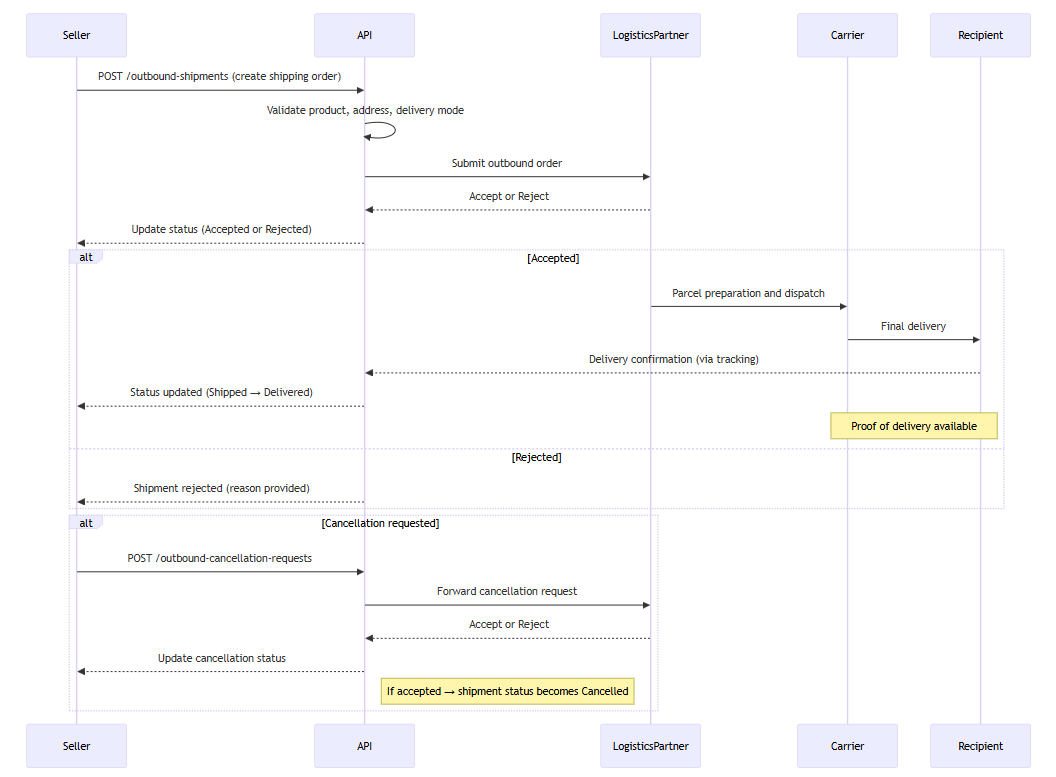
In this section we will look at how to manage the following cases and ensure maximum control of your orders:
Create an Outbound Shipment
Prerequisites
-
Products must be properly created, supplied and identifiable either by
sellerProductReferenceor by the pairproductId+productCondition. -
Delivery address must include a valid country code (see ISO_3166-1).
-
If the delivery mode is of type pickup point (e.g.:
PPMR), thepickupIdmust be provided in the delivery address. -
If the delivery country is Switzerland (
CH), pricing fields (unitSalesPrice,shippingCost,currencyCode) must be provided.
This endpoint is used to create an outbound shipment order from a fulfillment warehouse.
It initiates the outbound process by registering the request with the logistics partner. Once validated, the warehouse proceeds to preparation, shipping, and final delivery.
The system automatically assigns the best logistics partner based on stock availability, delivery country, and performance criteria — unless a storageCountry is explicitly specified.
Endpoint to use
Allows to create a new outbound-shipment for a specified seller.
Functional Rules:
-
When the outbound-shipment is created, a
productIdand aproductConditionor asellerProductReferenceis required to retrieve the current product in the system.If both are specified only the
sellerProductReferenceis used. -
When the outbound-shipment
deliveryModeisPPMR, thepickupIdis mandatory. -
When in the
deliveryAddressof the outbound-shipment thecountryCodeisCH, theunitSalesPrice,shippingCostandcurrencyCodeare mandatory.
Endpoint full URL: https://api.octopia-io.net/seller/v2/outbound-shipments
Parameters - Headers
| Name | In | Type | Description |
|---|---|---|---|
| SellerId* | header |
string
|
Octopia Seller Identifier. Example : 98979 |
Request body
|
Command used to create a new outbound-shipment. application/json |
Response codes
201 - SuccessHeaders:
|
||||||||||||||||
400 - Bad Requestapplication/problem+json |
||||||||||||||||
401 - Unauthorizedapplication/problem+json |
||||||||||||||||
403 - Forbiddenapplication/problem+json |
||||||||||||||||
409 - Conflictapplication/problem+json |
||||||||||||||||
415 - Unsupported Media Typeapplication/problem+json |
||||||||||||||||
500 - Internal Server Errorapplication/problem+json |
-
Request body example:
{
  "reference": "123456",
  "deliveryAddress": {
    "firstName": "Noel",
    "lastName": "Flantier",
    "email": "noel.flantier@gmail.com",
    "phone": "0600000000",
    "city": "Paris",
    "postalCode": "75000",
    "countryCode": "FR",
    "line": "4 rue de Rio"
  },
  "items": [
    {
      "productId": "WIK0683498200512",
      "productCondition": "New",
      "expectedQuantity": 1,
      "delivery": {
        "mode": "THD"
      }
    }
  ]
}
Important notes
-
Providing productId/productionCondition is optional when sellerProductReference si available
-
Seller product reference is prioritized: If both
productId/productConditionandsellerProductReferenceare present, onlysellerProductReferencewill be used. -
Pricing fields must be provided when shipping to a country with customs control, such as Switzerland.
-
Invalid or incomplete product identification will cause the shipment creation to be
Rejected.
Count Outbound Shipments by Filters
Prerequisites
-
Filters must be provided in query parameters to scope the count appropriately.
This endpoint returns the number of outbound shipments matching a set of filtering criteria.
It is useful for monitoring dashboards, pagination, and performance tracking. It supports filters such as status, country, date ranges, and state.
Endpoint to use
Allows to retrieve the amount of inbound-shipments for a specified seller according to several filters.
Examples:
-
Count inbound-shipments for a specified seller
/inbound-shipments/count -
Count inbound-shipments for a specified seller by the reference :
REFERENCE_001/inbound-shipments/count?reference=REFERENCE_001 -
Count inbound-shipments for a specified seller by supplyMode :
Fulfillment/inbound-shipments/count?supplyMode=Fulfillment -
Count inbound-shipments for a specified seller by code :
Appro_01/inbound-shipments/count?code=Appro_01 -
Count inbound-shipments for a specified seller by the country :
FR/inbound-shipments/count?country=FR -
Count inbound-shipments for a specified seller using date range
/inbound-shipments/count?createdAtMin=2020-04-20T10:10:00&createdAtMax=2020-04-20T10:11:00 -
Count inbound-shipments for a specified status
/inbound-shipments/count?status=Created
Endpoint full URL: https://api.octopia-io.net/seller/v2/inbound-shipments/count
Parameters - Headers
| Name | In | Type | Description |
|---|---|---|---|
| SellerId* | header |
string
|
Octopia Seller Identifier. Example : 98979 |
Parameters - Query
| Name | In | Type | Description |
|---|---|---|---|
| reference | query |
string
|
Seller reference for the ressource. Example : 0223258 |
| code | query |
string
|
The auto generate code of an inbound. Example : 100_1689869896673 |
| supplyMode | query |
string|enum
|
Supply mode of the inbound
Example : Fulfillment Available values : ["Fulfillment", "Xdock"] |
| country | query |
string|enum
|
Inbound destination country. Example : FR Available values : ["FR", "ES", "MA", "PT", "GB"] |
| createdAtMin | query |
string
|
Minimum creation date filter (RFC3339 / ISO8601 UTC). Return items only if createdAt is greater or equal to this value. Example : 2022-09-23T16:43:24 |
| createdAtMax | query |
string
|
Maximum creation date filter (RFC3339 / ISO8601 UTC). Return items only if createdAt is smaller or equal to this value. Example : 2024-09-24T16:43:24 |
| updatedAtMin | query |
string
|
Minimum update date filter (RFC3339 / ISO8601 UTC). Return items only if updatedAt is greater or equal to this value. Example : 2022-09-23T16:43:24 |
| updatedAtMax | query |
string
|
Maximum update date filter (RFC3339 / ISO8601 UTC). Return items only if updatedAt is smaller or equal to this value. Example : 2024-09-24T16:43:24 |
| status | query |
array[string|enum]
|
Filter by inbound shipment status. Multiple values can be provided. Example : List: ["Created", "Referencing"] Available values : ["Created", "Referencing", "Referenced", "Processing", "Accepted", "Refused", "AppointmentScheduled", "InProgress", "PartiallyDone", "Done", "AutomaticallyDone"] |
Response codes
200 - Successapplication/json |
||||||||||||||||
400 - Bad Requestapplication/problem+json |
||||||||||||||||
401 - Unauthorizedapplication/problem+json |
||||||||||||||||
403 - Forbiddenapplication/problem+json |
||||||||||||||||
500 - Internal Server Errorapplication/problem+json |
Important notes
-
This endpoint does not return objects, only a numeric count.
-
Use filters consistently with the list endpoint to ensure accuracy.
-
Zero is a valid result, indicating no shipments match the criteria.
Retrieve Outbound Shipments by Filters
Prerequisites
-
Cursor-based pagination is implemented using encoded cursors in the
Linkheader. -
Filters can include date ranges, status, state, delivery country, and more.
This endpoint retrieves a list of outbound shipments based on filter criteria.
The result includes details for each shipment: reference, delivery info, items, status, and parcel tracking details.
It is essential for displaying outbound shipment history, analyzing processing flows, and tracking parcel dispatches.
Endpoint to use
Allows to retrieve an outbound-shipment list for a specified seller, according to several filters.
Functional Rules:
-
This API delivers outbound-shipments using a cursor pagination.
A cursor parameter is used to navigate to the previous or the next page.
This parameter is encoded and acts as a pointer to the first or the last item in the page. When the parameter is not provided, the first products are returned until the expected limit.
Examples:
-
Retrieves list of outbound-shipments for a specified seller
/outbound-shipments -
Retrieve products with a cursor linked to the next page.
/outbound-shipments?cursor=QXNjXzE2OTA0NjI3NzYyNzI= -
Retrieve products with a limit of 1000 outbound-shipments. The next page is provided using a link header.
/outbound-shipments?limit=1000 -
Retrieves list of outbound-shipments for a specified seller by seller the reference: REFERENCE_001
/outbound-shipments?reference=REFERENCE_001 -
Retrieves list of outbound-shipments for a specified seller by status: Accepted
/outbound-shipments?status=Accepted -
Retrieves list of outbound-shipments for specified cancellation request status: Accepted
/outbound-shipments?cancellationRequestStatus=Accepted -
Retrieves list of outbound-shipments for a specified seller by state: Valid
/outbound-shipments?state=Valid -
Retrieves list of outbound-shipments for a specified seller using date range
/outbound-shipments?createdAtMin=2020-04-20T10:10:00.000Z&createdAtMax=2020-04-20T10:11:00.000Z/outbound-shipments?statusUpdatedAtMin=2020-04-20T10:10:00.000Z&statusUpdatedAtMax=2020-04-20T10:11:00.000Z -
Retrieves list of outbound-shipments for a specified seller ordered
/outbound-shipments?orderBy=Asc
Endpoint full URL: https://api.octopia-io.net/seller/v2/outbound-shipments
Parameters - Headers
| Name | In | Type | Description |
|---|---|---|---|
| SellerId* | header |
string
|
Octopia Seller Identifier. Example : 98979 |
Parameters - Query
| Name | In | Type | Description |
|---|---|---|---|
| reference | query |
string
|
Seller reference for the ressource. Example : 0223258 |
| storageCountry | query |
string|null
|
Storage country to filter the shipments. Example : FR |
| deliveryCountryCode | query |
array[string]|null
|
List of delivery country codes Example : List: ["FR", "ES"] |
| status | query |
array[string|enum]
|
Filter by inbound shipment status. Multiple values can be provided. Example : List: ["Created", "Referencing"] Available values : ["Created", "Referencing", "Referenced", "Processing", "Accepted", "Refused", "AppointmentScheduled", "InProgress", "PartiallyDone", "Done", "AutomaticallyDone"] |
| cancellationRequestStatus | query |
string|enum
|
The current status of cancellation request. Example : Accepted Available values : ["Created", "InProgress", "Accepted", "Rejected"] |
| deliveryModes | query |
string|enum
|
deliveryModes. Example : THD Available values : ["THD", "EHD", "SHD", "PPMR", "WSHD", "SRHD", "FDHD", "SB2B"] |
| state | query |
string|enum
|
The current state of the outbound-shipmentOutbound-shipment state. Example : Valid Available values : ["Valid", "Invalid"] |
| limit | query |
integer
|
Maximum number of products retrieved per page. Example : 10 |
| cursor | query |
string
|
Pagination cursor. Use together with Example : eyJDdXJzb3JUeXBlIjoyLE9mZmVyVGVjaG5pY2FsSWQiOiIxMjM0NTZfQUFBQkI2MTEyM182X0NESVNGUiJ9 |
| createdAtMin | query |
string
|
The created at minimum date of the ressource. Example : 2023-12-25T14:30:00Z |
| createdAtMax | query |
string
|
The created at maximum date of the ressource. Example : 2023-12-25T15:30:00Z |
| statusUpdatedAtMin | query |
string
|
Minimum date of status update of the outbound-shipment. Example : 2020-04-20 10:10:00 |
| statusUpdatedAtMax | query |
string
|
Maximum date of status update of the outbound-shipment. Example : 2020-04-20 10:11:00 |
| salesChannelName | query |
string
|
Sales channel name to help users identify which store the outbound shipment is coming from. Example : MYWEBISTE |
| orderBy | query |
string|enum
|
Field to order by the outbound-shipment created date. Example : Desc Available values : ["Desc", "Asc"] |
Response codes
200 - Successapplication/json
|
||||||||||||||||||||||||||||||||||||||||||||||||||||||||||||||||||||||||||||||||||||||||||||||||||||||||||||||||||||||||||||||||||||||||||||||||||||||||||||||||||||||||||||||||||||||||||||||||||||||||||||||||||||||||
400 - Bad Requestapplication/problem+json |
||||||||||||||||||||||||||||||||||||||||||||||||||||||||||||||||||||||||||||||||||||||||||||||||||||||||||||||||||||||||||||||||||||||||||||||||||||||||||||||||||||||||||||||||||||||||||||||||||||||||||||||||||||||||
401 - Unauthorizedapplication/problem+json |
||||||||||||||||||||||||||||||||||||||||||||||||||||||||||||||||||||||||||||||||||||||||||||||||||||||||||||||||||||||||||||||||||||||||||||||||||||||||||||||||||||||||||||||||||||||||||||||||||||||||||||||||||||||||
403 - Forbiddenapplication/problem+json |
||||||||||||||||||||||||||||||||||||||||||||||||||||||||||||||||||||||||||||||||||||||||||||||||||||||||||||||||||||||||||||||||||||||||||||||||||||||||||||||||||||||||||||||||||||||||||||||||||||||||||||||||||||||||
500 - Internal Server Errorapplication/problem+json |
Important notes
-
Pagination is cursor-based: Use the
Linkheader to navigate between pages. -
Parcel-level detail is included, enabling customer level restitution.
-
Delivery modes are relevant per item and must be matched with valid partner capabilities.
Retrieve a Specific Outbound Shipment
Prerequisites
-
Requires the unique UUID of the outbound shipment.
This endpoint retrieves a full detail view of a single outbound shipment.
It includes reference data, delivery address, product list, parcel data, shipping and delivery dates, cancellation status, and rejection reasons if applicable.
Endpoint to use
Allows to retrieve a single outbound-shipment by its unique identifier for a specified seller.
Example:
-
Retrieves the outbound-shipment with this unique identifier: cd795c4c-b9c6-403e-96f3-2ee049c80bf1.
/outbound-shipments/cd795c4c-b9c6-403e-96f3-2ee049c80bf1
Endpoint full URL: https://api.octopia-io.net/seller/v2/outbound-shipments/{outboundShipmentId}
Parameters - Headers
| Name | In | Type | Description |
|---|---|---|---|
| SellerId* | header |
string
|
Octopia Seller Identifier. Example : 98979 |
Parameters - Path
| Name | In | Type | Description |
|---|---|---|---|
| outboundShipmentId* | path |
string
|
Outbound-shipment identifier. Example : ea5f27b3-92e8-4c2a-9212-af892989b985 |
Response codes
200 - Successapplication/json |
||||||||||||||||||||||||||||||||||||||||||||||||||||||||||||||||||||||||||||||||||||||||||||||||||||||||||||||||||||||||||||||||||||||||||||||||||||||||||||||||||||||||||||||||||||||||||||||||||||||||
401 - Unauthorizedapplication/problem+json |
||||||||||||||||||||||||||||||||||||||||||||||||||||||||||||||||||||||||||||||||||||||||||||||||||||||||||||||||||||||||||||||||||||||||||||||||||||||||||||||||||||||||||||||||||||||||||||||||||||||||
403 - Forbiddenapplication/problem+json |
||||||||||||||||||||||||||||||||||||||||||||||||||||||||||||||||||||||||||||||||||||||||||||||||||||||||||||||||||||||||||||||||||||||||||||||||||||||||||||||||||||||||||||||||||||||||||||||||||||||||
404 - Not Foundapplication/problem+json |
||||||||||||||||||||||||||||||||||||||||||||||||||||||||||||||||||||||||||||||||||||||||||||||||||||||||||||||||||||||||||||||||||||||||||||||||||||||||||||||||||||||||||||||||||||||||||||||||||||||||
500 - Internal Server Errorapplication/problem+json |
Important notes
-
Cancellations are visible in the
cancellationRequestobject, including status and origin. -
Parcel details include tracking numbers, weights, carrier names, and shipping timelines.
-
Traceability data is available if the product requires serial or IMEI tracking.
Request an Outbound Shipment Cancellation
Prerequisites
-
Cancellation is allowed only when the shipment status is
Created,Accepted, orInPreparation. -
A cancellation
reasonmust be provided, it is recommended to use one of the documented list in the endpoint’s description.
This endpoint allows a seller to request cancellation of a shipping order that has not yet been fully processed or shipped.
If the shipment is still in an eligible state, the system will either reject it directly or forward the request to the logistics partner for review.
Endpoint to use
Request to cancel an outbound-shipment by its unique identifier.
Functional Rules:
-
When the outbound-shipment status is
createdorpending, the outbound-shipment isrejected. -
When the outbound-shipment status is
acceptedorinPreparation, a cancellation request is sent. This request will beacceptedorrejectedby the logistic partner.
If request is accepted, the outbound-shipment status is Cancelled.
-
When the status outbound-shipment is
partiallyShipped,shipped,delivered,cancelorrejectedthe cancellation request is forbidden. -
Reason must be filled with following values:
Customer details errorPrice errorCancellation at customer's requestSuspected fraudOther
Endpoint full URL: https://api.octopia-io.net/seller/v2/outbound-cancellation-requests
Parameters - Headers
| Name | In | Type | Description |
|---|---|---|---|
| SellerId* | header |
string
|
Octopia Seller Identifier. Example : 98979 |
Request body
|
Command used to create an outbound-shipment cancellation request. application/json |
Response codes
201 - Successapplication/json |
||||||||||||||||
400 - Bad Requestapplication/problem+json |
||||||||||||||||
401 - Unauthorizedapplication/problem+json |
||||||||||||||||
403 - Forbiddenapplication/problem+json |
||||||||||||||||
404 - Not Foundapplication/problem+json |
||||||||||||||||
409 - Conflictapplication/problem+json |
||||||||||||||||
500 - Internal Server Errorapplication/problem+json |
-
Request body example:
{
  "outboundShipmentId": "cd795c4c-b9c6-403e-96f3-2ee049c80bf1",
  "reason": "Cancellation at customer's request"
}
Important notes
-
Direct rejections occur when the shipment is in
Created. -
Requests in
AcceptedorInPreparationare subject to logistic partner decision. -
Cancellations are forbidden once the shipment is
Shipped,Delivered,Rejected, or alreadyCancelled.
Retrieve a Cancellation Request
Prerequisites
-
Requires the UUID of the cancellation request.
This endpoint retrieves the details of a previously submitted outbound shipment cancellation request.
It includes status (Created, InProgress, Accepted, or Rejected), the entity who submitted the request, the reason, and the timestamp.
Endpoint to use
Allows to retrieve a single outbound-shipment cancellation request by its unique identifier for a specified seller.
Example:
Retrieves the outbound-shipment with this unique identifier: cd795c4c-b9c6-403e-96f3-2ee049c80bf1.
/outbound-shipments/cd795c4c-b9c6-403e-96f3-2ee049c80bf1
Endpoint full URL: https://api.octopia-io.net/seller/v2/outbound-cancellation-requests/{outboundCancellationRequestId}
Parameters - Headers
| Name | In | Type | Description |
|---|---|---|---|
| SellerId* | header |
string
|
Octopia Seller Identifier. Example : 98979 |
Parameters - Path
| Name | In | Type | Description |
|---|---|---|---|
| outboundCancellationRequestId* | path |
string
|
Outbound-shipment cancellation request identifier. Example : cd795c4c-b9c6-403e-96f3-2ee049c80bf1 |
Response codes
200 - Successapplication/json |
||||||||||||||||
401 - Unauthorizedapplication/problem+json |
||||||||||||||||
403 - Forbiddenapplication/problem+json |
||||||||||||||||
404 - Not Foundapplication/problem+json |
||||||||||||||||
500 - Internal Server Errorapplication/problem+json |
Important notes
-
Cancellation status is also available directly within the shipment object under
cancellationRequest. -
This endpoint is helpful when cancellation decisions are pending or delayed.
-
Traceability is improved with timestamps and the source of the request (
API,Connector,Seller).
FAQ
It’s a shipping order you send to Octopia so our logistics partner can deliver products stored in fulfillment warehouses on your behalf.
It includes:
-
Who receives the parcel (delivery address)
-
What to ship (product + quantity)
-
How to ship (delivery mode)
-
Optional: your reference or pricing data
At minimum:
-
A
reference(your internal order ID) -
A valid
deliveryAddress(country, city, postalCode…) -
One or more items with:
-
productId+productConditionORsellerProductReference -
expectedQuantity -
A valid
delivery.mode(e.g.THD,PPMR, etc.)
-
Yes — for shipments to customs regulated destinations (e.g. Switzerland), fields like unitSalesPrice, shippingCost, and currencyCode are mandatory.
-
The product ID or reference is unknown or not available in the specified warehouse
-
Missing delivery mode or invalid for the country
-
Missing required pricing fields for destination country with customs requirement
-
You don’t have permission for the
storageCountry
Modes vary by country and include:
-
THD– Standard (no signature) -
SHD,EHD– Signature required -
PPMR– Pick-up point (requirespickupId) -
WSHD,FDHD,SRHD– Bulky delivery modes -
SB2B– B2B delivery mode
Each product’s size and destination has impact on eligible modes.
Note that this list is not exhaustive and some delivery modes might require prior activation or authorization at the account level.
See also Octopia Delivery Modes and provided values enumeration in the technical documentation of POST /outbound-shipments
Use:
-
GET /outbound-shipments(list with filters) -
GET /outbound-shipments/{id}(details)
You’ll see status, parcel tracking, and delivery info per item.
-
Created– Order accepted by API, not yet confirmed -
Accepted– Order validated by logistics system -
InPreparation– Order being packed -
Shipped– Parcel sent to carrier -
Delivered– Parcel delivered to customer -
Cancelled– Shipment cancelled (before being shipped) -
Rejected– Rejected due to invalid data
Use POST /outbound-cancellation-requests and provide:
-
The
outboundShipmentId -
A valid
reason(e.g. “Customer request”, “Suspected fraud”)
If the status is already Shipped, cancellation will be rejected.
No. Once created, shipments cannot be modified. You must cancel and re-create a new one if something went wrong.
There is no sandbox available.
Due to the nature of some of the manual operations involved in processing product data, receiving physical goods, and packaging shipments, along with synchronizing multiple warehouses and databases, conducting complete tests is relatively complicated and thus not provided as a common possibility.