
FFM – Inbound
- Home
- FFM – Inbound
Introduction
Last update :
Toolbox / Tips
-
Download the Postman collection
-
Download the YAML / See full technical documentation
-
Don’t forget to check the authentication documentation
The Inbound Shipments API enables sellers to notify Octopia Fulfillment warehouses that they are sending inventory to the warehouse. Known as a supply order, this process is critical for efficient stock reception, traceability, and coordination across different countries.
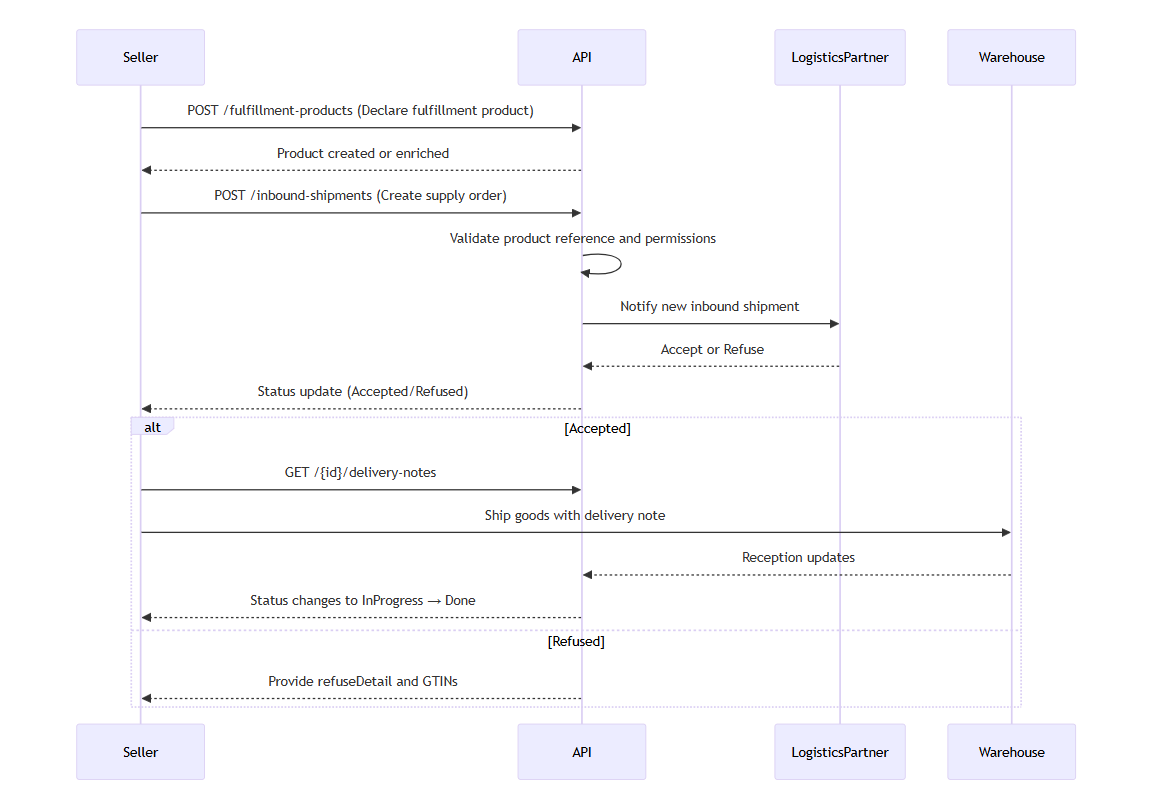
Sellers first need to ensure that the products they plan to send are properly referenced logistically. This is done by registering the GTIN, packaging dimensions, condition, traceability, and customs-related information via the POST /fulfillment-products endpoint. If a product is not previously referenced, any subsequent supply order involving it will be refused.
Once products are referenced, sellers can initiate the supply order by specifying the products, their quantities and their destination. After system validations (e.g. referencing products, country access), the request is forwarded to Octopia Fulfillment. If Accepted, a delivery note is generated for inclusion with the physical shipment. The warehouse then receives the goods, and reception statuses are updated accordingly.
Important — FR, ES, and UK Warehouse Availability Depending on Your Context
The REST Fulfillment API allows storage in FR, ES, and UK warehouses covering all Octopia Fulfillment as 3PL service usecases and external orders.
⚠️ However, products sold on http://Cdiscount.com using Fulfillment services, rely on a specific FR warehouse which does not yet support inbound shipments through APIs.
-
Cdiscount and Octopia sellers using Fulfillment for sales on Cdiscount.com and other marketplaces within the Octopia marketplaces network, cannot create Supply Orders to the FR warehouse via the REST API
=> inventory supply must be done through the Seller Portal.
Access to certain destinations (e.g. storageCountry: Spain) requires prior activation by an account manager.
Key Attributes
|
Attribute |
Description |
|---|---|
|
|
Unique identifier for the inbound shipment |
|
|
Seller’s internal reference for this inbound |
|
|
Auto-generated system code for the inbound (e.g., |
|
|
Current processing status (see lifecycle below) |
|
|
Target warehouse country (e.g., |
|
|
Supply method: |
|
|
List of products included in the inbound |
|
|
Octopia internal product identifier |
|
|
Product barcode (must be referenced first) |
|
|
|
|
|
Quantity announced in the inbound request |
|
|
Quantity actually received by the warehouse |
|
|
Quantity in dispute (e.g., damaged, mislabelled) |
|
|
Timestamp of warehouse reception |
|
|
Reason for refusal (e.g., unknown GTIN) |
|
|
Indicates if a delivery note is available |
Status Lifecycle
|
Status |
Description |
|---|---|
|
|
Inbound created and submitted by the seller |
|
|
Product referencing in progress |
|
|
All products successfully referenced |
|
|
Inbound received by logistics system, pending validation |
|
|
Inbound accepted by the warehouse/logistics |
|
|
Inbound refused due to validation/referencing issues |
|
|
Warehouse scheduled a reception slot |
|
|
Reception in progress at warehouse |
|
|
Some products received, others missing |
|
|
All products received and validated |
|
|
System-closed inbound (e.g., after timeout or full reception) |
Seller Workflow
Data Availability Period
Data remains available for 25 months after its last update date.
Data refers to : any manipulated object ressource (product/inventory/shipment) as a whole, including ressource and properties.
In this section we will look at how to manage the following cases and ensure maximum control of your orders:
Reference a Fulfillment Product
Prerequisites
-
Products must be declared before any attempt to create an inbound shipment.
-
The
GTINandproductConditionmust form a unique pair. -
The
sellerProductReferencemust be unique for each couple ofproductCondition+ GTIN -
If the product already exists, it cannot be updated, only enriched with missing fields.
This endpoint allows sellers to reference a product that will be stored in a fulfillment warehouse. It is a mandatory prerequisite to initiate any inbound shipment (POST /inbound-shipments). Without referencing, the system will reject the supply order.
This reference declaration provides logistics with key information such as the GTIN, packaging dimensions, weight, condition, customs references, and hazard classification. Once submitted, the product becomes eligible for inclusion in the inbound flow.
Typical scenarios:
-
Creating a brand-new product that has never been stocked before
-
Providing packaging details for international shipping (e.g., customs codes)
-
Adding traceability flags (e.g., IMEI, serial numbers) for regulated products
The response will either confirm creation or return the pre-existing data if the product is already known.
Octopia stores products in a globally shared catalog. This enables extensive product knowledge and federated base product data, including logistic properties, under a single product sheet per GTIN.
Creation precedence applies for each additional information submitted to the catalog.
-
Unknow products will be created
-
Existing products will be completed (if relevant)
sellerProductReference remains unique for any given seller.
Product information restituted can then differ from what was initially submitted through product referencing if the product was previously existing. (this includes but is not limited to : label, dimensions, category properties)
Endpoint to use
Use this endpoint to create a new fulfillment product.
Functional Rules:
-
Product Identification:
-
The product creation is a mandatory step to successfully proceed with all other fulfillment flows.
-
If the product does not exist, the supply order request (InboundShipment) will be refused.
-
The sellerProductReference must be the same as in your sales channels to ensure successful stock synchronization later.
-
The sellerProductReference must be unique.
-
Each GTIN (Global Trade Item Number) / productCondition pair has a corresponding sellerProductReference.
Example:
gtin&productCondition-->sellerProductReference-
9448415636567&New-->MyRef01 -
9448415636567&LikeNew-->MyRef02
-
Please note:
-
The measurements provided should correspond to the packaged product.
-
Some storage locations accept only new products.
-
-
Retrieving and Checking Product Information:
-
To retrieve and check your sellerProductReference and productCondition, use the endpoint:
/stock-seller-references?sellerProductReference=MyRef01&limit=100. -
To retrieve and check the rest of the product information, use the endpoint:
/products?Gtin=9448415636567
You will find more details about retrieving product information in the endpoints documentation.
Please note:
-
If the product already exists, your call will not update the existing product information.
-
This means that if you send, for example, a new label, but the product already exists, you might retrieve a different label when checking the product information.
-
Empty fields will be added, but existing information will not be modified.
-
Endpoint full URL: https://api.octopia-io.net/seller/v2/fulfillment-products
Request body
|
Command used to create a new fulfillment product. application/json |
Response codes
201 - Resource created |
||||||||||||||||
400 - Bad Requestapplication/problem+json |
||||||||||||||||
401 - Unauthorizedapplication/problem+json |
||||||||||||||||
403 - Forbiddenapplication/problem+json |
||||||||||||||||
500 - Internal Server Errorapplication/problem+json |
-
Request body example:
{
  "gtin": "0697691193670",
  "label": "MORPILOT Sac de transport chien chat",
  "sellerId": 12345,
  "sellerProductReference": "5291030-cd",
  "productCondition": "New",
  "dimensionMinimum": 5,
  "dimensionMedium": 10,
  "dimensionMaximum": 100,
  "weight": 12,
  "categoryUn": "1234",
  "categoryIcpe": "1234",
  "hasExpirationDate": true,
  "traceability": "SerialNumber",
  "customsReference": "1234.56.78",
  "productValue": 5,
  "originCountryCode": "FR",
  "language": "fr-FR"
}
Important notes
-
No update allowed: If the product already exists, new values will not overwrite existing ones. Only empty fields can be populated.
-
Packaging dimensions: All size and weight fields refer to the packed product, as stored in the warehouse.
-
Stock consistency: The
sellerProductReferenceshould match the identifier used on sales channels and plugins to ensure alignment with inventory and stock sync later. -
Retrieving product information: use
GET /productsto retrieve full product details including logistic details.
Create an Inbound Shipment
Prerequisites
-
The seller must be authorized to ship to the specified country.
-
Logistic referencing must be completed for all products.
-
Active service for targetted storage and shipping country.
Storage/Shipment Country specifics
-
Spain : Requires beforehand service activation by an account manager
This endpoint allows sellers to notify Octopia that they are planning to send stock to a warehouse. It marks the beginning of the inbound lifecycle and is required to trigger referencing and logistics validation. This include creating a supply order for France, United Kingdom or Spain.
Once the request is submitted, the system checks product references and access rights. If valid, the information is forwarded to the logistics partner. The supply order is either accepted or refused, with feedback provided in follow-up calls.
Endpoint to use
Use this route to create a new inbound shipment for a specified seller.
Endpoint full URL: https://api.octopia-io.net/seller/v2/inbound-shipments
Parameters - Headers
| Name | In | Type | Description |
|---|---|---|---|
| SellerId* | header |
string
|
Octopia Seller Identifier. Example : 98979 |
Request body
|
Command used to create a new inbound-shipment. application/json |
Response codes
201 - Resource createdHeaders:
|
||||||||||||||||
400 - Bad Requestapplication/problem+json |
||||||||||||||||
401 - Unauthorizedapplication/problem+json |
||||||||||||||||
403 - Forbiddenapplication/problem+json |
||||||||||||||||
415 - Unsupported Media Typeapplication/problem+json |
||||||||||||||||
500 - Internal Server Errorapplication/problem+json |
-
Request body example:
{
  "reference": "REF01",
  "storageCountry": "FR",
  "supplyMode": "Fulfillment",
  "items": [
    {
      "gtin": "6402386942259",
      "productCondition": "New",
      "quantity": 5
    }
  ]
}
Important notes
-
Country control: Spain (
ES) requires prior manual activation by an account manager. -
Duplicate GTINs: Each GTIN/condition combination must appear only once per shipment.
-
Validation errors: Unauthorized countries or missing references will result in a
400 Bad Request.
Count Inbound Shipments by Filters
Prerequisites
-
Filters can be used to segment the count by reference, code, supplyMode, country, date, or status.
This endpoint returns the number of inbound shipments matching a given set of filters. It is commonly used in back-office dashboards or monitoring jobs to assess shipment volumes, success rates, or SLA conformance.
For example, an integrator may count how many shipments were refused last week, or how many inbounds are scheduled to Spain this month.
Once submitted, the system applies the filters and returns a count integer field with no payload content beyond that.
Endpoint to use
Allows to retrieve the amount of inbound-shipments for a specified seller according to several filters.
Examples:
-
Count inbound-shipments for a specified seller
/inbound-shipments/count -
Count inbound-shipments for a specified seller by the reference :
REFERENCE_001/inbound-shipments/count?reference=REFERENCE_001 -
Count inbound-shipments for a specified seller by supplyMode :
Fulfillment/inbound-shipments/count?supplyMode=Fulfillment -
Count inbound-shipments for a specified seller by code :
Appro_01/inbound-shipments/count?code=Appro_01 -
Count inbound-shipments for a specified seller by the country :
FR/inbound-shipments/count?country=FR -
Count inbound-shipments for a specified seller using date range
/inbound-shipments/count?createdAtMin=2020-04-20T10:10:00&createdAtMax=2020-04-20T10:11:00 -
Count inbound-shipments for a specified status
/inbound-shipments/count?status=Created
Endpoint full URL: https://api.octopia-io.net/seller/v2/inbound-shipments/count
Parameters - Headers
| Name | In | Type | Description |
|---|---|---|---|
| SellerId* | header |
string
|
Octopia Seller Identifier. Example : 98979 |
Parameters - Query
| Name | In | Type | Description |
|---|---|---|---|
| reference | query |
string
|
Seller reference for the ressource. Example : 0223258 |
| code | query |
string
|
The auto generate code of an inbound. Example : 100_1689869896673 |
| supplyMode | query |
string|enum
|
Supply mode of the inbound
Example : Fulfillment Available values : ["Fulfillment", "Xdock"] |
| country | query |
string|enum
|
Inbound destination country. Example : FR Available values : ["FR", "ES", "MA", "PT", "GB"] |
| createdAtMin | query |
string
|
Minimum creation date filter (RFC3339 / ISO8601 UTC). Return items only if createdAt is greater or equal to this value. Example : 2022-09-23T16:43:24 |
| createdAtMax | query |
string
|
Maximum creation date filter (RFC3339 / ISO8601 UTC). Return items only if createdAt is smaller or equal to this value. Example : 2024-09-24T16:43:24 |
| updatedAtMin | query |
string
|
Minimum update date filter (RFC3339 / ISO8601 UTC). Return items only if updatedAt is greater or equal to this value. Example : 2022-09-23T16:43:24 |
| updatedAtMax | query |
string
|
Maximum update date filter (RFC3339 / ISO8601 UTC). Return items only if updatedAt is smaller or equal to this value. Example : 2024-09-24T16:43:24 |
| status | query |
array[string|enum]
|
Filter by inbound shipment status. Multiple values can be provided. Example : List: ["Created", "Referencing"] Available values : ["Created", "Referencing", "Referenced", "Processing", "Accepted", "Refused", "AppointmentScheduled", "InProgress", "PartiallyDone", "Done", "AutomaticallyDone"] |
Response codes
200 - Successapplication/json |
||||||||||||||||
400 - Bad Requestapplication/problem+json |
||||||||||||||||
401 - Unauthorizedapplication/problem+json |
||||||||||||||||
403 - Forbiddenapplication/problem+json |
||||||||||||||||
500 - Internal Server Errorapplication/problem+json |
Important notes
-
Efficient usage: Ideal for quick overviews without loading full shipment objects.
-
Matching filters: Same parameters as the search endpoint (date, status, reference…).
-
Empty result: A valid 200 with count = 0 indicates no matching inbounds.
Retrieve Inbound Shipments by Filters
Prerequisites
-
Cursor-based pagination is implemented.
-
Filtering supports status, dates, countries, and more.
This endpoint allows sellers to retrieve a list of inbound shipments that meet certain criteria. It supports a wide range of filters, including status (e.g., Created, Accepted), creation date, country, supply mode, and reference codes.
Use cases include:
-
Retrieving the last 10 inbounds for a seller
-
Finding all “
Refused” inbounds for a specific product -
Filtering all “
Accepted” shipments to Spain with a specific product reference
The response provides detailed information on each shipment, including statuses, product lines, reception status, and refusal details if applicable.
Endpoint to use
Allows to retrieve an inbound-shipment list for a specified seller, according to several filters.
This API delivers inbound-shipments using a cursor pagination.
A cursor parameter is used to navigate to the previous or the next page.
This parameter is encoded and acts as a pointer to the first or the last item in the page.
When the parameter is not provided, the first inbound is returned until the expected limit.
Examples:
-
Retrieves list of inbound-shipments for a specified seller
/inbound-shipments -
Retrieve inbound-shipments with a cursor linked to the next page.
/inbound-shipments?cursor=QXNjXzE2OTIxOTk0NTc4ODE= -
Retrieve inbound-shipments with a limit of 1000. The next page is provided using a link header.
/inbound-shipments?limit=1000 -
Retrieves list of inbound-shipments for a specified seller by the reference :
REFERENCE_001/inbound-shipments?reference=REFERENCE_001 -
Retrieves list of inbound-shipments for a specified seller by supplyMode :
Fulfillment/inbound-shipments?supplyMode=Fulfillment -
Retrieves list of inbound-shipments for a specified seller by code :
Appro_01/inbound-shipments?code=Appro_01 -
Retrieves list of inbound-shipments for a specified seller by the country :
FR/inbound-shipments?country=FR -
Retrieves list of inbound-shipments for a specified seller using date range
/inbound-shipments?createdAtMin=2020-04-20T10:10:00&createdAtMax=2020-04-20T10:11:00 -
Retrieves list of inbound-shipments for a specified seller ordered
/inbound-shipments?orderBy=Asc -
Retrieves list of inbound-shipments for a specified status
/inbound-shipments?status=Created
Endpoint full URL: https://api.octopia-io.net/seller/v2/inbound-shipments
Parameters - Headers
| Name | In | Type | Description |
|---|---|---|---|
| SellerId* | header |
string
|
Octopia Seller Identifier. Example : 98979 |
Parameters - Query
| Name | In | Type | Description |
|---|---|---|---|
| createdAtMin | query |
string
|
Minimum creation date filter (RFC3339 / ISO8601 UTC). Return items only if createdAt is greater or equal to this value. Example : 2022-09-23T16:43:24 |
| createdAtMax | query |
string
|
Maximum creation date filter (RFC3339 / ISO8601 UTC). Return items only if createdAt is smaller or equal to this value. Example : 2024-09-24T16:43:24 |
| updatedAtMin | query |
string
|
Minimum update date filter (RFC3339 / ISO8601 UTC). Return items only if updatedAt is greater or equal to this value. Example : 2022-09-23T16:43:24 |
| updatedAtMax | query |
string
|
Maximum update date filter (RFC3339 / ISO8601 UTC). Return items only if updatedAt is smaller or equal to this value. Example : 2024-09-24T16:43:24 |
| cursor | query |
string
|
Pagination cursor. Use together with Example : eyJDdXJzb3JUeXBlIjoyLE9mZmVyVGVjaG5pY2FsSWQiOiIxMjM0NTZfQUFBQkI2MTEyM182X0NESVNGUiJ9 |
| limit | query |
integer
|
Maximum number of products retrieved per page. Example : 10 |
| reference | query |
string
|
Seller reference for the ressource. Example : 0223258 |
| code | query |
string
|
The auto generate code of an inbound. Example : 100_1689869896673 |
| supplyMode | query |
string|enum
|
Supply mode of the inbound
Example : Fulfillment Available values : ["Fulfillment", "Xdock"] |
| country | query |
string|enum
|
Inbound destination country. Example : FR Available values : ["FR", "ES", "MA", "PT", "GB"] |
| orderBy | query |
string|enum
|
Order inbound by created date. Example : Asc Available values : ["Desc", "Asc"] |
| status | query |
array[string|enum]
|
Filter by inbound shipment status. Multiple values can be provided. Example : List: ["Created", "Referencing"] Available values : ["Created", "Referencing", "Referenced", "Processing", "Accepted", "Refused", "AppointmentScheduled", "InProgress", "PartiallyDone", "Done", "AutomaticallyDone"] |
Response codes
200 - Successapplication/json
|
||||||||||||||||||||||||||||||||||||||||||||||||||||||||||||||||||||||||||||||||||||||||||||||||||||||||||
400 - Bad Requestapplication/problem+json |
||||||||||||||||||||||||||||||||||||||||||||||||||||||||||||||||||||||||||||||||||||||||||||||||||||||||||
401 - Unauthorizedapplication/problem+json |
||||||||||||||||||||||||||||||||||||||||||||||||||||||||||||||||||||||||||||||||||||||||||||||||||||||||||
403 - Forbiddenapplication/problem+json |
||||||||||||||||||||||||||||||||||||||||||||||||||||||||||||||||||||||||||||||||||||||||||||||||||||||||||
500 - Internal Server Errorapplication/problem+json |
Important notes
-
Pagination mechanism: Uses a
Linkheader with a cursor to move through results. -
Data richness: Includes product-level information and reception history.
-
Ordering: Use
orderBy=Asc|Descto control the result order by creation date.
Retrieve a Specific Inbound Shipment
Prerequisites
-
Requires the UUID of the inbound shipment.
This endpoint is used to consult the detailed status and data for a specific inbound shipment. It returns all fields available: reference, country, supply mode, list of items (with GTINs), reception status, and logistics interactions.
Use cases include:
-
Viewing a refused shipment with reasons and impacted GTINs
-
Checking if reception has started or completed
-
Verifying whether a delivery note has been generated
This endpoint is typically called when a user selects a shipment from a list to view full details.
Endpoint to use
Allows to retrieve a single inbound-shipment by it's unique identifier for a specified seller.
Example:
-
Retrieves the inbound-shipment with this unique identifier :
b072c529-a894-456c-ab23-f434321fab69./inbound-shipments/1bc3d26d-1b8e-4022-bee6-cb6592aa6e42
Endpoint full URL: https://api.octopia-io.net/seller/v2/inbound-shipments/{inboundShipmentId}
Parameters - Headers
| Name | In | Type | Description |
|---|---|---|---|
| SellerId* | header |
string
|
Octopia Seller Identifier. Example : 98979 |
Parameters - Path
| Name | In | Type | Description |
|---|---|---|---|
| inboundShipmentId* | path |
string
|
The unique identifier of the inbound shipment (UUID format). Example : b072c529-a894-456c-ab23-f434321fab69 |
Response codes
200 - Successapplication/json |
||||||||||||||||||||||||||||||||||||||||||||||||||||||||||||||||||||||||||||||||||||||||||
400 - Bad Requestapplication/problem+json |
||||||||||||||||||||||||||||||||||||||||||||||||||||||||||||||||||||||||||||||||||||||||||
401 - Unauthorizedapplication/problem+json |
||||||||||||||||||||||||||||||||||||||||||||||||||||||||||||||||||||||||||||||||||||||||||
403 - Forbiddenapplication/problem+json |
||||||||||||||||||||||||||||||||||||||||||||||||||||||||||||||||||||||||||||||||||||||||||
404 - Not Foundapplication/problem+json |
||||||||||||||||||||||||||||||||||||||||||||||||||||||||||||||||||||||||||||||||||||||||||
500 - Internal Server Errorapplication/problem+json |
Important notes
-
Reception data: Includes quantity received vs. ordered, and litigation counts.
-
Refusal diagnostics:
refuseDetailprovides clear reasons and affected products. -
Traceability: Creation and update timestamps are always returned.
Retrieve a Delivery Note for a Shipment
Prerequisites
-
The shipment must have been at least accepted.
-
The
hasDeliveryNotefield should be checked beforehand.
This endpoint provides access to the delivery note, which is required for warehouse reception. The delivery note is returned in base64-encoded PDF format. Sellers must decode and print this file which has to be provided at warehouse reception.
Intended use cases:
-
Generating the PDF after a successful inbound acceptation
-
Automating the printing of delivery documents before physical shipment
Endpoint to use
Allows to retrieve a single delivery note by it's inbound shipment unique identifier for a specified seller.
Example:
-
Retrieves the inbound-shipment with this unique identifier :
b072c529-a894-456c-ab23-f434321fab69./inbound-shipments/b072c529-a894-456c-ab23-f434321fab69/delivery-notes
Endpoint full URL: https://api.octopia-io.net/seller/v2/inbound-shipments/{inboundShipmentId}/delivery-notes
Parameters - Headers
| Name | In | Type | Description |
|---|---|---|---|
| SellerId* | header |
string
|
Octopia Seller Identifier. Example : 98979 |
Parameters - Path
| Name | In | Type | Description |
|---|---|---|---|
| inboundShipmentId* | path |
string
|
The unique identifier of the inbound shipment (UUID format). Example : b072c529-a894-456c-ab23-f434321fab69 |
Response codes
200 - Successapplication/json |
||||||||||||||||
400 - Bad Requestapplication/problem+json |
||||||||||||||||
401 - Unauthorizedapplication/problem+json |
||||||||||||||||
403 - Forbiddenapplication/problem+json |
||||||||||||||||
404 - Not Foundapplication/problem+json |
||||||||||||||||
500 - Internal Server Errorapplication/problem+json |
Important notes
-
Base64 handling: The file must be decoded client-side before printing.
-
Error handling: A 404 response may indicate the note is not yet available.
-
Compliance: Warehouses may reject deliveries missing this document.
FAQ
It’s a supply order that tells the warehouse you’re sending products to them. It’s the first operational step in using Octopia Fulfillment.
Once the inbound is created and accepted, you receive a delivery note to physically send your goods.
You need to provide at least:
-
The
storageCountry(e.g. FR, ES, GB) -
A list of products with:
-
gtin -
productCondition -
quantity
-
No — all products must be referenced first using the logistic referencing API (POST /fulfillment-products).
If a product is missing or invalid, the inbound shipment will be rejected during the Referencing workflow stage (status = Refused).
You can only create an inbound to countries you’re authorized for.
Some countries (like Spain) require prior activation by your account manager. Otherwise, the warehouse will reject the request.
-
Upon submission you receive an
inboundId -
The system checks product referencing
-
The warehouse is notified
-
The status moves from
Created→[…]→AcceptedorRefused -
Once accepted, you can download the delivery note PDF and proceed to ship.
Use this endpoint:GET /inbound-shipments/{inboundShipmentId}/delivery-notes
You’ll receive a base64-encoded PDF document. It must be printed and added to your physical shipment.
Not directly through the API.
Some inbound flows may later trigger an appointment (status = AppointmentScheduled), but that is handled by the logistic partner.
No, once submitted, inbounds cannot be modified. If the request is invalid, it will be Refused. You can then create a new corrected one.
You can cancel the request but only manually on the Octopia fulfillment portal, this cannot be done through the API.
Use either:
-
GET /inbound-shipmentswith filters (status,reference,country, etc.) -
GET /inbound-shipments/{inboundShipmentId}for full details
Statuses include:Created, Referencing, Accepted, InProgress, Done, Refused, PartiallyDone, etc.
Please see technical documentation on detailled statuses
It means the warehouse has not yet approved the shipment — no delivery note is available. Wait for the inbound status to become Accepted before requesting the delivery note.
They perform a reception scan and update the status to:
-
InProgressorPartiallyDone -
Then eventually:
DoneorAutomaticallyDone
Product-level information like receiptedQuantity, litigationQuantity, and reception dates is then available in the GET /stocks and GET /inbound-shipments endpoints.
There is no sandbox available.
Due to the nature of some of the manual operations involved in processing product data, receiving physical goods, and packaging shipments, along with synchronizing multiple warehouses and databases, conducting complete tests is relatively complicated and thus not provided as a common possibility.