
Discussions management
- Home
- Discussions management
Introduction

Last update :
Toolbox / Tips
-
Download the Postman collection
-
Download the YAML / See full technical documentation
-
Don’t forget to check the authentication documentation
The Discussion API enables Octopia sellers to manage communication threads between customers, the seller, and support teams. It is designed to support relationship management by allowing sellers to open, view, and respond to discussions regarding their orders or offers.
Discussions are structured around typologies and subtypologies, providing a classification system for the nature of each message. Sellers can exchange messages, add attachments, and track the state of each discussion to ensure timely handling of customer concerns.
|
Attribute |
Description |
|---|---|
|
|
Boolean indicating if the discussion is currently open or closed. |
|
|
Type and sub-type of the discussion (e.g., |
|
|
Level of severity or escalation: |
|
|
Unique identifier for the discussion. |
|
|
Target user of a message (e.g., |
|
|
Boolean flag indicating if a message has been read. |
Seller Workflow
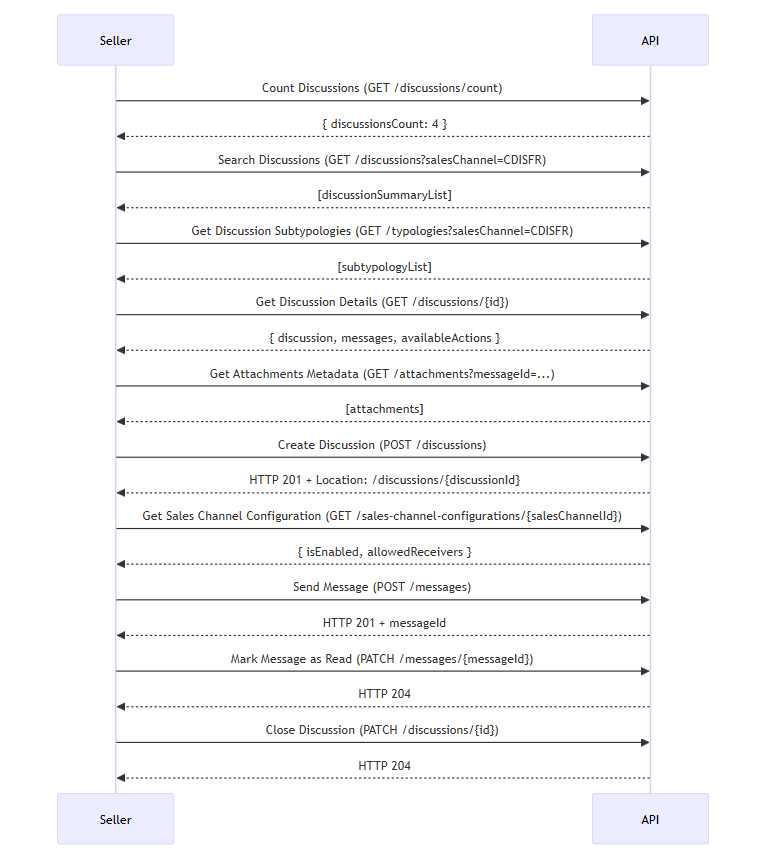
In this section we will look at how to manage the following cases and ensure maximum control of CRM activities:
Count Discussions
Prerequisites
-
Optionally use filters like
salesChannel,graduationCode,processStatus, orisOpen.
Enable sellers to estimate how many discussions match given criteria — without retrieving full discussion content.
Useful to:
-
Monitor overall workload (e.g. “How many open claims do I have across all channels?”),
-
Build dashboards with metrics (trends over time),
-
Trigger alerts or SLAs if number of untreated discussions exceeds threshold,
-
Optimize UIs by displaying counts instead of full lists when detail isn’t needed.
Functional Rules
-
Supports filtering by
salesChannel,graduationCode,processStatus, andisOpenonly. -
Query limits: none specified, but count endpoint is lightweight (no message bodies, no attachments).
-
Performance constraint: should return quickly as it only aggregates metadata.
-
If filters are invalid (wrong date range, unsupported status values), returns 400.
-
Missing required headers (e.g.
sellerId) returns 401 or 403.
Endpoint to use
Use this route to get the count of discussions according filter parameters
Functional Rules:
-
You can query on multiple sales channel using comma separated values
-
Filters are restrictive, if you don't provide a filter then no filtering is applied on this field
Examples:
Get the discussion count for the sales channel CDISFR: /discussions/count?salesChannel=CDISFR
Get the opened and to treat discussion count: /discussions/count?processStatus=ToTreat&isOpen=true
Endpoint full URL: https://api.octopia-io.net/seller/v2/discussions/count
Parameters - Headers
| Name | In | Type | Description |
|---|---|---|---|
| SellerId* | header |
string
|
Octopia Seller Identifier. Example : 98979 |
Parameters - Query
| Name | In | Type | Description |
|---|---|---|---|
| salesChannel | query |
array[string]
|
The sales channel. Example : List: ["SELLZZ", "CDISFR"] |
| graduationCode | query |
|enum
|
The discussion graduation code Example : Discussion Available values : ["Discussion", "Claim", "Level_1"] |
| processStatus | query |
string|enum
|
Filter on the status of the discussion Example : ToTreat Available values : ["ToTreat", "Treated"] |
| isOpen | query |
boolean
|
Filter on whether a discussion is open or not Example : 1 |
Response codes
200 - Successfully retrieved the matching discussions countapplication/json |
||||||||||||||||
401 - Unauthorizedapplication/problem+json |
||||||||||||||||
403 - Forbiddenapplication/problem+json |
||||||||||||||||
500 - Server Errorapplication/problem+json |
Important notes
-
Combine with filters to segment metrics (e.g., by typology).
-
Returns only the
discussionsCountfield (integer).
List discussions using filters
Allow the seller to retrieve all discussions matching business filters such as order ID, typology, process status, and open/closed state.
Common use cases include:
-
Displaying the seller’s active discussions by typology or status,
-
Filtering for SLA tracking (e.g. “Which discussions remain open for more than X days?”),
-
Retrieving only recently updated discussions for performance reasons,
-
Identifying unresolved issues per channel or customer segment.
Functional Rules
-
Supports date filtering (
updatedAtMin,updatedAtMax) and pagination (pageIndex,pageSize). -
Sorting available via
sort=asc|desc:updatedAt(default is descending). -
Use
includeMessages=FirstMessage|LastMessageto retrieve a message preview. -
Accepts filtering by:
discussionId,salesChannel,typologyCode,subTypologyCode,orderSellerId,processStatus,isOpen. -
Maximum search period is 6 months.
Endpoint to use
Use this API to search discussions by filter parameters.
Functional Rules:
-
By default the result list is sorted by descending order on the date of the last update.
-
The maximum period of research discussions may not exceed 6 months
-
For the
discussionIdandsalesChannelfilters, you can use one or multiple values separated by comma. -
Sorting is available with attributes:
-
desc:updatedAt -
asc:updatedAt -
desc:createdAt -
asc:createdAt
Default:
desc:updatedAt -
Examples:
- Retrieve the second page of 20 items among all open discussions
/discussions?isOpen=true&pageIndex=2&pageSize=20
- Retrieve the first page of 50 items of discussion updated in January
/discussions?pageIndex=1&pageSize=100&updatedAtMin=2021-01-01&updatedAtMax=2021-01-31
- Retrieve the discussion with
discussionId60afb211f41c9700016d92ae
/discussions?discussionId=60afb211f41c9700016d92ae
- Retrieve discussions about an order with the status "in progress"
/discussions?processStatus=inProgress&typologyCode=Order
Endpoint full URL: https://api.octopia-io.net/seller/v2/discussions
Parameters - Headers
| Name | In | Type | Description |
|---|---|---|---|
| SellerId* | header |
string
|
Octopia Seller Identifier. Example : 98979 |
Parameters - Query
| Name | In | Type | Description |
|---|---|---|---|
| discussionId | query |
string
|
The discussion Id. Example : 507f1f77bcf86cd799439011 |
| orderSellerId | query |
string
|
The order reference of the seller Example : 507f1f77bcf8 |
| salesChannel | query |
array[string]
|
The sales channel. Example : List: ["SELLZZ", "CDISFR"] |
| isOpen | query |
boolean
|
Filter on whether a discussion is open or not Example : 1 |
| processStatus | query |
string|enum
|
Filter on the status of the discussion Example : ToTreat Available values : ["ToTreat", "Treated"] |
| typologyCode | query |
string|enum
|
The typology of discussion. Default : order Available values : ["order", "offer", "Order", "Offer"] |
| subTypologyCode | query |
string
|
Filter on the sub typology of the discussion.
To retrieve available values you can use the Example : orderCancellation |
| updatedAtMin | query |
string
|
Filters out discussions last updated before the specified date. Example : 2023-12-25T14:30:00Z |
| updatedAtMax | query |
string
|
Filters out discussions last updated after the specified date. Example : 2035-05-07T15:52:17.897Z |
| pageSize | query |
number
|
The maximum number of elements in a page. (Min: 1 / Max: 100) Default : 20 Example : 10 |
| pageIndex | query |
integer
|
The index of the page (Min: 1 / Max: 100) Default : 1 Example : 1 |
| sort | query |
string
|
Sort the result set based on this parameter.
If not provided, the result set will be sorted in descending order of the To construct a sort, use the format {sortDirection}:{property}. Sort direction can be:
Available properties:
Default : desc:updatedAt Example : desc:updatedAt |
| includeMessages | query |
string|enum
|
Request that the first or last message of each discussion is included in the response. If not set, no message will be included Example : FirstMessage Available values : ["FirstMessage", "LastMessage"] |
Response codes
200 - Successfully retrieved matching discussionsapplication/json |
||||||||||||||||||||||||||||||||||||||||||||||||||||||||||||||||||||||||||||||||||||||||||||
400 - Bad Requestapplication/problem+json |
||||||||||||||||||||||||||||||||||||||||||||||||||||||||||||||||||||||||||||||||||||||||||||
401 - Unauthorizedapplication/problem+json |
||||||||||||||||||||||||||||||||||||||||||||||||||||||||||||||||||||||||||||||||||||||||||||
403 - Forbiddenapplication/problem+json |
||||||||||||||||||||||||||||||||||||||||||||||||||||||||||||||||||||||||||||||||||||||||||||
500 - Server Errorapplication/problem+json |
Important notes
-
Always use
updatedAtMin/Maxto avoid large unbounded queries. -
Use
includeMessagesto reduce API calls when showing previews. -
Handle
400errors from invalid date formats or missing salesChannel.
Sub-case Get discussion subtypologies
Prerequisites
-
Sales channel, order status, typologyCode must be provided.
Allow the seller to fetch the list of available subtypologies used to classify a discussion based on the order context and sales channel.
This enables:
-
Dynamically loading values in form dropdowns,
-
Preventing invalid subtypology values when creating a discussion,
-
Determining whether a given subtypology is open to sellers or customers.
Functional Rules
-
Requires combination of
salesChannel,typologyCode, andorderStatus. -
Optional filtering by
userType(Seller, Customer). -
Returned list includes
typologyCode,subTypologyCode, activation state, and allowed user types. -
Only enabled subtypologies (
state: true) should be used.
Endpoint to use
Use this route to search discussion subtypologies.
Functional Rules:
- You can specify multiple sales channels with comma separated values but the filter will match typologies with both sales channel
Example:
Retrieve typologies with typology code order and sales channel SELLZZ:
/typologies?salesChannel=SELLZZ&typologyCode=Order&orderStatus=Shipped
Endpoint full URL: https://api.octopia-io.net/seller/v2/typologies
Parameters - Headers
| Name | In | Type | Description |
|---|---|---|---|
| SellerId* | header |
string
|
Octopia Seller Identifier. Example : 98979 |
Parameters - Query
| Name | In | Type | Description |
|---|---|---|---|
| salesChannel* | query |
array[string]
|
The sales channel. Example : List: ["SELLZZ", "CDISFR"] |
| orderStatus* | query |
array[string|enum]
|
The order status for which the typology is allowed. To specify multiple statuses, separate them with commas. Example Default : Array Example : List: ["Delivered", "Shipped"] Available values : ["Accepted", "InPreparation", "Shipped", "Delivered", "Cancelled", "Undefined"] |
| typologyCode* | query |
string|enum
|
The typology of discussion. Default : order Available values : ["order", "offer", "Order", "Offer"] |
| userType | query |
array[string|enum]
|
The type of user that is allowed to open a discussion with this sub-typology. You can specify multiple user types by separating them with commas. Example Available values : ["Seller", "Customer"] |
Response codes
200 - Successfully retrieved matching subtypologiesapplication/json |
||||||||||||||||||||||||||||
400 - Bad Requestapplication/problem+json |
||||||||||||||||||||||||||||
401 - Unauthorizedapplication/problem+json |
||||||||||||||||||||||||||||
403 - Forbiddenapplication/problem+json |
||||||||||||||||||||||||||||
500 - Server Errorapplication/problem+json |
Important notes
-
The response includes whether a subtypology is enabled (
state: true/false). -
Use this list to feed form dropdowns before calling
POST /discussions. -
Returns userType eligibility (
Seller,Customer).
Get Discussion Details
Prerequisites
-
Must know the discussion ID to retrieve.
Allow the seller to retrieve complete information about a specific discussion including the subject, status, participants, and all messages exchanged.
Typical use cases include:
-
Accessing full context before replying,
-
Reviewing historical messages and metadata,
-
Checking available actions (e.g. auto-close),
-
Verifying if attachments or customer responses are present.
Functional Rules
-
Requires a valid
discussionId. -
Response includes the discussion metadata, messages (with metadata only for attachments), available actions, and eligible receivers.
-
Messages are returned in full (not paginated).
Endpoint to use
Use this API to get the full discussion using a discussion id:
-
Discussion
-
Messages
-
Attachments (metadata only)
Functional Rules:
- You can only retrieve attachments metadata, for full attachments use the
GET /attachmentsroute
Example:
Get full discussion by id 21554654retregf6548:
/discussions/21554654retregf6548
Endpoint full URL: https://api.octopia-io.net/seller/v2/discussions/{discussionId}
Parameters - Headers
| Name | In | Type | Description |
|---|---|---|---|
| SellerId* | header |
string
|
Octopia Seller Identifier. Example : 98979 |
Parameters - Path
| Name | In | Type | Description |
|---|---|---|---|
| discussionId* | path |
string
|
The discussion Id. Example : 21554654retregf6548 |
Response codes
200 - Successfully retrieved the discussionapplication/json |
||||||||||||||||||||||||||||||||||||||||||||||||||||||||||||||||||||||||||||||||||||||||||||||||||||||||||||||||||||
401 - Unauthorizedapplication/problem+json |
||||||||||||||||||||||||||||||||||||||||||||||||||||||||||||||||||||||||||||||||||||||||||||||||||||||||||||||||||||
403 - Forbiddenapplication/problem+json |
||||||||||||||||||||||||||||||||||||||||||||||||||||||||||||||||||||||||||||||||||||||||||||||||||||||||||||||||||||
404 - Not Foundapplication/problem+json |
||||||||||||||||||||||||||||||||||||||||||||||||||||||||||||||||||||||||||||||||||||||||||||||||||||||||||||||||||||
500 - Server Errorapplication/problem+json |
Important notes
-
Always validate existence first with search endpoint.
-
attachmentsreturned are metadata only.
Get Attachments Metadata
Prerequisites
-
Must pass either
discussionId,messageId, orattachmentId.
Retrieve metadata for files attached to a specific message or discussion.
Use cases include:
-
Listing attachments available for download in a seller dashboard,
-
Verifying if required documents were sent (e.g. invoice, image),
Functional Rules
-
You must specify at least one filter:
discussionId,messageId, orattachmentId. -
Returned metadata includes
attachmentName,fileFormat, IDs, and linkage (to message/discussion). -
Returns the file as base64 string in
contentnode -
If no filter is passed or query is ambiguous, API returns 400.
Endpoint to use
Use this route to retrieve attachments either by discussionId, messageId or by attachmentId.
Functional Rules:
- At least one of the three parameters is mandatory
Examples:
Retrieve attachments linked to the discussion of discussionId 547654
/attachments?discussionId=547654
Retrieve attachments linked to the message of messageId 4589614
/attachments?messageId=4589614
Retrieve attachment with attachmentId 986536
/attachments?attachmentId=986536
Endpoint full URL: https://api.octopia-io.net/seller/v2/attachments
Parameters - Headers
| Name | In | Type | Description |
|---|---|---|---|
| SellerId* | header |
string
|
Octopia Seller Identifier. Example : 98979 |
Parameters - Query
| Name | In | Type | Description |
|---|---|---|---|
| salesChannelId* | query |
string
|
The ID of sales channel Example : SELLZZ |
| discussionId | query |
string
|
The discussion Id. Example : 507f1f77bcf86cd799439011 |
| messageId | query |
string
|
The ID of the message Example : 807f1f77bcf86cd799439044 |
| attachmentId | query |
string
|
The ID of the attachment Example : 60ab64fa37efec0001dd39b6 |
Response codes
200 - Successfully retrieved the matching attachmentsapplication/json |
||||||||||||||||||||
400 - Bad Requestapplication/problem+json |
||||||||||||||||||||
401 - Unauthorizedapplication/problem+json |
||||||||||||||||||||
500 - Server Errorapplication/problem+json |
Important notes
-
Validate inputs: at least one of the three filters is required.
-
Use this endpoint before attempting to download via another service.
-
Attachments include filename, type, and IDs.
Create a Discussion
Prerequisites
-
Must check via “Get Sales Channel Configuration” sub-case that seller is authorized to initiate discussions.
-
Must retrieve valid
subTypologyCodefrom “Get discussion subtypologies” sub-case
Allow the seller to open a new dialog with customer (or Grc Operator) tied to a specific order or product issue.
Use cases include:
-
Reporting a damaged product,
-
Requesting order cancellation or investigating a delay,
-
Escalations or product warranty issues.
Functional Rules
-
Must supply valid
subtypology(from the typologies endpoint) and valid order referencing the seller. -
Character limits apply: subject between 5–50 chars, message body between 13–5000 chars.
-
Attachments rules: max 3 attachments per message; max size per message 4MB.
-
If sales channel does not support discussion initiation an error is returned.
Endpoint to use
Use this API to create a new discussion.
The discussion can be created if only the sales channel activates the functionality for the seller to initiate a discussion.
It is preferable to use the exact sub-typology spelling that matches the spelling in the GET /typologies endpoint.
This will help you retrieve your discussion when filtering with sub-typology.
Functional Rules:
-
The discussion should be created with the sub-typology for the seller.
-
The discussion is limited to one per sub-typology per order or product from order.
-
Multiple discussions with different sub-typologies can be created.
-
The maximum attachments per message cannot exceed 3 attachments.
-
The maximum attachments size per message cannot exceed 4 MB.
-
The character length of the subject should be a minimum of 5 chars and a maximum of 50 chars.
-
The character length of the message body should be a minimum of 13 chars and a maximum of 5000 chars.
Example:
To create a new discussion use /discussions
Endpoint full URL: https://api.octopia-io.net/seller/v2/discussions
Parameters - Headers
| Name | In | Type | Description |
|---|---|---|---|
| SellerId* | header |
string
|
Octopia Seller Identifier. Example : 98979 |
Request body
|
Create discussion application/json |
Response codes
201 - Createdapplication/json |
||||||||||||||||||||||
400 - Bad Requestapplication/problem+json |
||||||||||||||||||||||
409 - Conflictapplication/problem+json
|
||||||||||||||||||||||
401 - Unauthorizedapplication/problem+json |
||||||||||||||||||||||
403 - Forbiddenapplication/problem+json |
||||||||||||||||||||||
500 - Server Errorapplication/problem+json |
Request Body Example:
{
  "subject": "Broken product",
  "orderId": "SALESC123456789",
  "salesChannel": "SALESC",
  "subtypologyCode": "broken-product",
  "productId": "pm5972a",
  "message": {
    "body": "product received is broken",
    "receiver": "Customer"
  }
}
Important notes
-
Avoid duplicates by checking existing discussions via
GET /discussions. -
Max 3 attachments per message (4 MB total).
-
Subject: 5–50 characters. Message body: 13–5000 characters.
Sub-case Get Sales Channel Configuration
Prerequisites
-
Must know sales channel ID.
-
Use before allowing sellers to open discussions.
Allow the seller to verify whether a sales channel allows initiating a discussion, and identify the available recipients.
Useful for:
-
Enabling or disabling “create discussion” options dynamically in the UI,
-
Displaying allowed user types (Customer, Grc Operator) per channel,
-
Preventing API calls to unsupported channels.
Functional Rules
-
Requires
sellerIdandsalesChannelId. -
Returns a config object including:
-
isEnabled: whether seller-initiated discussions are allowed, -
allowedReceivers: list of eligible recipient user types.
-
-
Should be cached per session or sales channel to avoid repeated calls.
Endpoint to use
Use this endpoint before initiating a discussion to get the sales channel configuration, serving the following functions:
-
Identify whether the sales channel allows or disallows the seller to initiate a discussion.
-
Identify recipients eligible for the seller when initiating a discussion.
Functional Rules:
- You can only get the configuration of one sales channel at a time, to get multiple configuration use
GET /sales-channel-configurations
Example:
Get sales channel configuration by identifier SALESC: /sales-channel-configurations/SALESC
Endpoint full URL: https://api.octopia-io.net/seller/v2/sales-channel-configurations/{salesChannelId}
Parameters - Headers
| Name | In | Type | Description |
|---|---|---|---|
| SellerId* | header |
string
|
Octopia Seller Identifier. Example : 98979 |
Parameters - Path
| Name | In | Type | Description |
|---|---|---|---|
| salesChannelId* | path |
string
|
The sales channel identifier Example : SELLZZ |
Response codes
200 - Successfully retrieved the sales channel configurationapplication/json |
||||||||||||||||||
401 - Unauthorizedapplication/problem+json |
||||||||||||||||||
403 - Forbiddenapplication/problem+json |
||||||||||||||||||
404 - Not Foundapplication/problem+json |
||||||||||||||||||
500 - Server Errorapplication/problem+json |
Important notes
-
If
isEnabled: false, discussion creation cannot be made by the seller. -
Use
allowedReceiversto pre-fill messaging interface. -
Can be cached for seller session duration.
Send a Message in a Discussion
Prerequisites
-
Discussion must already exist.
-
Must know the ID and target receiver(s).
Allow the seller to respond within an ongoing discussion with a new message and optional attachments.
Typical business needs include:
-
Answering a customer question or claim,
-
Sending a document (invoice, delivery proof),
-
Continuing a multi-step support conversation.
Functional Rules
-
Message must include body text (13–5000 characters) and valid receiver (type and ID).
-
Up to 3 attachments allowed per message, total size must not exceed 4MB.
-
salesChannelmust match the discussion context. -
API returns the
messageIdon success.
Endpoint to use
Use this route to add a new message in an existing discussion.
Functional Rules:
-
The maximum attachments per message cannot exceed 3 attachments.
-
The maximum attachments size per message cannot exceed 4 MB.
Example:
To create a message use /messages
Endpoint full URL: https://api.octopia-io.net/seller/v2/messages
Parameters - Headers
| Name | In | Type | Description |
|---|---|---|---|
| SellerId* | header |
string
|
Octopia Seller Identifier. Example : 98979 |
Request body
|
application/json |
Response codes
201 - Successfully created the messageapplication/json |
||||||||||||||||
400 - Bad Requestapplication/problem+json |
||||||||||||||||
401 - Unauthorizedapplication/problem+json |
||||||||||||||||
403 - Forbiddenapplication/problem+json |
||||||||||||||||
409 - Conflictapplication/problem+json |
||||||||||||||||
500 - Server Errorapplication/problem+json |
Request Body Example:
{
  "body": "Please find attached invoice.",
  "discussionId": "507f1f77bcf86cd799439011",
  "salesChannel": "CASIFR",
  "receivers": [
    {
      "userId": "123",
      "userType": "Customer"
    }
  ]
}
Important notes
-
Max 3 attachments per message (4 MB total).
-
Fields
body,discussionId,receivers,salesChannelare mandatory. -
201 CreatedreturnsmessageId.
Mark Message as Read
Prerequisites
-
Message must exist and
messageIdmust be known.
Allow the seller to mark a specific message as read, confirming that it was seen and processed.
Helps to:
-
Track message read status in internal tools,
-
Drive notification logic or SLA compliance,
-
Clear unread indicators in UIs.
Functional Rules
-
Only the
hasReadproperty can be updated. -
Requires
PATCHbody with JSON operation format (opt, path, value). -
Returns
204 No Contenton success.
Endpoint to use
This route allows you to replace properties in the message object.
Fonctional rules:
-
You can only patch the
hasReadproperty, which expects a boolean value -
You can only use the
replaceoperation
Example:
Flag a specific message as read: /messages/21554654retregf6548
With body
[
  {
    "opt": "replace",
    "path": "/hasRead",
    "value": "true"
  }
]
Endpoint full URL: https://api.octopia-io.net/seller/v2/messages/{messageId}
Parameters - Headers
| Name | In | Type | Description |
|---|---|---|---|
| SellerId* | header |
string
|
Octopia Seller Identifier. Example : 98979 |
Parameters - Path
| Name | In | Type | Description |
|---|---|---|---|
| messageId* | path |
string
|
The identifier of the message you want to modify Example : 601ac4eca034005ec47c29e5 |
Request body
|
The update payload to flag a message as read or not read application/json |
Response codes
204 - Success - No content |
||||||||||||||||
400 - Bad Requestapplication/problem+json |
||||||||||||||||
401 - Unauthorizedapplication/problem+json |
||||||||||||||||
403 - Forbiddenapplication/problem+json |
||||||||||||||||
404 - Not foundapplication/problem+json |
||||||||||||||||
500 - Server Errorapplication/problem+json |
Request Body Example:
[
  {
    "opt": "replace",
    "path": "/hasRead",
    "value": "true"
  }
]
Important notes
-
Only the
hasReadfield can be modified. -
Useful for UI read/unread indicators.
-
Returns
204 No Contenton success.
Close a Discussion
Prerequisites
-
Must know the discussion ID.
-
Use only if business logic allows closing (based on typology/config).
Allow the seller to formally close an ongoing discussion when the issue has been resolved or no further action is needed.
Useful to:
-
Finalize customer support cases,
-
Prevent further messages from being exchanged,
-
Improve back-office clarity and reduce clutter.
Functional Rules
-
isOpenis updated tofalseviaPATCHoperation. -
Endpoint only supports one operation: replace
/isOpenvalue. -
If already closed, request is rejected (400).
-
Returns 204 No Content on success.
Endpoint to use
Use this API to open or close a discussion
Functional Rules:
-
You can only patch the
isOpenproperty using the request body, which expects a boolean value -
You can only use the
replaceoperation
Example:
Close a specific discussion: /discussions/21554654retregf6548
With body
[
  {
    "opt": "replace",
    "path": "/isOpen",
    "value": "false"
  }
]
Endpoint full URL: https://api.octopia-io.net/seller/v2/discussions/{discussionId}
Parameters - Headers
| Name | In | Type | Description |
|---|---|---|---|
| SellerId* | header |
string
|
Octopia Seller Identifier. Example : 98979 |
Parameters - Path
| Name | In | Type | Description |
|---|---|---|---|
| discussionId* | path |
string
|
The discussion Id. Example : 21554654retregf6548 |
Request body
|
The update payload to open or close the discussion application/json |
Response codes
204 - Success - No content |
||||||||||||||||
400 - Bad Requestapplication/problem+json |
||||||||||||||||
401 - Unauthorizedapplication/problem+json |
||||||||||||||||
403 - Forbiddenapplication/problem+json |
||||||||||||||||
404 - Not foundapplication/problem+json |
||||||||||||||||
500 - Server Errorapplication/problem+json |
Request Body Example:
[
  {
    "opt": "replace",
    "path": "/isOpen",
    "value": "false"
  }
Important notes
-
Do not close already closed discussions (avoid 400 errors).
-
A
204is returned when successful.
FAQ
A discussion is a structured communication thread between the seller and the buyer (and optionally Grc Operator) related to an order or product issue. It is used for customer support purposes such as complaints, product issues, or general inquiries.
When available (see sales channel configuration)
You should create a discussion when:
-
You want to proactively communicate about an issue (e.g., delay, substitution).
-
You need a written trace for post-order matters tied to a specific typology.
Typologies classify discussions by topic (e.g., Order issue, questions on a published offer), while subtypologies provide a more granular classification (e.g., broken-product, missing-accessory, any compatible product or shipping issue). These are used for routing, analytics, and business rules.
Use GET /typologies to retrieve the valid list based on the sales channel and order context.
Yes — but only if the sales channel configuration allows it.
You must first call GET /sales-channel-configurations/{salesChannelId} to check whether seller-initiated discussions are enabled. If not, discussions must be initiated by the customer.
No — only one discussion per (order, subtypology, product) is allowed.
If you try to create a duplicate, the API will return 409 Conflict with the Location of the existing discussion.
An initial message is automatically included in the thread at creation, based on the payload. This kickstarts the exchange.
This boolean field indicates whether the discussion is still active. When set to false, the thread is closed.
Reopening conditions include customer message or volontary reopening by the seller.
Use PATCH /discussions/{id} to close/open a discussion.
-
Search for discussions (e.g. open claims)
-
View the latest messages and details
-
Respond or upload supporting documents
-
Close the thread once resolved
Yes — discussions can be escalated internally. When graduation=Claim or Level_1, an internal GRC team may step in and respond through the API.
-
Message body: min 13, max 5000 characters
-
Subject: 5–50 characters
-
Attachments: max 3 per message, total size ≤ 4 MB, supported formats: PDF, JPG, PNG, etc.