
FFM – Stock
- Home
- FFM – Stock
Introduction
Last update :
Toolbox / Tips
-
Download the Postman collection
-
Download the YAML / See full technical documentation
-
Don’t forget to check the authentication documentation
The Stock Management API allows sellers to query and review their Fulfillment stocks stored in Octopia’s warehouses. It provides visibility into quantity breakdowns (available, allocated, blocked, return, etc.) and localized stock per storage country. This is vital for sellers to understand their inventory state, trigger inbound or outbound orders, and monitor stock health.
Key Principles & Business Behavior
-
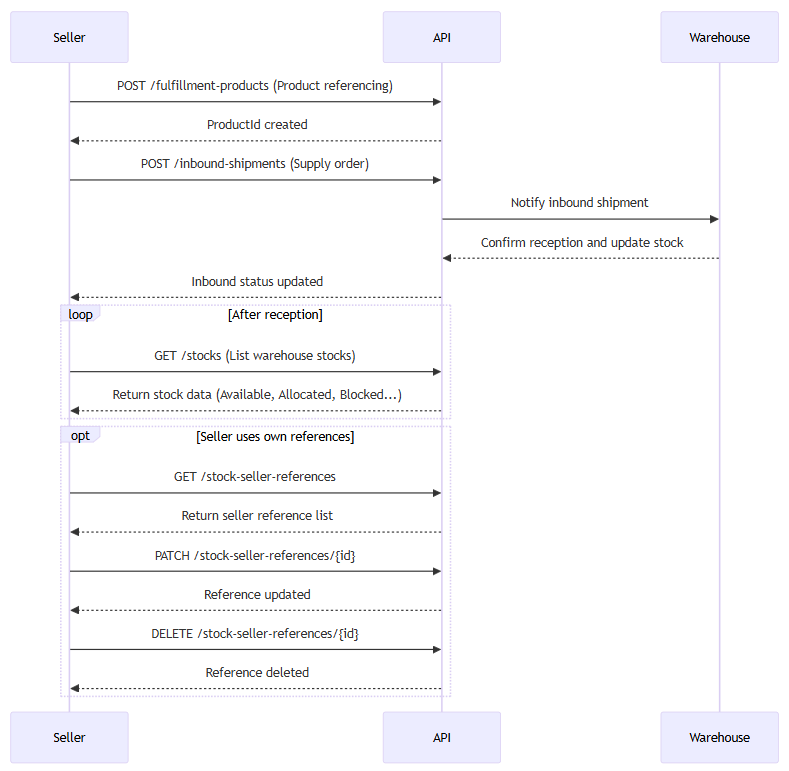
Before retrieving stock, products must be declared and supplied to the warehouse (See Inbound documentation). Stock is only available after the warehouse received and at least started processing the supply order.
-
Stocks are broken down by:
-
Quantities (e.g. Available, Allocated, Blocked, Litigation, Removal, Return, LogisticOperations)
-
Localization per storage country: enables seller to see how much stock is in each warehouse location, changes, and update reasons.
-
-
The API supports:
-
Retrieving a single stock record by its uuId
-
Listing stocks with filters and cursor‐based pagination
-
Querying “stock seller references” (i.e. reference entries that link seller product reference + warehouse stock)
-
-
Some filters are mutually exclusive: for instance,
deliveryCountrycannot be combined withupdatedAtMin/Max,storageCountry,sort, ororder. -
Sorting is allowed by quantity fields (e.g. Available, Blocked, etc.) via a
sortparameter, and ordering Asc/Desc. -
The
stock-seller-referencesendpoints let sellers review their own product references tied to underlying stocks and octopia productIds (without retrieving full inventory details)etrieving full inventory details).
The stock API is a core foundation of the Fulfillment flow: after any inbound shipment reception, stock becomes visible, and sellers can plan outbound shipments, returns, or inventory operations based on live data.
Key Attributes
|
Field |
Level |
Description |
|---|---|---|
|
|
Global |
Unique identifier of the stock entry |
|
|
Global |
Octopia product identifier |
|
|
Global |
Main state of the product. Possible values: |
|
|
Global |
Product detailed state. Possible values: |
|
|
Global |
Seller’s internal reference for the product and condition combination (used for catalog mapping) |
|
|
Global |
Source of the stock: |
|
|
Global / Warehouse |
Ready to ship |
|
|
Global / Warehouse |
Quantity reserved for orders |
|
|
Global / Warehouse |
Quantity blocked (e.g., quality issues, customs) |
|
|
Global / Warehouse |
Quantity under dispute (e.g., damaged upon receipt) |
|
|
Global / Warehouse |
Quantity marked for warehouse removal by the seller |
|
|
Global / Warehouse |
Quantity returned and not resellable |
|
|
Global / Warehouse |
Quantity temporarily unavailable due to internal logistics operations |
|
|
Global / Warehouse |
Timestamp when the stock record was created |
|
|
Global / Warehouse |
Timestamp when the stock record was last updated |
|
updatedDetails |
Warehouse |
|
|
updateReason |
Warehouse |
|
|
volume |
Warehouse |
|
Seller Workflow
In this section we will look at how to manage the following cases and ensure maximum control of your orders:
Retrieve Stocks with Filters
Prerequisites
-
Pagination is managed using the
cursorparameter. -
A
limitparameter is required; maximum is 1000 per page.
This endpoint retrieves a paginated list of all fulfillment stocks.
It supports filters such as productId, sellerProductReference, productCondition, productState, storageCountry, deliveryCountry, and update dates.
This is the primary method to view inventory.
Endpoint to use
A route used to get list stocks fulfillment by sellerId & limit as
required and any of those parameter sellerProductReference,
productId, productCondition, productState, storageCountry,
cursor.
Using a cursor pagination. A cursor parameter is used to navigate to the previous
or the next page. This parameter is encoded and acts as a pointer to the first
or the last item in the page. When the parameter is not provided, the first
products are returned until the expected limit.
Functional Rules:
The parameter deliveryCountry cannot be combined with updatedAtMin, updatedAtMax, storageCountry, sort or order parameters.
Examples:
-
Retrieves list of stock fulfillment for a specified seller
/stocks?limit=100 -
Retrieve seller stock fulfillment with a cursor linked to the next or previous page.
/stocks?limit=100&cursor=bmV4dF9fMTIzX0FCMzMzXzNfNQ -
Retrieve seller stock fulfillment with a a sort On available quantity and order type.
/stocks?limit=100&order=Desc&Sort=Available -
Retrieve seller stock fulfillment with a cursor linked to next or previous page with a sort type and an order.
/stocks?limit=100&order=Asc&Sort=Available&cursor=bmV4dF9fMTIzX0FCMzMzXzNfNQ -
Retrieves list of stocks fulfillment for a specified seller and sellerProductReference.
/stocks?sellerProductReference=SELLERX1204&limit=100 -
Retrieves list of stocks seller fulfillment for a specified seller and productId.
/stocks?productId=product01&limit=100 -
Retrieves list of stocks fulfillment for a specified seller and productCondition.
/stocks?productCondition=New&limit=100 -
Retrieves list of stocks fulfillment for a specified seller and productState.
/stocks?productState=New&limit=100 -
Retrieves list of stocks fulfillment for a specified seller and storageCountry.
/stocks?storageCountry=ES&limit=100 -
Retrieves list of stocks fulfillment for a specified seller and deliveryCountry.
/stocks?deliveryCountry=FR&limit=100 -
Retrieves list of stocks fulfillment for a specified seller that were updated on the 26th of october 2024.
/stocks?updatedAtMin=2024-10-26T00:00:00&updatedAtMax=2024-10-26T23:59:59&limit=100 -
Retrieves list of stocks fulfillment for a specified seller with a sellerproductReference value that's not empty or null.
/stocks?hasSellerProductReference=true&limit=100
Endpoint full URL: https://api.octopia-io.net/seller/v2/stocks
Parameters - Headers
| Name | In | Type | Description |
|---|---|---|---|
| SellerId* | header |
string
|
Octopia Seller Identifier. Example : 98979 |
Parameters - Query
| Name | In | Type | Description |
|---|---|---|---|
| limit | query |
integer
|
number of items in response Example : 10 |
| sellerProductReference | query |
string
|
seller Product Reference Example : product01X98979 |
| productId | query |
string
|
Product Id Example : product01 |
| productCondition | query |
string|enum
|
Product Condition Example : New Available values : ["New", "LikeNew", "VeryGoodState", "AverageState", "RefurbishedLikeNew", "RefurbishedVeryGoodState", "RefurbishedCorrectState"] |
| productState | query |
string|enum
|
Product state Example : New Available values : ["New", "Used", "Refurbished"] |
| hasSellerProductReference | query |
boolean
|
SellerProductReference is filled Example : 1 |
| storageCountry | query |
string
|
Country of stock's storage - ISO 3166-1 alpha-2. This parameter cannot be combined with the Example : FR |
| deliveryCountry | query |
string
|
Filters the stock that can be delivered to the specified country - ISO 3166-1 alpha-2. This parameter cannot be combined with Example : FR |
| updatedAtMin | query |
string
|
Date of stock's minumum update (UTC). This parameter cannot be combined with the Example : 2020-04-20 10:10:00 |
| updatedAtMax | query |
string
|
Date of stock's maximum update (UTC). This parameter cannot be combined with the Example : 2020-04-21 10:10:00 |
| cursor | query |
string|null
|
Pagination cursor. Example : QXNjXzE2OTA0NjI3NzYyNzI= |
| sort | query |
string|enum
|
Field to order by the stock's sort field. This parameter cannot be combined with the Example : Available Available values : ["Available", "Blocked", "Allocated", "Removal", "Litigation", "Return", "LogisticOperations"] |
| order | query |
string|enum
|
Field to order by the stock's sort field. This parameter cannot be combined with the Example : Desc Available values : ["Desc", "Asc"] |
Response codes
200 - Successapplication/json
|
||||||||||||||||||||||||||||||||||||||||||||||||||||||||||||||||||||||||||||||||||||||||||||||
400 - Bad Requestapplication/problem+json |
||||||||||||||||||||||||||||||||||||||||||||||||||||||||||||||||||||||||||||||||||||||||||||||
401 - Unauthorizedapplication/problem+json |
||||||||||||||||||||||||||||||||||||||||||||||||||||||||||||||||||||||||||||||||||||||||||||||
403 - Forbiddenapplication/problem+json |
||||||||||||||||||||||||||||||||||||||||||||||||||||||||||||||||||||||||||||||||||||||||||||||
500 - Internal Server Errorapplication/problem+json |
Important notes
-
deliveryCountryfiltering is exclusive: it cannot be combined withstorageCountry,sort,order, or date filters. -
Sorting is possible on stock types such as Available, Blocked, etc., using
sortandorder. -
Each stock line includes warehouse-specific metrics, making this endpoint useful for monitoring volume and allocation.
Retrieve a Single Stock
Prerequisites
-
You must have the unique
stockIdof the record to retrieve. -
The stock must exist in the system and be linked to the seller’s account.
This endpoint retrieves all information related to a specific stock item, including product identity, available quantities by type (e.g., Available, Blocked, Litigation), and localization per storage country.
It is useful for back-office views, issue investigation (e.g., blocked or litigated stock), or customer service reconciliation.
Endpoint to use
A route used to get stock fulfillment by unique identifier for a specified seller.
Exemple:
Retrieves list of stock fulfillment by id
/stocks/792b3249-8b65-404b-b8ec-1f7f205ae423
Endpoint full URL: https://api.octopia-io.net/seller/v2/stocks/{stockId}
Parameters - Headers
| Name | In | Type | Description |
|---|---|---|---|
| SellerId* | header |
string
|
Octopia Seller Identifier. Example : 98979 |
Parameters - Path
| Name | In | Type | Description |
|---|---|---|---|
| stockId* | path |
string
|
Stock unique identifier. |
Response codes
200 - Successapplication/json |
||||||||||||||||||||||||||||||||||||||||||||||||||||||||||||||||||||||||
400 - Bad Requestapplication/problem+json |
||||||||||||||||||||||||||||||||||||||||||||||||||||||||||||||||||||||||
401 - Unauthorizedapplication/problem+json |
||||||||||||||||||||||||||||||||||||||||||||||||||||||||||||||||||||||||
403 - Forbiddenapplication/problem+json |
||||||||||||||||||||||||||||||||||||||||||||||||||||||||||||||||||||||||
404 - Not Foundapplication/problem+json |
||||||||||||||||||||||||||||||||||||||||||||||||||||||||||||||||||||||||
415 - Unsupported Media Typeapplication/problem+json |
||||||||||||||||||||||||||||||||||||||||||||||||||||||||||||||||||||||||
500 - Internal Server Errorapplication/problem+json |
Important notes
-
Quantities are broken down by operational states (e.g., Blocked, Allocated, LogisticOperations).
-
Localization provides warehouse-specific view, including update reason and volume.
-
Product condition and state are distinct: both are included in the response.
Retrieve Stock Seller References
Prerequisites
-
The seller must have already declared products into the system.
-
Pagination is required via
limitandcursor.
This endpoint lists the current stock-level references linking products (via productId and productCondition) to a seller-defined identifier (sellerProductReference).
It is typically used to align external systems (e.g., marketplaces or ERPs) with Octopia’s internal product tracking.
Endpoint to use
A route used to get stock seller reference fulfillment by sellerId & limit as required and any of those parameters sellerProductReference, productId, productCondition, cursor. Results are ordered by creation date descendant by default.
Examples:
-
Retrieves list of stock seller reference fulfillment for a specified seller.
/stock-seller-references?limit=100 -
Retrieve seller reference fulfillment with a cursor linked to the next page.
/stock-seller-references?limit=100&cursor=91425db0-d61a-410a-9e69-cfa02a103216 -
Retrieves list of stock seller reference fulfillment for a specified seller and sellerProductReference.
/stock-seller-references?sellerProductReference=SELLERX1204&limit=100 -
Retrieves list of stock seller reference fulfillment for a specified seller and productId.
/stock-seller-references?productId=product01&limit=100 -
Retrieves list of stock seller reference fulfillment for a specified seller and productCondition.
/stock-seller-references?productCondition=New&limit=100 -
Retrieves list of stock seller reference fulfillment for a specified seller and order the response by creation date ascendant.
/stock-seller-references?limit=100&orderBy=Asc
Endpoint full URL: https://api.octopia-io.net/seller/v2/stock-seller-references
Parameters - Headers
| Name | In | Type | Description |
|---|---|---|---|
| SellerId* | header |
string
|
Octopia Seller Identifier. Example : 98979 |
Parameters - Query
| Name | In | Type | Description |
|---|---|---|---|
| limit | query |
integer
|
limit items by request Example : 10 |
| sellerProductReference | query |
string|null
|
seller Product Reference Example : product01X98979 |
| productId | query |
string|null
|
product Id Example : product01 |
| productCondition | query |
string|enum
|
product Condition Example : New Available values : ["New", "LikeNew", "VeryGoodState", "AverageState", "RefurbishedLikeNew", "RefurbishedVeryGoodState", "RefurbishedCorrectState"] |
| orderBy | query |
string|enum
|
Field to order by the stock created date. Example : Desc Available values : ["Desc", "Asc"] |
| cursor | query |
string|null
|
Pagination cursor. Example : 91425db0-d61a-410a-9e69-cfa02a103216 |
Response codes
200 - Successapplication/json
|
||||||||||||||||||||||||||||||||||||
400 - Bad Requestapplication/problem+json |
||||||||||||||||||||||||||||||||||||
401 - Unauthorizedapplication/problem+json |
||||||||||||||||||||||||||||||||||||
403 - Forbiddenapplication/problem+json |
||||||||||||||||||||||||||||||||||||
500 - Internal Server Errorapplication/problem+json |
Important notes
-
Each reference includes creation and update timestamps, which can be used for sync verification.
-
Filtering is possible by productId, condition, sellerProductReference, or datetime updates.
FAQ
It allows you to retrieve real-time stock levels and inventory details for your products stores in Octopia Fulfillment’s network of warehouses.
Each stock entry contains the following information:
-
Available: ready to ship -
Allocated: reserved for orders -
Blocked: locked due to issues (customs, QC, fraud…) -
Litigation: under investigation (damaged or dispute) -
Removal: pending pickup/removal by seller -
Return: returned but not sellable -
LogisticOperations: in transit inside warehouse or between warehouses
You also get this data per storage country via localizedStocks.
-
The stocks endpoint refers to a product’s inventory in warehouses.
-
The stock seller reference endpoint only returns seller provided product references.
Stock data is near real-time (updates occur after inbound, outbound, returns, etc.).
You can filter by:
-
updatedAtMin/updatedAtMax(timestamps) -
storageCountry,deliveryCountry, or sort by specific quantity types
-
storageCountry: shows stock physically located in a given country (e.g.FR,ES) -
deliveryCountry: shows stock eligible for delivery to that country (cross-dock logic)
Note: deliveryCountry cannot be combined with updatedAt, sort, or storageCountry.
This means the product was received but flagged during warehouse inspection. It’s quarantined and not shippable.
This requires manual seller action.
Yes — each stock entry has a productCondition and productState, which allow you to distinguish:
-
New vs Used
-
Refurbished (LikeNew, Good, Correct, etc.)
There is no sandbox available.
Due to the nature of some of the manual operations involved in processing product data, receiving physical goods, and packaging shipments, along with synchronizing multiple warehouses and databases, conducting complete tests is relatively complicated and thus not provided as a common possibility.