
FFM – Return
- Home
- FFM – Return
Introduction
Last update :
Toolbox / Tips
-
Download the Postman collection
-
Download the YAML / See full technical documentation
-
Don’t forget to check the authentication documentation
This API enables sellers to manage warehouse returns in two main scenarios:
-
Customer Returns: When a buyer requests to return a parcel (due to defect, mismatch, change of mind, etc.). In that case, the seller submits a return request, receives a return label and instructions, and the buyer sends the product back to the warehouse.
-
Carrier Returns: When a carrier is unable to deliver a shipment and sends it back to the warehouse (for example, undeliverable address, refusal, transport damage, etc.). In this case, no label is generated; the seller is only informed of the return incident.
In both scenarios, the return is linked to a previous outbound shipment through the outboundShipmentId.
This API complements the Outbound Shipments flow: once a parcel has been shipped, some units may later be returned. This endpoint allows you to manage that part of the lifecycle.
Key Attributes
|
Field |
Description |
|---|---|
|
|
Unique identifier of the return |
|
|
Return type: |
|
|
Processing status of the return. Possible values: |
|
|
Reason provided for the return (e.g., |
|
|
Optional classification returned by the warehouse after inspection |
|
|
Optional comment provided by the seller or logistics partner |
|
|
Comment from the warehouse upon reception |
|
|
Identifier of the outbound shipment linked to this return |
|
|
Seller’s order reference associated with the return |
|
|
Order reference used by the seller |
|
|
ID of the parcel returned |
|
|
Date the return was received and processed by the warehouse |
|
|
Creation date of the return |
|
|
Last update date of the return |
|
|
List of returned products |
|
|
Whether a return label is available |
|
|
Endpoint to retrieve the return label |
|
|
Quantity received but not declared in the return (extra items) |
Seller Workflow
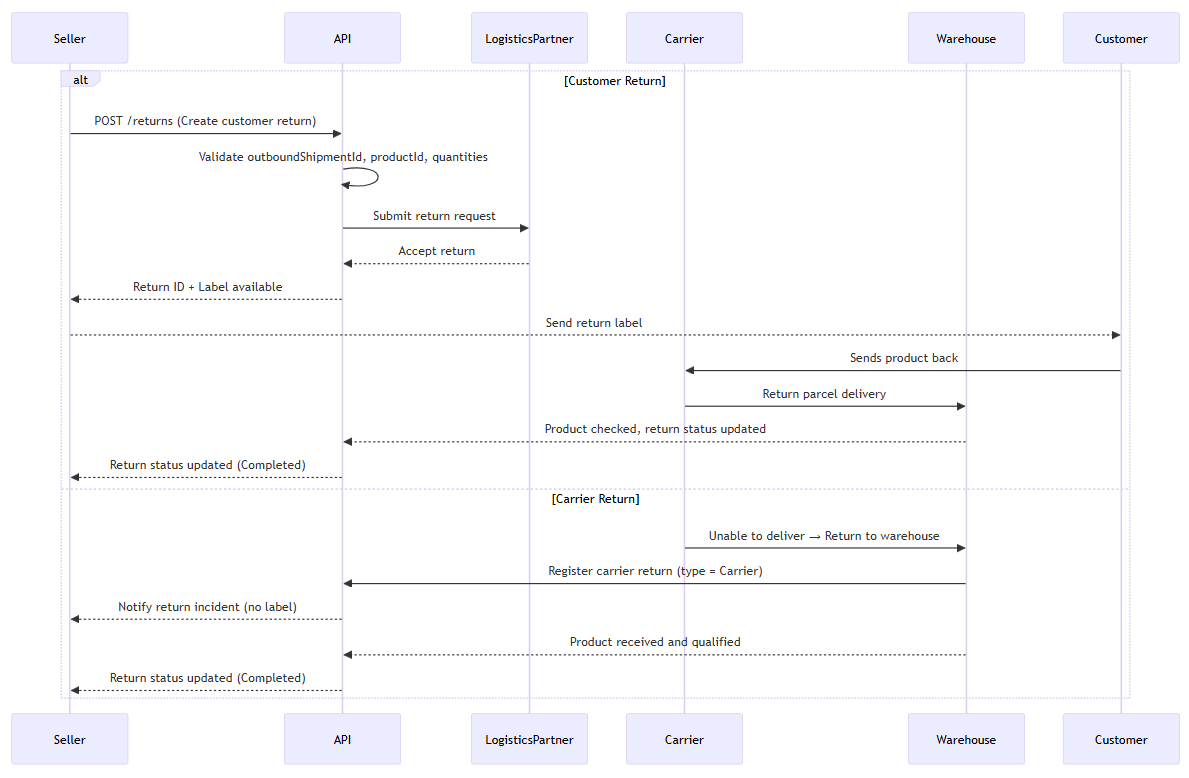
In this section, you’ll learn how to manage the following use cases and maintain full control over your return operations:
Create a Customer Return
Prerequisites
-
The outbound shipment must already exist and be referenced via its
outboundShipmentId. -
Only products that have already been shipped or delivered can be returned.
-
The
productIdand the returned quantity must be valid and not exceed the originally shipped quantity. -
For any given product within a shipment the sum of returned quantities accross returns cannot exceed the initial shipped quantity of the
outboundShipment.
This endpoint allows sellers to initiate a return request for one or more products from a previously shipped outbound order.
For customer returns, the return triggers return label generation so the buyer can send the goods back to the warehouse.
For carrier returns (e.g., undeliverable parcels), no seller action is required, these returns are automatically created when the carrier notifies the system. You can retrieve these returns but not create them. Use of carrier oriented return reasons will reject the request.
Endpoint to use
Use this route to create a new return for the specified seller.
Functional Rules:
-
This return is associated with a parcel shipment that needs to be returned to the warehouse.
-
The seller must have the appropriate rights to perform this action.
Endpoint full URL: https://api.octopia-io.net/seller/v2/returns
Parameters - Headers
| Name | In | Type | Description |
|---|---|---|---|
| SellerId* | header |
string
|
Octopia Seller Identifier. Example : 98979 |
Request body
|
Request body containing the return creation data including outbound shipment identifier, reference, reason, comment, and return lines. application/json |
Response codes
201 - Return successfully createdHeaders:
|
||||||||||||||||
400 - Bad Requestapplication/problem+json |
||||||||||||||||
401 - Unauthorizedapplication/problem+json |
||||||||||||||||
403 - Forbiddenapplication/problem+json |
||||||||||||||||
409 - Conflictapplication/problem+json |
||||||||||||||||
415 - Unsupported Media Typeapplication/problem+json |
||||||||||||||||
500 - Internal Server Errorapplication/problem+json |
-
Request body example:
{
  "outboundShipmentId": "ad36144a-902c-4953-8d5d-98f423cace36",
  "reference": "20231109145205-43572-FFM",
  "reason": "ReferenceError",
  "comment": "Customer received the wrong product",
  "lines": [
    {
      "productId": "PRODUCT001",
      "quantity": 1,
      "productCondition": "RefurbishedLikeNew"
    }
  ]
}
Important notes
-
Label generation may take up to 15 minutes after request submission for customer returns.
-
Carrier returns are registered automatically, this endpoint cannot be used to create them.
-
HTTP 400 errors will occur if product ID, product condition or quantity is invalid or exceeds the eligible amount.
-
Avoid including sensitive data (e.g., medical or financial details) in the
commentfield.
Count Returns using Filters
Prerequisites
-
Filters should be used to narrow down the count by criteria such as type, status, reason, date range, etc.
The endpoint returns only the total number of returns that match the specified filters, not the full list of objects.
This endpoint provides the total count of returns matching the applied filters.
It is particularly useful for:
-
Performance reporting (e.g., monthly return rate)
-
UI counters showing return totals.
-
Reconciliation dashboards comparing return trends over time.
Endpoint to use
Use this route to retrieve the total count of returns for a specified seller matching the provided filters. This endpoint supports the same filter parameters as the list endpoint but returns only the count instead of the full return data.
Examples:
-
Retrieve the return with the
outboundShipmentId(expedition order unique identifier)dac98618-83a9-4c34-9b45-d3f8ba9f92e9/returns/count?outboundShipmentId=dac98618-83a9-4c34-9b45-d3f8ba9f92e9 -
Retrieve the return with the reference (used on the delivery order by the seller)
Uk_Q4PXaP060lfRPPrSS2A/returns/count?reference=Uk_Q4PXaP060lfRPPrSS2A -
Retrieve a returns paginated list of 10 items and with a cursor linked to the next page.
/returns?limit=10&cursor=QXNjXzE2OTIxOTk0NTc4ODE= -
Retrieve a returns list created between the
2022-12-04 at 09:00and2022-12-24 at 18:00./returns/count?createdAtMin=2022-12-04T09:00:00.000Z&createdAtMax=2022-12-24T18:00:00.000Z -
Retrieve a returns list updated between the
2022-12-04 at 09:00and2022-12-24 at 18:00./returns/count?updatedAtMin=2022-12-04T09:00:00.000Z&updatedAtMax=2022-12-24T18:00:00.000Z -
Retrieve returns with the
Createdstatus./returns/count?status=Created -
Retrieve returns with the
CarrierandCustomertypes./returns/count?types=Carrier&types=Customer -
Retrieve returns with the
ReferenceErrorandDamagedreasons./returns/count?reasons=ReferenceError&reasons=Damaged -
Retrieve returns with the
CustomerRefusalandTransportDamagecarrierReasons./returns/count?carrierReasons=CustomerRefusal&carrierReasons=TransportDamage
Endpoint full URL: https://api.octopia-io.net/seller/v2/returns/count
Parameters - Headers
| Name | In | Type | Description |
|---|---|---|---|
| SellerId* | header |
string
|
Octopia Seller Identifier. Example : 98979 |
Parameters - Query
| Name | In | Type | Description |
|---|---|---|---|
| createdAtMin | query |
string
|
The created at minimum date of the ressource. Example : 2023-12-25T14:30:00Z |
| createdAtMax | query |
string
|
The created at maximum date of the ressource. Example : 2023-12-25T15:30:00Z |
| updatedAtMin | query |
string
|
The updated at minimum date of orders. Example : 2023-12-25T14:30:00Z |
| updatedAtMax | query |
string
|
The updated at maximum date of orders. Example : 2023-12-25T15:30:00Z |
| reference | query |
string
|
Reference which is used on the delivery order by the seller. Example : Uk_Q4PXaP060lfRPPrSS2A |
| outboundShipmentId | query |
string
|
The expedition order unique identifier. Example : ad36144a-902c-4953-8d5d-98f423cace36 |
| orderSellerId | query |
string
|
Order seller identifier. Example : 23110913520O9RW9 |
| status | query |
array[string|enum]
|
Filter by return status. Multiple values can be provided to match returns with any of the specified statuses. Example : List: ["Created"] Available values : ["Created", "Accepted", "Pending", "Completed"] |
| types | query |
array[string|enum]
|
Filter by return type. Multiple values can be provided to match returns with any of the specified types (Carrier or Customer). Example : List: ["Customer"] Available values : ["Carrier", "Customer"] |
| reasons | query |
array[string|enum]
|
Filter by customer return reason. Multiple values can be provided to match returns with any of the specified reasons. Example : List: ["ReferenceError"] Available values : ["ReferenceError", "Damaged", "Retraction", "MultipleDelivery", "MissingItem", "UnpackingDefect", "Undeliverable", "CustomerRefusal", "TransportDamage", "NotRetrieved"] |
| carrierReasons | query |
array[string|enum]
|
Filter by carrier return reason. Multiple values can be provided to match returns with any of the specified carrier reasons. Example : List: ["TransportDamage"] Available values : ["Undeliverable", "CustomerRefusal", "TransportDamage", "NotRetrieved"] |
| parcelId | query |
string
|
Identifier of the returned parcel. Example : 0204261429HZEMY |
Response codes
200 - Successapplication/json |
||||||||||||||||
400 - Bad Requestapplication/problem+json |
||||||||||||||||
401 - Unauthorizedapplication/problem+json |
||||||||||||||||
403 - Forbiddenapplication/problem+json |
||||||||||||||||
500 - Internal Server Errorapplication/problem+json |
Important notes
-
All filters are optional, except
sellerIdin the request header. -
All filters from the search endpoint are supported, including types, reasons, parcel ID, date ranges, status.
-
Combine multiple filters to perform precise segment analysis (e.g., returns by reason and date range).
-
The endpoint returns a single integer representing the total count.
Retrieve Returns using Filters
Prerequisites
-
Pagination is handled through the
limitparameter and a cursor, returned in theLinkheader. -
Multiple filters can be combined (e.g.,
status,reference,types,reasons, date ranges). -
This endpoint returns a paginated list of returns, ordered by creation date unless another sort order is specified.
This endpoint returns a paginated list of returns. It supports extensive filtering options including type (Customer/Carrier), reason, status, date ranges, outboundShipmentId, and parcel ID.
This endpoint allows you to retrieve a detailed list of returns using a wide range of filters.
It is typically used to:
-
Browse or export historical returns
-
Investigate return statuses and potential shipment issues
-
Identify carrier-returned parcels for operational processing
Endpoint to use
Use this route to retrieve a paginated list of returns with optional filters such as outboundShipmentId, reference, date ranges, status, type, and reasons.
Functional Rules:
-
If
limitparameter is omitted, default value 20 is used. -
If
limitparameter value is less than 1 or greater than 100, then a400 - Bad Requestis returned.
Examples:
-
Retrieve the return with the
outboundShipmentId(expedition order unique identifier)dac98618-83a9-4c34-9b45-d3f8ba9f92e9/returns?outboundShipmentId=dac98618-83a9-4c34-9b45-d3f8ba9f92e9 -
Retrieve the return with the reference (used on the delivery order by the seller)
Uk_Q4PXaP060lfRPPrSS2A/returns?reference=Uk_Q4PXaP060lfRPPrSS2A -
Retrieve a returns paginated list of 10 items and with a cursor linked to the next page.
/returns?limit=10&cursor=QXNjXzE2OTIxOTk0NTc4ODE= -
Retrieve a returns list created between the
2022-12-04 at 09:00and2022-12-24 at 18:00./returns?createdAtMin=2022-12-04T09:00:00.000Z&createdAtMax=2022-12-24T18:00:00.000Z -
Retrieve a returns list updated between the
2022-12-04 at 09:00and2022-12-24 at 18:00./returns?updatedAtMin=2022-12-04T09:00:00.000Z&updatedAtMax=2022-12-24T18:00:00.000Z -
Retrieve returns with the
Createdstatus./returns?status=Created -
Retrieve returns with the
CarrierandCustomertypes./returns?types=Carrier&types=Customer -
Retrieve returns with the
ReferenceErrorandDamagedreasons./returns?reasons=ReferenceError&reasons=Damaged -
Retrieve returns with the
CustomerRefusalandTransportDamagecarrierReasons./returns?carrierReasons=CustomerRefusal&carrierReasons=TransportDamage
Endpoint full URL: https://api.octopia-io.net/seller/v2/returns
Parameters - Headers
| Name | In | Type | Description |
|---|---|---|---|
| SellerId* | header |
string
|
Octopia Seller Identifier. Example : 98979 |
Parameters - Query
| Name | In | Type | Description |
|---|---|---|---|
| limit | query |
integer|enum
|
Maximum number of items requested for the page (pagination). Example : 10 Available values : ["1", "10", "20", "50", "100"] |
| cursor | query |
string|null
|
Pagination cursor used to retrieve the next page of results. This value is provided in the response Link header. Example : QXNjXzE2OTg3OTMyMDA= |
| createdAtMin | query |
string
|
The created at minimum date of the ressource. Example : 2023-12-25T14:30:00Z |
| createdAtMax | query |
string
|
The created at maximum date of the ressource. Example : 2023-12-25T15:30:00Z |
| orderBy | query |
string|enum
|
Sort order for returns by creation date.
Example : Asc Available values : ["Asc", "Desc"] |
| updatedAtMin | query |
string
|
The updated at minimum date of orders. Example : 2023-12-25T14:30:00Z |
| updatedAtMax | query |
string
|
The updated at maximum date of orders. Example : 2023-12-25T15:30:00Z |
| reference | query |
string
|
Reference which is used on the delivery order by the seller. Example : Uk_Q4PXaP060lfRPPrSS2A |
| outboundShipmentId | query |
string
|
The expedition order unique identifier. Example : ad36144a-902c-4953-8d5d-98f423cace36 |
| orderSellerId | query |
string
|
Order seller identifier. Example : 23110913520O9RW9 |
| status | query |
array[string|enum]
|
Filter by return status. Multiple values can be provided to match returns with any of the specified statuses. Example : List: ["Created"] Available values : ["Created", "Accepted", "Pending", "Completed"] |
| types | query |
array[string|enum]
|
Filter by return type. Multiple values can be provided to match returns with any of the specified types (Carrier or Customer). Example : List: ["Customer"] Available values : ["Carrier", "Customer"] |
| reasons | query |
array[string|enum]
|
Filter by customer return reason. Multiple values can be provided to match returns with any of the specified reasons. Example : List: ["ReferenceError"] Available values : ["ReferenceError", "Damaged", "Retraction", "MultipleDelivery", "MissingItem", "UnpackingDefect", "Undeliverable", "CustomerRefusal", "TransportDamage", "NotRetrieved"] |
| carrierReasons | query |
array[string|enum]
|
Filter by carrier return reason. Multiple values can be provided to match returns with any of the specified carrier reasons. Example : List: ["TransportDamage"] Available values : ["Undeliverable", "CustomerRefusal", "TransportDamage", "NotRetrieved"] |
| parcelId | query |
string
|
Identifier of the returned parcel. Example : 0204261429HZEMY |
Response codes
200 - Successapplication/json
|
||||||||||||||||||||||||||||||||||||||||||||||||||||||||||||||||||||||||||||||||||||||||||||||||||||||||||||||
400 - Bad Requestapplication/problem+json |
||||||||||||||||||||||||||||||||||||||||||||||||||||||||||||||||||||||||||||||||||||||||||||||||||||||||||||||
401 - Unauthorizedapplication/problem+json |
||||||||||||||||||||||||||||||||||||||||||||||||||||||||||||||||||||||||||||||||||||||||||||||||||||||||||||||
403 - Forbiddenapplication/problem+json |
||||||||||||||||||||||||||||||||||||||||||||||||||||||||||||||||||||||||||||||||||||||||||||||||||||||||||||||
500 - Internal Server Errorapplication/problem+json |
Important notes
-
Returned items include:
-
hasLabelandlabelUrl(if a customer return label is available) -
original outbound shipment details
-
metadata (reason, type, status, timestamps, parcel info)
-
-
Only the first page is returned unless the
cursoris passed, make sure you implement pagination logic.
Retrieve a Specific Return
Prerequisites
-
You must provide the unique
returnIdof the return to retrieve. -
The
sellerIdheader is required to ensure the return belongs to the correct seller context.
This endpoint retrieves the full details of a single return, including:
-
Return metadata (type, status, reason, timestamps)
-
Outbound shipment information
-
Product lines and quantities (expected, receipted, conformity)
-
Label availability and link (if applicable)
-
Warehouse feedback (recommended reason, comments, product state)
-
Parcel identifiers and reverse-logistics information
It is typically used to:
-
Review the status and details of a return
-
Validate warehouse reception and product conformity
-
Investigate customer or carrier return issues
Endpoint to use
Use this route to retrieve a specific return by its unique identifier.
Example:
-
Retrieve the return with the ID
abbf3123-f914-42d9-ab98-886e731672a5/returns/abbf3123-f914-42d9-ab98-886e731672a5
Endpoint full URL: https://api.octopia-io.net/seller/v2/returns/{returnId}
Parameters - Headers
| Name | In | Type | Description |
|---|---|---|---|
| SellerId* | header |
string
|
Octopia Seller Identifier. Example : 98979 |
Parameters - Path
| Name | In | Type | Description |
|---|---|---|---|
| returnId* | path |
string
|
The unique identifier of the return (UUID format). Example : 70583ff4-bc95-495d-9694-37c73d35d33e |
Response codes
200 - Successapplication/json |
||||||||||||||||||||||||||||||||||||||||||||||||||||||||||||||||||||||||||||||||||||||||||||||
400 - Bad Requestapplication/problem+json |
||||||||||||||||||||||||||||||||||||||||||||||||||||||||||||||||||||||||||||||||||||||||||||||
401 - Unauthorizedapplication/problem+json |
||||||||||||||||||||||||||||||||||||||||||||||||||||||||||||||||||||||||||||||||||||||||||||||
403 - Forbiddenapplication/problem+json |
||||||||||||||||||||||||||||||||||||||||||||||||||||||||||||||||||||||||||||||||||||||||||||||
404 - Not Foundapplication/problem+json |
||||||||||||||||||||||||||||||||||||||||||||||||||||||||||||||||||||||||||||||||||||||||||||||
500 - Internal Server Errorapplication/problem+json |
Important notes
-
Response includes both seller-provided information (reason, comment) and warehouse-provided feedback (product state, unexpected quantity, warehouse comment).
-
The return type (Customer or Carrier) is returned to provide context about how the return was initiated.
-
Parcel-level metadata (
parcelId) is included when available, which helps track the returned parcel in reverse logistics flows. -
The
hasLabelandlabelUrlfields indicate whether a customer return label is available for download.
Retrieve Return Label Content (PDF/PNG)
Prerequisites
-
The return must have an associated customer return label (carrier returns do not generate labels).
-
The
returnIdmust correspond to an existing return that is eligible for label retrieval. -
The
sellerIdheader is required to validate the request context.
This endpoint returns the binary content of the return label (PDF or PNG), typically used for:
-
Allowing customers to download or print the return label
-
Embedding the label in seller or marketplace dashboards
-
Automating return documentation in customer service flows
Endpoint to use
Use this route to get the label of a return.
Functional Rules:
- The label is available for a defined period of time. After that, the label is no longer available and appears as expired.
Examples:
-
Retrieve the label of the return with the id
abbf3123-f914-42d9-ab98-886e731672a5/returns/abbf3123-f914-42d9-ab98-886e731672a5/labels
Endpoint full URL: https://api.octopia-io.net/seller/v2/returns/{returnId}/labels
Parameters - Headers
| Name | In | Type | Description |
|---|---|---|---|
| SellerId* | header |
string
|
Octopia Seller Identifier. Example : 98979 |
Parameters - Path
| Name | In | Type | Description |
|---|---|---|---|
| returnId* | path |
string
|
The identifier return. Example : 5f472fd6-489e-4aa3-92b5-9998419d6dc5 |
Response codes
200 - Successapplication/pdfimage/png |
||||||||||||||||
400 - Bad Requestapplication/problem+json |
||||||||||||||||
401 - Unauthorizedapplication/problem+json |
||||||||||||||||
403 - Forbiddenapplication/problem+json |
||||||||||||||||
404 - Not foundapplication/problem+json |
||||||||||||||||
500 - Internal Server Errorapplication/problem+json |
Important notes
-
The format of the returned label is determined by the
Acceptheader:-
application/pdf→ PDF label -
image/png→ PNG label
-
-
The endpoint returns raw binary content. Frontend apps should implement proper file download, rendering, or print workflows.
-
If a return does not have a label, the response may be:
-
404 Not Found (no label available yet)
-
An empty body, depending on warehouse state
-
-
Labels are only generated for seller initiated Customer returns. Carrier returns never include downloadable labels.
FAQ
A return refers to a product coming back to the warehouse, either:
-
Customer return: the seller initiates a return request on behalf of the buyer.
-
Carrier return: the carrier fails to deliver (e.g. refusal, damage), and the parcel is returned
-
Customer returns are created by the seller via
POST /returns -
Carrier returns are created automatically by the warehouse — you only monitor them
You must provide at least:
-
A valid
outboundShipmentId -
A list of products (
productId,quantity)
You can only return products that have already been shipped or delivered.
Yes. You can return fewer units than were shipped. The system checks that cumulative returned quantities ≤ total shipped quantity.
No. If a productId is not linked to a fulfillment outbound shipment, the API will reject the request with a 400 error.
No — you must use the productId that was part of the original shipment (GET /outbound-shipments/{id} helps retrieve them).
Once the return is accepted, call:GET /returns/{returnId}/labels
It returns a PDF or PNG (base64), depending on the Accept header.
-
Created: return registered -
Accepted: validated by warehouse -
Pending: waiting for some product expected -
Completed: product received and processed
Check status = Completed, and inspect:
-
receiptedQuantity -
receiptedProductState -
conformity(e.g.Conform,NonConform)
All available in GET /returns/{id}
-
Types:
-
Customer– initiated by seller -
Carrier– created after failed delivery
-
-
Customer reasons:
-
ReferenceError,Damaged,Retraction,UnpackingDefect...
-
-
Carrier reasons:
-
Undeliverable,CustomerRefusal,TransportDamage,NotRetrieved
-
Yes — you can filter returns with parcelId and retrieve returns that affected specific shipments.
No — returns are not cancellable once created. If not needed, you can let it expire without sending the parcel.
There is no sandbox available.
Due to the nature of some of the manual operations involved in processing product data, receiving physical goods, and packaging shipments, along with synchronizing multiple warehouses and databases, conducting complete tests is relatively complicated and thus not provided as a common possibility.