
Seller information
- Home
- Seller information
Introduction

Last update :
Toolbox / Tips
-
Download the Postman collection
-
Download the YAML / See full technical documentation
-
Don’t forget to check the authentication documentation
Octopia exposes a set of endpoints enabling a seller or integrator to retrieve all key information about their seller account, legal identity, operational preferences, and performance indicators.
This API is not used to update seller data — it is read-only and provides visibility into seller status, delivery setup, subscriptions, legal structure, and account health.
It is particularly relevant:
-
During onboarding audits and validations.
-
To feed internal seller dashboards.
-
For marketplaces wanting to cross-check seller eligibility or compliance.
-
To allow sellers to understand their current operational state and fulfilment configuration.
This API is typically used right after authentication, either to populate the seller home page or to run periodic compliance checks.
Key States & Attributes
|
Attribute |
Description |
|---|---|
|
|
Overall status of the seller: |
|
|
Operational mode: |
|
|
Onboarding phase: |
|
|
Boolean flag: does the seller accept orders automatically? |
|
|
Associated logistics configuration. |
|
|
Embedded object with SIRET, company name, legal form, share capital, etc. |
|
|
SLA performance, order acceptance rate, claims, refunds, etc. |
|
|
Historic and current subscriptions to sales channels. |
Seller Workflow
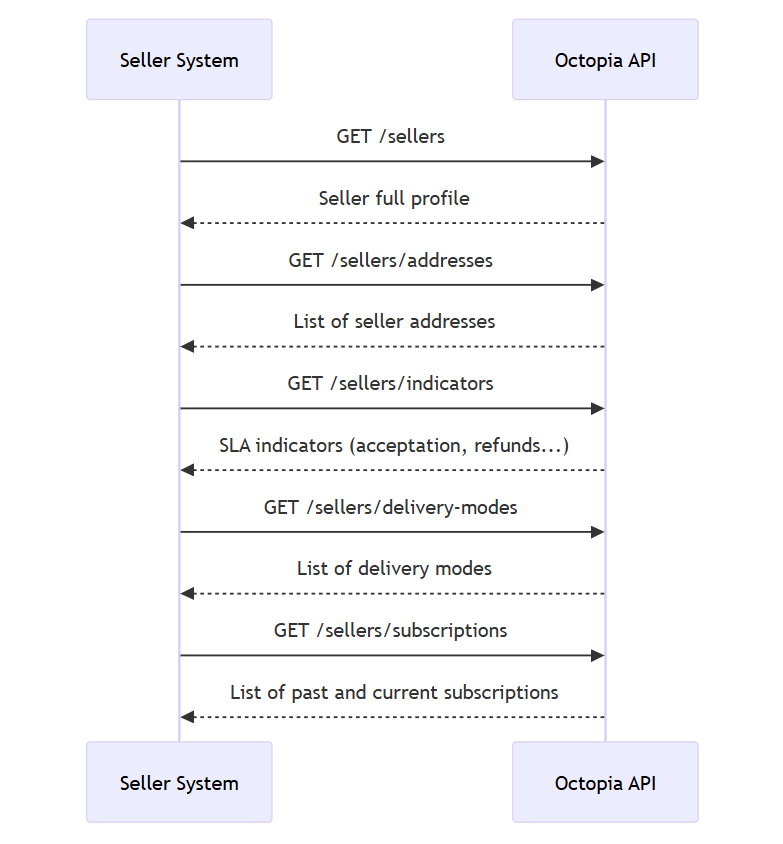
Data availability period
No expiration or date filtering is mentioned. The data returned is real-time and reflects the current state of the seller.
Retrieve Seller Full Profile
Prerequisites
-
SellerIdmust be passed as header.
This endpoint returns the complete seller profile including personal, legal, logistic, and configuration details. It is the primary endpoint to get the current state of a seller account.
Typical use cases:
-
Display seller info in back-office.
-
Audit legal and fiscal details.
-
Check onboarding status and current operational status.
Functional Rules
-
No query parameters required.
-
The object includes nested hyperlinks (
href) to related data (addresses, delivery modes…). -
Some fields may be null if not configured yet (e.g.,
logo_url). -
The seller state and sub-state help determine whether the account is active or under restriction.
Endpoint to use
Retrieves seller information.
Example:
-
Retrieve seller's information:
/sellers
Endpoint full URL: https://api.octopia-io.net/seller/v2/sellers
Parameters - Headers
| Name | In | Type | Description |
|---|---|---|---|
| SellerId* | header |
string
|
Octopia Seller Identifier. Example : 98979 |
Response codes
200 - Successapplication/json |
||||||||||||||||||||||||||||||||||||||||||||||||||||||||||||||||||||||||||||||||||||||||||||||||||||||||||||||||||||||||||||||||||||
400 - Bad Requestapplication/problem+json |
||||||||||||||||||||||||||||||||||||||||||||||||||||||||||||||||||||||||||||||||||||||||||||||||||||||||||||||||||||||||||||||||||||
401 - Unauthorizedapplication/problem+json |
||||||||||||||||||||||||||||||||||||||||||||||||||||||||||||||||||||||||||||||||||||||||||||||||||||||||||||||||||||||||||||||||||||
403 - Forbiddenapplication/problem+json |
||||||||||||||||||||||||||||||||||||||||||||||||||||||||||||||||||||||||||||||||||||||||||||||||||||||||||||||||||||||||||||||||||||
404 - Not Foundapplication/problem+json |
||||||||||||||||||||||||||||||||||||||||||||||||||||||||||||||||||||||||||||||||||||||||||||||||||||||||||||||||||||||||||||||||||||
500 - Internal Server Errorapplication/problem+json |
Important notes
-
Onboarding validation: Use
subscription_stepto check if the seller has completed the onboarding. -
Legal verification: Use
seller_legal_informationto extract company registration data (SIRET, EORI, share capital). -
Multi-channel linking:
subscriptionanddelivery_modesfields are links — call those endpoints separately if needed.
Retrieve Seller Addresses
This endpoint returns the full list of addresses associated with the seller: legal address, warehouse, return point, etc.
It is particularly used to:
-
Feed logistics or billing flows.
-
Display or cross-check delivery and legal address in seller profiles.
Functional Rules
-
Address list may include several types (e.g., billing, return).
-
Returned addresses contain standard fields:
street,zip_code,city,country,civility, etc. -
Does not support filters or pagination.
Endpoint to use
Retrieves seller addresses.
Example:
-
Retrieve seller's addresses:
/sellers/addresses
Endpoint full URL: https://api.octopia-io.net/seller/v2/sellers/addresses
Parameters - Headers
| Name | In | Type | Description |
|---|---|---|---|
| SellerId* | header |
string
|
Octopia Seller Identifier. Example : 98979 |
Response codes
200 - Successapplication/json |
||||||||||||||||||||||||||||||||||||||||
400 - Bad Requestapplication/problem+json |
||||||||||||||||||||||||||||||||||||||||
401 - Unauthorizedapplication/problem+json |
||||||||||||||||||||||||||||||||||||||||
403 - Forbiddenapplication/problem+json |
||||||||||||||||||||||||||||||||||||||||
404 - Not Foundapplication/problem+json |
||||||||||||||||||||||||||||||||||||||||
500 - Internal Server Errorapplication/problem+json |
Important notes
-
Multiple addresses: Always iterate on the list; some sellers may have return warehouses distinct from their legal location.
-
Granularity:
appartment_number,building, andinstructionsfields may be critical for home deliveries. -
Civility compliance: Fields like
first_name,last_name, andcivilityare needed for labeling and customs documentation.
Retrieve Seller Delivery Modes
This endpoint returns the list of delivery modes configured by the seller for their offers.
It supports frontend and logistics tooling by helping:
-
Build delivery method selectors.
-
Validate if express or heavy product delivery is enabled.
Functional Rules
-
Each delivery mode includes:
-
code: short code likeTHD,EHD, etc. -
name: human-readable name. -
delivery_delay: in business days. -
is_express_delivery,more_than30_kg_product: boolean flags.
-
-
No query params or filtering options.
Endpoint to use
⚠️ This endpoint is deprecated
Retrieves seller delivery modes.
Example:
-
Retrieve seller's delivery-modes:
/sellers/delivery-modes
Endpoint full URL: https://api.octopia-io.net/seller/v2/sellers/delivery-modes
Parameters - Headers
| Name | In | Type | Description |
|---|---|---|---|
| SellerId* | header |
string
|
Octopia Seller Identifier. Example : 98979 |
Response codes
200 - Successapplication/json |
||||||||||||||||||
400 - Bad Requestapplication/problem+json |
||||||||||||||||||
401 - Unauthorizedapplication/problem+json |
||||||||||||||||||
403 - Forbiddenapplication/problem+json |
||||||||||||||||||
404 - Not Foundapplication/problem+json |
||||||||||||||||||
500 - Internal Server Errorapplication/problem+json |
Important notes
-
Offer compatibility: These delivery modes are typically used in offer creation flows — verify they are reflected in product packages.
-
Heavy product flag: Some channels may block
more_than30_kg_product = trueif no compatible carrier is set. -
Express options: Not all sellers enable express delivery — use
is_express_deliveryflag to inform UI or eligibility logic.
Retrieve Seller Subscriptions
This endpoint returns the list of subscriptions associated with the seller across sales channels.
Useful for:
-
Checking if seller is subscribed and actively selling.
-
Displaying past and current subscription states.
-
Troubleshooting subscription rejections.
Functional Rules
-
Response is a list of subscription objects with:
-
status,state,action,reason_action -
acceptation_date,subscription_request_date, etc.
-
-
Supports multi-channel, multi-state scenarios.
-
Seller may have several historical subscriptions per sales channel.
Endpoint to use
Retrieves seller subscriptions
Example:
-
Retrieve seller's subscriptions:
/sellers/subscriptions
Endpoint full URL: https://api.octopia-io.net/seller/v2/sellers/subscriptions
Parameters - Headers
| Name | In | Type | Description |
|---|---|---|---|
| SellerId* | header |
string
|
Octopia Seller Identifier. Example : 98979 |
Response codes
200 - Successapplication/json |
||||||||||||||||||||||||||||||||||||||||||||||||
400 - Bad Requestapplication/problem+json |
||||||||||||||||||||||||||||||||||||||||||||||||
401 - Unauthorizedapplication/problem+json |
||||||||||||||||||||||||||||||||||||||||||||||||
403 - Forbiddenapplication/problem+json |
||||||||||||||||||||||||||||||||||||||||||||||||
404 - Not Foundapplication/problem+json |
||||||||||||||||||||||||||||||||||||||||||||||||
500 - Internal Server Errorapplication/problem+json |
Important notes
-
Sales channel onboarding: Use
stateandstatusfields to validate if the seller is active on each sales channel. -
Audit purposes:
reason_action_complementexplains why a subscription was rejected or suspended. -
Currency control:
offer_submission_currencyandseller_payment_currencymay differ depending on the channel.
Retrieve Seller Performance Indicators
This endpoint retrieves SLA indicators used by Octopia to monitor seller performance.
These KPIs are essential to:
-
Monitor compliance with seller obligations.
-
Prevent suspension or penalties.
-
Display SLA metrics in back office dashboards.
Functional Rules
-
Returns five key SLA objects:
-
order_acceptation,product_shipping,deadline_compliance,order_claims,order_refunds
-
-
Each includes:
-
value_d30,value_d60,value_d365(rolling periods) -
compliant_d30,treshold,treshold_type
-
Endpoint to use
Get seller indicators.
Example:
-
Retrieve seller's indicators:
/sellers/indicators
Endpoint full URL: https://api.octopia-io.net/seller/v2/sellers/indicators
Parameters - Headers
| Name | In | Type | Description |
|---|---|---|---|
| SellerId* | header |
string
|
Octopia Seller Identifier. Example : 98979 |
Response codes
200 - Successapplication/json |
||||||||||||||||||||||||||||||||||||||||||||||||||||||||||||||||||||||||||||||||||||||||||||||||||||||||||||||||||||||||||||||||||||||||||||||||||||||||||||||||||||||||||||||
400 - Bad Requestapplication/problem+json |
||||||||||||||||||||||||||||||||||||||||||||||||||||||||||||||||||||||||||||||||||||||||||||||||||||||||||||||||||||||||||||||||||||||||||||||||||||||||||||||||||||||||||||||
401 - Unauthorizedapplication/problem+json |
||||||||||||||||||||||||||||||||||||||||||||||||||||||||||||||||||||||||||||||||||||||||||||||||||||||||||||||||||||||||||||||||||||||||||||||||||||||||||||||||||||||||||||||
403 - Forbiddenapplication/problem+json |
||||||||||||||||||||||||||||||||||||||||||||||||||||||||||||||||||||||||||||||||||||||||||||||||||||||||||||||||||||||||||||||||||||||||||||||||||||||||||||||||||||||||||||||
404 - Not Foundapplication/problem+json |
||||||||||||||||||||||||||||||||||||||||||||||||||||||||||||||||||||||||||||||||||||||||||||||||||||||||||||||||||||||||||||||||||||||||||||||||||||||||||||||||||||||||||||||
500 - Internal Server Errorapplication/problem+json |
Important notes
-
Only available for Cdiscount sale channel
-
SLA compliance:
compliant_d30shows current risk of penalty; use it in seller dashboard alerts. -
Value granularity: Compare short-term (30 days) vs long-term (365 days) metrics to evaluate trends.
-
Auto-check exclusion: Some sellers may be temporarily excluded from computation (
auto_check_exclusion = true).
Retrieve List of Supported Carriers
This endpoint returns all supported carrier codes and labels with strong tracking performance and the associated parameters required for integration.
Functional Rules
-
Carrier object includes:
-
code: internal reference. -
label: display name. -
additionalParametersRequired: e.g., tracking account number.
-
Endpoint to use
List of supported carriers with high Tracking retrieval performance.
The list provides the associated mandatory carrierCode requested for tracking POST
Example:
-
Retrieve all carries:
/carriers
Endpoint full URL: https://api.octopia-io.net/seller/v2/carriers
Parameters - Headers
| Name | In | Type | Description |
|---|---|---|---|
| SellerId* | header |
string
|
Octopia Seller Identifier. Example : 98979 |
Response codes
200 - List of supported carriers.application/json |
||||||||||||||||||||||||
400 - Bad Requestapplication/problem+json |
||||||||||||||||||||||||
401 - Unauthorizedapplication/problem+json |
||||||||||||||||||||||||
403 - Forbiddenapplication/problem+json |
||||||||||||||||||||||||
404 - Not Foundapplication/problem+json |
||||||||||||||||||||||||
500 - Internal Server Errorapplication/problem+json |
Important notes
-
Order shipping carrierName: When sending tracking information, the
carrierNameshould match the providedlabel. -
Dynamic fields: Some carriers require additional parameters — always validate
additionalParametersRequiredbefore integration. -
Scope of list: Only includes carriers with high reliability for tracking retrieval (not a full postal carrier list).
FAQ
You should check the values returned by seller_state and seller_sub_state in the /sellers endpoint:
-
seller_state = Activatedmeans your account is enabled globally. -
seller_sub_state = ActiveSellerconfirms you’re in normal operating mode.
IfPutOnNoticeorBannedSellerappear, your account is under restriction.
Use the subscription_step field from the /sellers response. If it’s set to Finished, your onboarding is fully complete. Any other value means your account is still under validation.
Call /sellers/addresses. This will return all configured addresses, including optional fields like instructions, building, or relay_id.
SLA indicators are performance metrics used by Octopia to monitor your service quality:
-
order_acceptation,product_shipping,order_refunds, etc.
Each indicator shows values over 30, 60, and 365 days. Ifcompliant_d30 = false, you may be at risk of a warning or restriction.
Yes. Use /sellers/subscriptions. It lists your historical and current subscriptions per sales channel, with status (Subscribed, Unsubscribed) and action history (Subscribe, Cancel, Suspend, etc.).
This means your system requires manual acceptance of new orders. You might miss SLA commitments if orders are not accepted quickly. Enabling auto-acceptance is often recommended.
This API is read-only. Any update to seller data must go through the Octopia Seller Portal or your onboarding contact. The /sellers API only reflects the current state in the system.