
Financial management
- Home
- Financial management
Introduction

Last update :
Toolbox / Tips
-
Download the Postman collection
-
Download the YAML / See full technical documentation
-
Don’t forget to check the authentication documentation
This documentation describes how to access your financial data as a seller on Octopia-powered marketplaces (Cdiscount, Bebeboutik, CDON SE, Wooday).
It presents the endpoints made available by the Octopia Financial Report API, and explains how to retrieve invoices, payment records, and financial operations in order to monitor, control, and reconcile your commercial activity.
Business Purpose
This API provides sellers with:
-
Financial visibility: Track income (sales, refunds, service fees) and their associated invoices.
-
Reconciliation support: Operations, and payments across dates, channels, and event types.
-
Access to documents: Download invoice PDFs individually or in bulk for accounting or tax reporting.
Data availability period
Financial information concerning orders is available the day after the acceptation of the order by the seller.
Sellers can therefore retrieve all the financial information of an order (or refund) at Day +1.
Commission statements are issued every 10 days on 9/19/29 of the month. It is a document of grouping of invoices.
The invoice documents (PDF files) are available at the same time as the invoice information.
Finally, payments are triggered automatically every 10 days on 1/11/21 of the month.
Sellers can retrieve the details of the payments made on each payment, as well as payment history.
Key States & Attributes
|
Attribute |
Description |
|---|---|
|
|
Status of a financial operation: |
|
|
Nature of financial events: |
|
|
Identifier of a financial transaction (can be an order or invoice). |
|
|
Date when the operation became eligible for payment. |
|
|
Sub-objects providing detailed amounts per operation type (gross, VAT, breakdowns). |
|
|
Aggregate gross and VAT amounts for a payment or operation. |
|
|
Source marketplace or region associated with the transaction. |
|
|
Link to service invoice document (e.g., subscription, logistics, etc.). |
|
|
Reason why a payment is blocked (if applicable). |
Seller Workflow
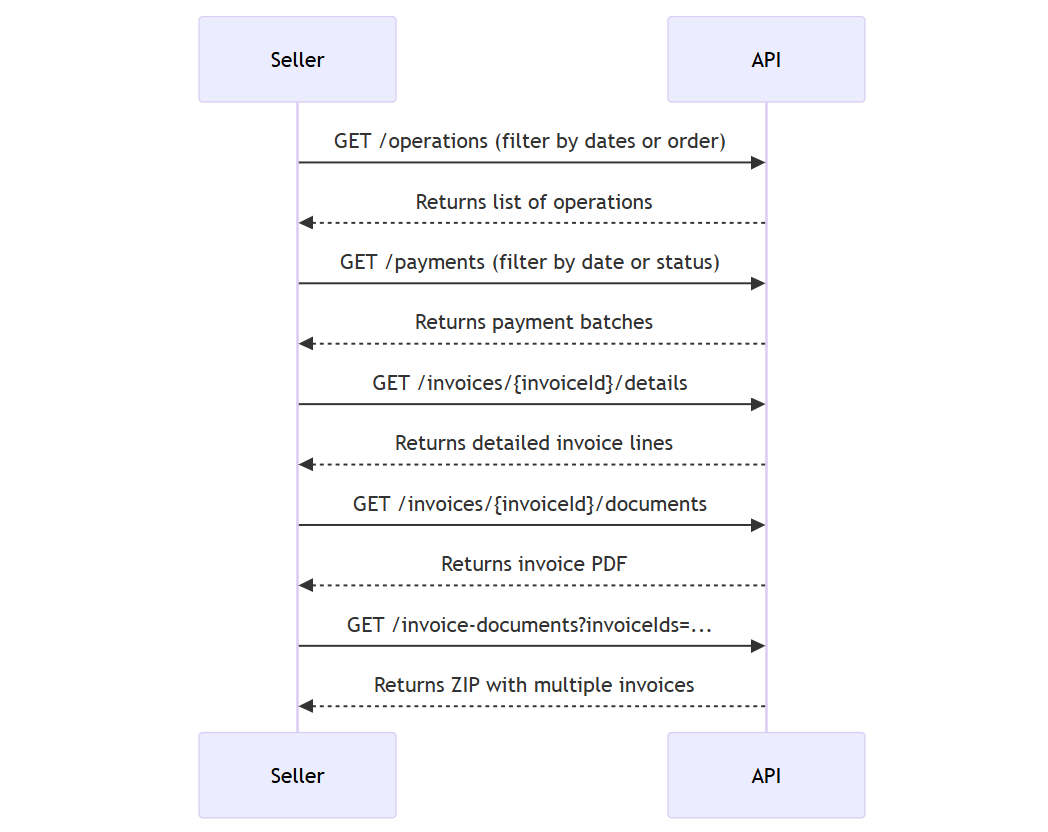
Channel-specific behaviors
Please note that financial operations may differ slightly from one sales channel to another, especially in terms of:
-
Commission structures
-
Invoice frequency
-
Tax and VAT rules
-
Payment delay and withholding
Always refer to the data returned by the API and the sales channel configuration for reconciliation.
Count Financial Operations
Prerequisites
-
At least one of:
orderReference,invoiceId, or a full date range (paidAtMin+paidAtMaxORchangedAtMin+changedAtMax).
To retrieve the number of financial operations matching a set of criteria, without returning the full operation list.
This lightweight endpoint returns a single integer: the number of financial operations matching the provided filters.
This helps:
-
Monitor the number of items generated on an invoice or payment
-
Control pagination behavior when calling
/operations -
Power visual KPI charts without full data retrieval
Functional Rules
-
Endpoint returns integer count.
-
If no filter provided, request rejected (400).
-
Date formats must be ISO 8601.
Endpoint to use
Allows you to:
-
Count the number of operations related to a payment (order, commissions, invoices, guarantee reserve...).
-
Count item details related to a financial operation (order/refund).
Functional Rules:
-
At least one of these filters is required:
orderReference,invoiceId, or a full date range (paidAtMin+paidAtMaxorchangedAtMin+changedAtMax). -
Recommended call frequency:
-
Daily in order to monitor business accounting.
-
On each payout in order to reconcile accouting items.
-
Example:
-
Count all operations paid between two dates
/operations/count?paidAtMin=2021-09-01&paidAtMax=2021-09-15 -
Count all operations linked to a specific order
/operations/count?orderReference=1601302358PGI56 -
Count all operations linked to a specific invoice and a specific event type
/operations/count?invoiceId=1400178408&eventType=Refund,Commission
Endpoint full URL: https://api.octopia-io.net/seller/v2/operations/count
Parameters - Headers
| Name | In | Type | Description |
|---|---|---|---|
| SellerId* | header |
string
|
Octopia Seller Identifier. Example : 98979 |
Parameters - Query
| Name | In | Type | Description |
|---|---|---|---|
| orderReference | query |
string
|
External reference of the order used by the sales channel to communicate with the customer. Example : 1601302358PGI56 |
| paidAtMin | query |
string
|
Minimum payment date - Expected date-time at ISO 8601 format (UTC as default time-zone) It also requests to complete the filter Example : 2024-05-27T00:00:00Z |
| paidAtMax | query |
string
|
Maximum payment date - Expected date-time at ISO 8601 format (UTC as default time-zone) It also requests to complete the filter Example : 2024-09-27T23:59:59Z |
| eventTypes | query |
array[string|enum]
|
Operation type Example : List: ["Refund"] Available values : ["Sale", "Commission", "Refund", "CommissionRestitution", "Subscription", "CdiscountServices", "LogisticFee", "SecurityDeposit", "FfmOrdersReturns", "FfmStorage", "FfmShippingCost", "SplittedPaymentFees", "TradeMarketingFees", "AgecLawFees"] |
| states | query |
array[string|enum]
|
Payment status of the financial operation Example : List: ["Paid"] Available values : ["NotPayable", "Estimated", "Paid", "Blocked", "InProcess"] |
| invoiceId | query |
integer
|
Invoice ID Example : 1801067043 |
| changedAtMin | query |
string
|
Minimum date of last change - Expected date-time at ISO 8601 format (UTC as default time-zone). It also requests to complete the filter Please combine this filter with another to secure the request performance. Example : 2024-05-27T00:00:00Z |
| changedAtMax | query |
string
|
Maximum date of last change - Expected date-time at ISO 8601 format (UTC as default time-zone). It also requests to complete the filter Please combine this filter with another to secure the request performance. Example : 2024-09-27T23:59:59Z |
| salesChannelId | query |
string
|
The Unique identifier of the sales channel the data comes from Example : CDISFR |
Response codes
200 - Successapplication/json |
||||||||||||||||
400 - Bad Requestapplication/problem+json |
||||||||||||||||
401 - Unauthorizedapplication/problem+json |
||||||||||||||||
403 - Forbiddenapplication/problem+json |
||||||||||||||||
404 - Not Foundapplication/problem+json |
||||||||||||||||
500 - Internal Server Errorapplication/problem+json |
Retrieve Financial Operations
Prerequisites
-
At least one filter:
orderReference,invoiceId, or valid date range; optional filters like eventTypes or states.
To retrieve a detailed list of financial operations (sales, refunds, commissions, service fees…) linked to your orders, invoices, or payments.
These operations are the foundation of the financial reconciliation process.
Each financial operation returned by this endpoint represents a transaction recorded by Octopia’s financial system. This includes:
-
Order sales
-
Commissions
-
Refunds
-
Logistic and subscription fees
-
Guarantee or service charges
-
VAT amounts when applicable
Each item includes metadata such as:
-
Related
invoiceId -
Event types
-
Currency and total amounts
-
Operation date and payment date
-
Current payment state (Paid, Estimated, Blocked…)
Functional Rules
-
Default
pageSize: 20. -
If filters missing or invalid, 400.
Endpoint to use
Allows you to:
-
Retrieve all financial informations related to a payment (order, commissions, invoices, guarantee reserve...).
-
Search for a financial operation (order/refund) and retrieves its details.
Functional Rules:
-
Default
PageSize: 20 -
At least one of these filters is required:
orderReference,invoiceId, or a full date range (paidAtMin+paidAtMaxorchangedAtMin+changedAtMax). -
Recommended call frequency:
On each payout in order to reconcile accouting items.
-
The following fields display the gross amount (VAT included): sales, refunds, commissions, and service financial flow.
Examples:
-
Retrieve all operations paid between two dates:
/operations?paidAtMin=2021-09-01&paidAtMax=2021-09-15 -
Retrieve all operations linked to a specific order:
/operations?orderReference=1601302358PGI56 -
Retrieve all operations linked to a specific invoice and a specific event type:
/operations?invoiceId=1400178408&eventType=Refund,Commission
Endpoint full URL: https://api.octopia-io.net/seller/v2/operations
Parameters - Headers
| Name | In | Type | Description |
|---|---|---|---|
| SellerId* | header |
string
|
Octopia Seller Identifier. Example : 98979 |
Parameters - Query
| Name | In | Type | Description |
|---|---|---|---|
| pageIndex | query |
integer
|
The index of the page (Min: 1 / Max: 100) Default : 1 Example : 1 |
| pageSize | query |
number
|
The maximum number of elements in a page. (Min: 1 / Max: 100) Default : 20 Example : 10 |
| orderReference | query |
string
|
External reference of the order used by the sales channel to communicate with the customer. Example : 1601302358PGI56 |
| paidAtMin | query |
string
|
Minimum payment date - Expected date-time at ISO 8601 format (UTC as default time-zone) It also requests to complete the filter Example : 2024-05-27T00:00:00Z |
| paidAtMax | query |
string
|
Maximum payment date - Expected date-time at ISO 8601 format (UTC as default time-zone) It also requests to complete the filter Example : 2024-09-27T23:59:59Z |
| eventTypes | query |
array[string|enum]
|
Operation type Example : List: ["Refund"] Available values : ["Sale", "Commission", "Refund", "CommissionRestitution", "Subscription", "CdiscountServices", "LogisticFee", "SecurityDeposit", "FfmOrdersReturns", "FfmStorage", "FfmShippingCost", "SplittedPaymentFees", "TradeMarketingFees", "AgecLawFees"] |
| states | query |
array[string|enum]
|
Payment status of the financial operation Example : List: ["Paid"] Available values : ["NotPayable", "Estimated", "Paid", "Blocked", "InProcess"] |
| invoiceId | query |
integer
|
Invoice ID Example : 1801067043 |
| changedAtMin | query |
string
|
Minimum date of last change - Expected date-time at ISO 8601 format (UTC as default time-zone). It also requests to complete the filter Please combine this filter with another to secure the request performance. Example : 2024-05-27T00:00:00Z |
| changedAtMax | query |
string
|
Maximum date of last change - Expected date-time at ISO 8601 format (UTC as default time-zone). It also requests to complete the filter Please combine this filter with another to secure the request performance. Example : 2024-09-27T23:59:59Z |
| salesChannelId | query |
string
|
The Unique identifier of the sales channel the data comes from Example : CDISFR |
Response codes
200 - Successapplication/json
|
||||||||||||||||||||||||||||||||||||||||||||||||||||||||||||||||||||||||||||||||||||||||||||||||||||||||||||||||||||||||||||||||||
400 - Bad Requestapplication/problem+json |
||||||||||||||||||||||||||||||||||||||||||||||||||||||||||||||||||||||||||||||||||||||||||||||||||||||||||||||||||||||||||||||||||
401 - Unauthorizedapplication/problem+json |
||||||||||||||||||||||||||||||||||||||||||||||||||||||||||||||||||||||||||||||||||||||||||||||||||||||||||||||||||||||||||||||||||
403 - Forbiddenapplication/problem+json |
||||||||||||||||||||||||||||||||||||||||||||||||||||||||||||||||||||||||||||||||||||||||||||||||||||||||||||||||||||||||||||||||||
404 - Not Foundapplication/problem+json |
||||||||||||||||||||||||||||||||||||||||||||||||||||||||||||||||||||||||||||||||||||||||||||||||||||||||||||||||||||||||||||||||||
500 - Internal Server Errorapplication/problem+json |
Important notes
-
Response includes
common.totalAmount– total across all matching operations (not just current page). -
Use filters (especially event types) to reduce noise.
-
Heavy use could have performance impact.
Count Invoice Details
Prerequisites
-
invoiceIdmust be known and valid.
Allow the seller to know how many detail lines a given invoice contains without fetching all line‑items.
Functional Rules
-
No pagination or query filters other than those inherent to the path.
-
Returns an integer count.
-
If
invoiceIddoes not exist, returns404. -
Use sparingly to avoid overloading reporting tools.
Endpoint to use
Allows you to count the number of orders/operations in an invoice.
Functional Rules:
-
Recommended call frequency:
-
One time after each 10 days (on 9, 19 and 29 of each month).
-
This is because the invoices are generated before the payout.
-
Example:
-
Count the number of details for the invoice
1400178408:/invoices/1400178408/details/count
Endpoint full URL: https://api.octopia-io.net/seller/v2/invoices/{invoiceId}/details/count
Parameters - Headers
| Name | In | Type | Description |
|---|---|---|---|
| SellerId* | header |
string
|
Octopia Seller Identifier. Example : 98979 |
Parameters - Path
| Name | In | Type | Description |
|---|---|---|---|
| invoiceId* | path |
integer
|
Invoice ID Example : 1801067043 |
Response codes
200 - Successapplication/json |
||||||||||||||||
400 - Bad Requestapplication/problem+json |
||||||||||||||||
401 - Unauthorizedapplication/problem+json |
||||||||||||||||
403 - Forbiddenapplication/problem+json |
||||||||||||||||
404 - Not Foundapplication/problem+json |
||||||||||||||||
500 - Internal Server Errorapplication/problem+json |
Important notes
-
Best used to preview volume before performing full detail fetch.
-
Good to combine with UI indicators (e.g., “You have 120 lines in this invoice”).
Retrieve Invoice Details
Prerequisites
-
invoiceIdmust be known and valid.
This endpoint provides the detail of all operations included in a specific invoice.
Each item represents a sale, refund, service fee, or commission and includes detailed metadata.
Functional Rules
-
Default pageSize is 20 unless overridden.
-
Supports
pageIndex,pageSizequery params. -
The response includes item metadata: product/order reference, amounts, VAT, dates.
-
If invalid pagination or bad invoice ID, returns 400 or 404.
Endpoint to use
Allows you to retrieve the details of an invoice in order to reconcile the operations concerned (sales, refunds, shipments).
Functional Rules:
-
Default
PageSize: 20 -
Recommended call frequency:
-
One time after each 10 days (on 9, 19 and 29 of each month).
-
This is because the invoices are generated before the payout.
-
Example:
-
Retrieve details of the invoice
1400178408:/invoices/1400178408/details?pageIndex=1&pageSize=25
Endpoint full URL: https://api.octopia-io.net/seller/v2/invoices/{invoiceId}/details
Parameters - Headers
| Name | In | Type | Description |
|---|---|---|---|
| SellerId* | header |
string
|
Octopia Seller Identifier. Example : 98979 |
Parameters - Path
| Name | In | Type | Description |
|---|---|---|---|
| invoiceId* | path |
integer
|
Invoice ID Example : 1801067043 |
Parameters - Query
| Name | In | Type | Description |
|---|---|---|---|
| pageIndex | query |
integer
|
The index of the page (Min: 1 / Max: 100) Default : 1 Example : 1 |
| pageSize | query |
number
|
The maximum number of elements in a page. (Min: 1 / Max: 100) Default : 20 Example : 10 |
Response codes
200 - Successapplication/json
|
||||||||||||||||||||||||||||||||||||||||||||||||
400 - Bad Requestapplication/problem+json |
||||||||||||||||||||||||||||||||||||||||||||||||
401 - Unauthorizedapplication/problem+json |
||||||||||||||||||||||||||||||||||||||||||||||||
403 - Forbiddenapplication/problem+json |
||||||||||||||||||||||||||||||||||||||||||||||||
404 - Not Foundapplication/problem+json |
||||||||||||||||||||||||||||||||||||||||||||||||
500 - Internal Server Errorapplication/problem+json |
Important notes
-
May impact performance for high pageIndex; consider filtering.
Download Invoice Document
Prerequisites
-
invoiceIdmust be known and valid.
This endpoint returns the official PDF version of a specific invoice.
Invoices are available for download after being generated on fixed dates (9th, 19th, 29th of each month).
Functional Rules
-
Returns PDF binary of the invoice document.
-
If document not present for that invoice ID, return 404.
-
Authorization via
SellerId; verify that seller owns or is allowed to see that invoice.
Endpoint to use
Allows you to download the PDF of a specific invoice.
Functional Rules:
-
Recommended call frequency:
-
One time after each 10 days (on 9, 19 and 29 of each month).
-
This is because the invoices are generated before the payout.
-
Example:
-
Download the document of the invoice
1400178408:/invoices/1400178408/documents
Endpoint full URL: https://api.octopia-io.net/seller/v2/invoices/{invoiceId}/documents
Parameters - Headers
| Name | In | Type | Description |
|---|---|---|---|
| SellerId* | header |
string
|
Octopia Seller Identifier. Example : 98979 |
Parameters - Path
| Name | In | Type | Description |
|---|---|---|---|
| invoiceId* | path |
integer
|
Invoice ID Example : 1801067043 |
Response codes
200 - Successapplication/pdf |
||||||||||||||||
400 - Bad Requestapplication/problem+json |
||||||||||||||||
401 - Unauthorizedapplication/problem+json |
||||||||||||||||
403 - Forbiddenapplication/problem+json |
||||||||||||||||
404 - Not Foundapplication/problem+json |
||||||||||||||||
500 - Internal Server Errorapplication/problem+json |
Important notes
-
Cache documents locally once downloaded.
-
PDF size / rendering time might vary with number of line items.
Download Multiple Invoice Documents
Prerequisites
-
invoiceIdsquery parameter list (min 2, max 10).
This endpoint allows sellers to download several invoice documents in one call, grouped inside a compressed (ZIP) archive.
It is intended to:
-
Speed up the retrieval of a batch of PDF invoices (e.g. for monthly exports)
-
Reduce manual effort compared to downloading each file individually
-
Integrate with accounting automation tools
Each file in the archive corresponds to a invoice PDF previously issued for the seller.
Functional Rules
-
`invoiceIds` array is mandatory (min 2, max 10)
-
Result is
application/zipcontaining multiple PDFs -
If some invoiceIds are invalid or missing docs, behavior may vary (error vs partial)
Endpoint to use
Allows you to download up to 10 invoices at the same time in an archived file.
Functional Rules:
-
Recommended call frequency:
-
One time after each 10 days (on 9, 19 and 29 of each month).
-
This is because the invoices are generated before the payout.
-
Example:
-
Download a zip file containing documents of invoices
1400178408,1400178409,1400178410:/invoice-documents?invoiceIds=1400178408,1400178409,1400178410
Endpoint full URL: https://api.octopia-io.net/seller/v2/invoice-documents
Parameters - Headers
| Name | In | Type | Description |
|---|---|---|---|
| SellerId* | header |
string
|
Octopia Seller Identifier. Example : 98979 |
Parameters - Query
| Name | In | Type | Description |
|---|---|---|---|
| invoiceIds* | query |
array[integer(int64)]
|
Invoice ID list Example : List: ["1900000000", "1900000001"] |
Response codes
200 - Successapplication/zip |
||||||||||||||||
400 - Bad Requestapplication/problem+json |
||||||||||||||||
401 - Unauthorizedapplication/problem+json |
||||||||||||||||
403 - Forbiddenapplication/problem+json |
||||||||||||||||
404 - Not Foundapplication/problem+json |
||||||||||||||||
500 - Internal Server Errorapplication/problem+json |
Important notes
-
Archive size may be large; network performance matters.
-
Use only when needed, not for every invoice.
Count Payments
This endpoint allows sellers to retrieve the number of payment records that match a given set of filters, without fetching all payment data.
It can be used to:
-
Power UI counters, pagination indicators or business dashboards
-
Monitor historical payment volume
-
Validate if a full payment request is necessary
Each payment counted may correspond to:
-
A paid transfer
-
An upcoming (Estimated) payment
-
A blocked or unpayable amount
Endpoint to use
Allows you to count the number of payments according to date, sales channel and payment status.
Functional Rules:
-
Recommended call frequency:
-
On each payout in order to reconcile payments with the amount received by the Seller on his bank account
-
On demand in order to check payment history.
-
Examples:
-
Count all seller payments:
/payments/count -
Count all seller payments between two dates:
/payments/count?payedAtMin=2021-09-013&payedAtMax=2021-09-15 -
Count all seller payments between two dates with a specific payment state:
/payments/count?payedAtMin=2021-09-013&payedAtMax=2021-09-15&paymentStates=Estimated,NotPayable
Endpoint full URL: https://api.octopia-io.net/seller/v2/payments/count
Parameters - Headers
| Name | In | Type | Description |
|---|---|---|---|
| SellerId* | header |
string
|
Octopia Seller Identifier. Example : 98979 |
Parameters - Query
| Name | In | Type | Description |
|---|---|---|---|
| paidAtMin | query |
string
|
Minimum payment date - Expected date-time at ISO 8601 format (UTC as default time-zone) It also requests to complete the filter Example : 2024-05-27T00:00:00Z |
| paidAtMax | query |
string
|
Maximum payment date - Expected date-time at ISO 8601 format (UTC as default time-zone) It also requests to complete the filter Example : 2024-09-27T23:59:59Z |
| paymentStates | query |
array[string|enum]
|
The payment states Example : List: ["Paid"] Available values : ["NotPayable", "Estimated", "Paid", "Blocked", "InProcess"] |
| salesChannelId | query |
string
|
The Unique identifier of the sales channel the data comes from Example : CDISFR |
Response codes
200 - Successapplication/json |
||||||||||||||||
400 - Bad Requestapplication/problem+json |
||||||||||||||||
401 - Unauthorizedapplication/problem+json |
||||||||||||||||
403 - Forbiddenapplication/problem+json |
||||||||||||||||
404 - Not Foundapplication/problem+json |
||||||||||||||||
500 - Internal Server Errorapplication/problem+json |
List Payments
This endpoint allows sellers to retrieve a list of payments received or expected based on aggregated financial operations grouped by sales channel and payment date.
Each payment returned by this endpoint corresponds to a transfer (or forecasted transfer) to the seller’s bank account and consolidates multiple operations into a single payment record. This includes:
-
Sales revenue
-
Refund adjustments
-
Commissions deducted
-
Service and logistic fees
-
Guarantee or reserve charges
Each payment item includes metadata such as:
-
Total gross amount (including VAT)
-
Breakdown by operation type (sales, refunds, services)
-
Associated payment state (
Estimated,Paid,Blocked,NotPayable) -
Payment date
-
Sales channel
This API is essential for sellers to reconcile their payments with operations and bank statements.
Endpoint to use
Allows you to retrieve the payment overall for each payout.
Functional Rules:
-
All operations are group by date, sales channel and payment status.
-
Default
pageSize: 20 -
Recommended call frequency:
-
On each payout in order to reconcile payments with the amount received by the Seller on his bank account
-
On demand in order to check payment history.
-
Examples:
-
Retrieve all seller payments from the last received payment (
state=Paid) to all incommings payments (state=Estimated):/payments -
Retrieve all seller payments between two dates:
/payments?payedAtMin=2021-09-013&payedAtMax=2021-09-15 -
Retrieve all seller payments between two dates with a specific payment state:
/payments?payedAtMin=2021-09-013&payedAtMax=2021-09-15&paymentStates=Estimated,NotPayable
Endpoint full URL: https://api.octopia-io.net/seller/v2/payments
Parameters - Headers
| Name | In | Type | Description |
|---|---|---|---|
| SellerId* | header |
string
|
Octopia Seller Identifier. Example : 98979 |
Parameters - Query
| Name | In | Type | Description |
|---|---|---|---|
| paidAtMin | query |
string
|
Minimum payment date - Expected date-time at ISO 8601 format (UTC as default time-zone) It also requests to complete the filter Example : 2024-05-27T00:00:00Z |
| paidAtMax | query |
string
|
Maximum payment date - Expected date-time at ISO 8601 format (UTC as default time-zone) It also requests to complete the filter Example : 2024-09-27T23:59:59Z |
| paymentStates | query |
array[string|enum]
|
The payment states Example : List: ["Paid"] Available values : ["NotPayable", "Estimated", "Paid", "Blocked", "InProcess"] |
| salesChannelId | query |
string
|
The Unique identifier of the sales channel the data comes from Example : CDISFR |
| pageIndex | query |
integer
|
The index of the page (Min: 1 / Max: 100) Default : 1 Example : 1 |
| pageSize | query |
number
|
The maximum number of elements in a page. (Min: 1 / Max: 100) Default : 20 Example : 10 |
Response codes
200 - Successapplication/json
|
||||||||||||||||||||||||||||||||||||||||||
400 - Bad Requestapplication/problem+json |
||||||||||||||||||||||||||||||||||||||||||
401 - Unauthorizedapplication/problem+json |
||||||||||||||||||||||||||||||||||||||||||
403 - Forbiddenapplication/problem+json |
||||||||||||||||||||||||||||||||||||||||||
404 - Not Foundapplication/problem+json |
||||||||||||||||||||||||||||||||||||||||||
500 - Internal Server Errorapplication/problem+json |
Important notes
-
Default pageSize: 20
FAQ
Invoices are issued every 10 days: on the 9th, 19th, and 29th of each month. They consolidate all operations since the last billing cycle.
Payouts are executed every 10 days (on the 1st, 11th, and 21st), or on demand once funds are cleared.
-
Invoices summarize what is billed (sales, commissions, services).
-
Payments represent what is actually paid out to the seller, based on cleared funds and due dates.
It is a transaction that impacts your account: sale, refund, commission, guarantee, logistics fee, etc.
-
paidAt: when the transaction was paid. -
changedAt: when the transaction was last updated — useful for tracking changes (refunds, corrections).
Yes — all amounts are gross (including VAT), with VAT fields provided separately when applicable.
-
Retrieve
GET /paymentsonce per payout to reconcile balances. -
Use
GET /operationswithchangedAtMin/Maxdaily for incremental accounting sync. -
Retrieve invoice details only when needed, using
GET /invoices/{id}/details.
The VAT presentation depends on the order’s shipping country.
For shipments outside the EU:
VAT is always included in all grossAmount fields (sales, refunds, commissions).
The VAT rate and amount are explicitly broken down under vatSale or vatRefund blocks.
You can see:
-
salesVatAmount: VAT on the product sale
-
salesShippingCostVatAmount: VAT on the shipping cost
-
salesTotalVatAmount: total VAT for the transaction
In all other cases, VAT is 0 and the gross amount equals the net amount.
Let’s say you want to reconcile all financial operations linked to order 1601302358PGI56.
Here’s how to proceed:
1. Search for operations
GET /operations?orderReference=1601302358PGI56
2. API returns something like:
{
  "items": [
    {
      "operationReference": "1601302358PGI56",
      "orderStatus": "Accepted",
      "paidAt": "2025-09-11",
      "eventTypes": ["Sale", "Commission", "VAT"],
      "sale": {
        "productAmount": 100.00,
        "shippingFeesAmount": 5.00,
        "processingFeesAmount": 1.00,
        "total": 106.00
      },
      "vatSale": {
        "salesVatAmount": 20.00,
        "salesShippingCostVatAmount": 1.00,
        "salesTotalVatAmount": 21.00
      },
      "commission": 10.00,
      "commissionDetail": [
        {"type": "product", "amount": 7.00},
        {"type": "paymentFees", "amount": 3.00}
      ],
      "totalAmount": 96.00
    }
  ]
}
3. Interpretation
|
Component |
Value |
|---|---|
|
Product Sale (gross) |
€100.00 |
|
Shipping (gross) |
€5.00 |
|
Processing Fees (gross) |
€1.00 |
|
Total Sale (gross) |
€106.00 |
|
VAT on Product |
€20.00 |
|
VAT on Shipping |
€1.00 |
|
Total VAT |
€21.00 |
|
Commission (gross) |
€10.00 |
|
Payout to seller (gross) |
€96.00 |
📌 So, the seller will receive €96.00 on this order, and the operation includes a full breakdown of revenue, fees, and taxes.