
Offer integration (JSON)
- Home
- Offer integration (JSON)
Introduction

Last update :
All package types now compatible with every SalesChannels
Toolbox / Tips
-
Download the Postman collection
-
Download the YAML / See full technical documentation
-
Don’t forget to check the authentication documentation
The Offer integration API enables sellers to batch manage their offer catalog on Octopia by creating and processing offer packages. These packages allow sellers to perform bulk create and update full offer (Upsert), update partially the offers (Update), or delete (Delete) operations for offers on a specific sales channel.
This API is critical in the broader offer lifecycle for synchronizing seller catalogs across multiple marketplaces, controlling offer visibility, adjusting stock and prices, and removing outdated listings.
A package-centric flow ensures operational safety: sellers can prepare and review packages before submitting them for integration. After submission, packages are processed, and sellers can retrieve integration results (successes, rejections, duplications) during 3 days.
Key States & Attributes
|
Field |
Description |
Business Rules |
|---|---|---|
|
packageType |
Defines the operation type: |
A package can only have one type. Each type has specific field requirements. |
|
packageState |
Workflow status: |
Only |
|
sellerExternalReference |
Seller-defined unique identifier for the offer (per product, condition, channel) |
Required in all package types. Used as the anchor for updates/deletes. |
|
product.gtin / product.reference |
Product identifier (GTIN / EAN) and internal reference |
Required in |
|
price / taxes |
Price of the offer and applicable taxes |
Required in |
|
quantity |
Inventory count |
Required in |
|
deliveryModes & preparationTime |
Delivery options and preparation time before shipping |
Full delivery list must be sent in |
|
resultCode & integrationStatus |
Outcome of each offer request (e.g., created, rejected, duplicated) |
Retrieved via results endpoint after integration. |
Seller Workflow
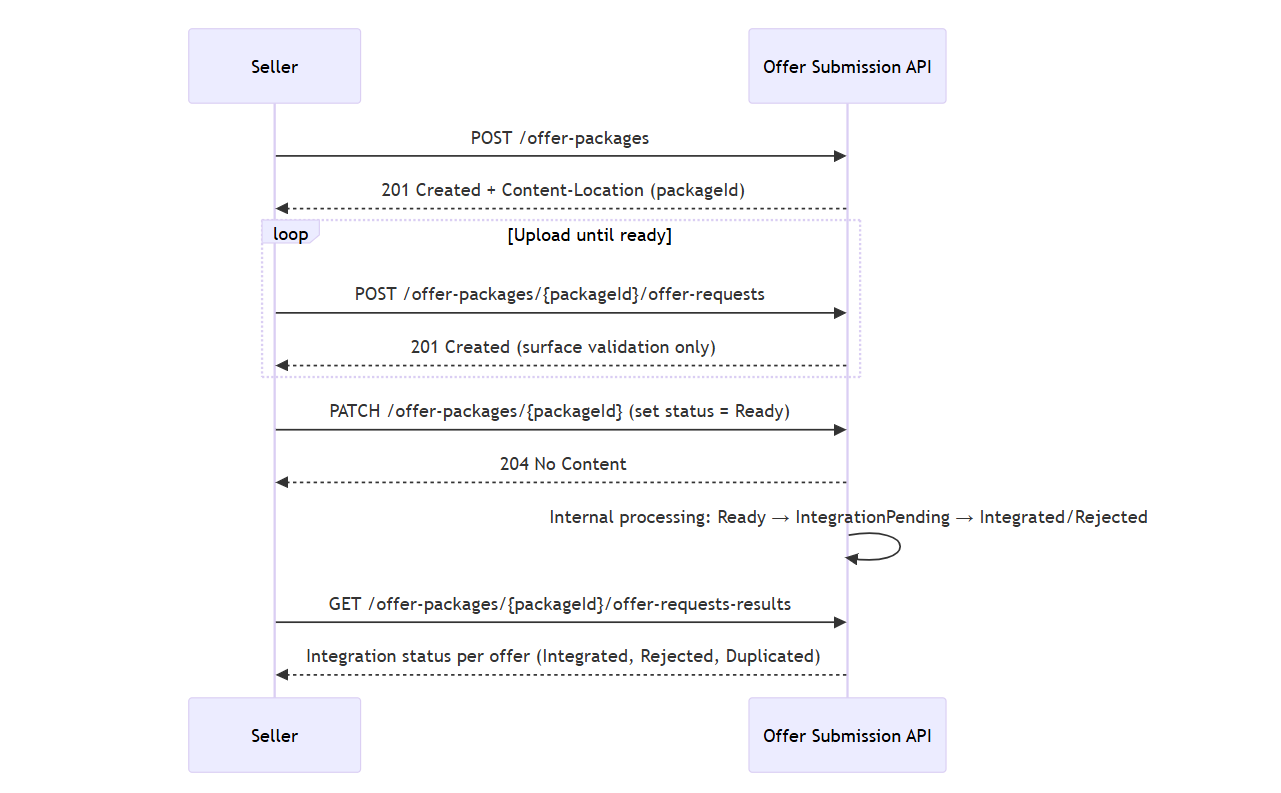
Data Availability Period
-
Results are available after the package is submitted and for 3 days after being fully processed.
-
Only basic syntax validation is done during upload. Business validation (e.g., reference existence, field logic) happens during integration.
-
Large packages (max 50000 offers) may take longer to process; result availability depends on package size.
Create a Package
Prerequisites
-
Mandatory headers:
-
sellerId— ID of the seller -
salesChannelId— Target sales channel
-
-
Optional header:
-
Accept-Language—en-US(default),fr-FR,es-ES
-
This endpoint creates a new offer package that will group offer requests of a specific type (Upsert, Update, or Delete).
The created package will be in WaitingForCompletion state, allowing uploads of offer requests.
Each package is limited to:
-
A single sales channel
-
A single package type
Creating a package is the first step in preparing batch requests to your offer catalog.
-
You must specify a valid
packageType:-
Upsert– create or update an existing offer -
Update– partial update of an existing offer -
Delete– remove an existing offer
-
-
The returned
Content-Locationheader contains thepackageId. -
You cannot reuse or modify a package’s
packageTypeafter creation. -
The Accept-Language will define the offer requests results message localization when your package will be treated. You can choose from French (fr-FR), English (en-US) and Spanish (es-ES).
Endpoint to use
NEW! NOW AVAILABLE FOR CDISCOUNT
This method allows you to create an offer package to manage your offer catalog on a sales channel.
Functional Rules:
- What is the purpose of this method ?
Once your offer package is created, you will be able to upload offer requests in it that will create, update or delete offers from your catalog according to your package type.
- What are the package types ?
You can use one of the following packages type to manage your offer catalog:
-
Upsert: (case sensitive) allows to create new offers or replace an existing one with new information. Requires all the mandatory information of the offer. -
Update: (case sensitive) allows to update partially existing offers. Requires the seller external reference and one or several of the information (field) that you want to update. -
Delete: (case sensitive) allows Allows to delete existing offers. Requires only the seller external reference.
- Where can you find the package id ?
The package id is available into the Content-Location in the Headers.
- What is the Accept-Language use ?
The Accept-Language will define the offer requests results message localization when your package will be treated. You can choose from French (fr-FR), English (en-US) and Spanish (es-ES).
- What are the limits ?
Here are the guidelines:
-
Each package can only target one sales channel.
-
Each package can only have one type.
- I have created an offer package, what do I do now ?
Once your offer package is created, you can:
-
Check the information of about your package through
GET
/offer-packages -
Start uploading your offer requests through
POST
/offer-packages/{packageId}/offer-requests.
Endpoint full URL: https://api.octopia-io.net/seller/v2/offer-packages
Parameters - Headers
| Name | In | Type | Description |
|---|---|---|---|
| Accept-Language | header |
string
|
The Default : en-US Example : en-US |
| SellerId* | header |
string
|
Octopia Seller Identifier. Example : 98979 |
| SalesChannelId* | header |
string
|
The sales channel identifier Example : CDISFR |
Request body
|
application/json |
Response codes
201 - CreatedHeaders:
|
||||||||||||||||
400 - Bad Requestapplication/problem+json |
||||||||||||||||
401 - Unauthorizedapplication/problem+json |
||||||||||||||||
403 - Forbiddenapplication/problem+json |
||||||||||||||||
429 - Too Many Requestsapplication/problem+json |
||||||||||||||||
500 - Internal Server Errorapplication/problem+json |
Request body:
{
  "packageType": "Upsert"
}
Important notes
-
Package ID is returned via
Content-Locationheader, not in the response body. -
All uploads must match the declared package type.
-
You can create multiple packages concurrently, as long as each respects the channel and type constraints.
-
Packages are available during 6 hours if not completed (status ‘Ready’)
Retrieve existing Packages by Filter
This endpoint lists all previously created offer packages. You can filter them by processing state (e.g., WaitingForCompletion, Integrated) and by salesChannelId.
This is especially useful for monitoring progress or reusing packages that are still editable.
Functional Rules
-
Supports filtering by:
-
state– current status of the package -
salesChannelId– to target a specific channel
-
-
Pagination supported via
limitquery param. -
Use
Cursorfor cursor-based pagination. -
Response includes package metadata and status, plus optional result messages.
Endpoint to use
This method allows you to get your existing packages and gives you the ability to filter them by status.
Functional Rules:
-
What are the packages status that can be used as a filter?
By state:
-
WaitingForCompletion: offer packages open to new offer requests uploads.
- GET
/offer-packages?state=WaitingForCompletion
- GET
-
Ready: offer packages ready to be treated.
- GET
/offer-packages?state=Ready
- GET
-
IntegrationPending: offer packages currently being treated
- GET
/offer-packages?state=IntegrationPending
- GET
-
Integrated: offer packages successfully treated
- GET
/offer-packages?state=Integrated
- GET
-
Rejected: offer packages rejected
- GET
/offer-packages?state=Rejected
- GET
By Sales Channel Id:
-
salesChannelId: filter all your packages created on the sales channel
- GET
/offer-packages?salesChannelId=SELLZZ
- GET
-
-
Your package is on Waiting for completion status?
You can upload your offer requests through the method:
POST
/offer-packages/{packageId}/offer-requests -
Your package is on Integrated status?
You can check your offer requests results through the method:
GET
/offer-packages/{packageId}/offer-requests-results -
Your package is on Rejected status?
You can check the reason on the result message
Endpoint full URL: https://api.octopia-io.net/seller/v2/offer-packages
Parameters - Headers
| Name | In | Type | Description |
|---|---|---|---|
| SellerId* | header |
string
|
Octopia Seller Identifier. Example : 98979 |
Parameters - Query
| Name | In | Type | Description |
|---|---|---|---|
| state | query |
string
|
The state of a package Example : Integrated |
| salesChannelId | query |
string
|
Format - string. The sales channel identifier of a package Example : SELLZZ |
| limit | query |
integer
|
The number of items in a page Default : 100 Example : 10 |
Response codes
200 - List of packages foundapplication/json
|
||||||||||||||||||||||||||||||||||||||||
400 - Bad Requestapplication/problem+json |
||||||||||||||||||||||||||||||||||||||||
401 - Unauthorizedapplication/problem+json |
||||||||||||||||||||||||||||||||||||||||
403 - Forbiddenapplication/problem+json |
||||||||||||||||||||||||||||||||||||||||
429 - Too Many Requestsapplication/problem+json |
||||||||||||||||||||||||||||||||||||||||
500 - Internal Server Errorapplication/problem+json |
Important notes
-
Only packages in
WaitingForCompletioncan be modified. -
Integrated or Rejected packages are immutable, but can be audited via results.
-
Each response includes up to
limitresults and may includeLinkheaders for pagination.
Retrieve a Package by ID
Prerequisites
-
Path parameter:
packageId
This endpoint retrieves all information about a specific package by its ID, including its state, submission date, type, and (if applicable) processing results.
Useful to determine if a package is still modifiable, or to confirm it has been processed.
Functional Rules
-
Use this to verify if your package can still receive uploads or the results if it has been submitted.
-
State transitions are:
-
WaitingForCompletion→ available for uploads -
IntegrationPending,IntegratedorRejected→ when completed
-
Endpoint to use
This method allows you to check your package using the packageId
Functional Rules:
-
Your package is on Waiting for completion status?
You can upload your offer requests through the method: POST
/offer-packages/{packageId}/offer-requests -
Your package is on Integrated status?
You can check your offer requests results through the method: GET
/offer-packages/{packageId}/offer-requests-results -
Your package is on Rejected status?
You can check the reason on the result message
Endpoint full URL: https://api.octopia-io.net/seller/v2/offer-packages/{packageId}
Parameters - Headers
| Name | In | Type | Description |
|---|---|---|---|
| SellerId* | header |
string
|
Octopia Seller Identifier. Example : 98979 |
Parameters - Path
| Name | In | Type | Description |
|---|---|---|---|
| packageId* | path |
string
|
The unique identifier of the package Example : AAA0000001 |
Response codes
200 - the package with specified idapplication/json |
||||||||||||||||||||||||
400 - Bad Requestapplication/problem+json |
||||||||||||||||||||||||
401 - Unauthorizedapplication/problem+json |
||||||||||||||||||||||||
403 - Forbiddenapplication/problem+json |
||||||||||||||||||||||||
404 - Not Foundapplication/problem+json |
||||||||||||||||||||||||
429 - Too Many Requestsapplication/problem+json |
||||||||||||||||||||||||
500 - Internal Server Errorapplication/problem+json |
Important notes
-
This call is necessary before uploading offers, to ensure the package is in the correct state.
-
If status is
Integrated, check results via the/offer-requests-resultsendpoint. -
If status is
Rejected, a result message will explain the reason.
Upload Offer Requests in a Package
Prerequisites
-
Path:
packageId(must be inWaitingForCompletion)
This endpoint lets sellers upload one or more offer requests to the specified package.
These can be created in batches and uploaded multiple times until submission.
Only JSON validation occurs at this stage. Full business validation happens upon submission.
Functional Rules
-
Maximum 100 offer requests per upload
-
Up to 50,000 requests per package
-
Uploads only allowed in
WaitingForCompletionstate -
Rules depend on package type:
Upsert
-
All required fields must be provided
-
Creates or updates existing offer if same reference/GTIN/condition exists
-
Multiple conflicting entries with the same reference will be rejected
Update
-
Only updated fields should be included
-
At least one field must be changed
-
deliveryModesmust be a full array -
Multiple conflicting entries with the same reference will be rejected
Delete
-
Only
sellerExternalReferencerequired -
If no match is found → rejected
Endpoint to use
NEW! NOW AVAILABLE FOR CDISCOUNT
This method allows to upload offer requests in an existing offer package before sending it to be treated.
You can upload offer requests as many times as you want until you consider your offer package complete.
Functional Rules:
-
What kind of offer requests should I upload according to my package type?
According to your package types, here are the expected offer request:
-
Upsert: Every offer request must contain all the mandatory information of an offer.
-
If no other offer on this sales channel share the same seller external reference, GTIN/EAN code and condition, your offer will be created.
-
Else, the existing offer information will be replaced with the offer request information.
-
-
Update: Only the Seller External Reference and the updated information should be added.
-
If no other offer on this sales channel share the same seller external reference, your offer requests will be rejected. You will have to create the offer thanks to the upsert package type to be able to update then
-
Else, the existing offer will be updated with the information submitted. The offer information submitted can concern at least one information otherwise the offer request will be rejected. You can update one or several information of your offer. For example, you update only the price for one offer and for another offer the price AND the quantity. Every kind of offer information can be updated. The remaining information will stay the same.
-
Please note that:
-
If you wish to update information expressed as array in the offer request, please include the full list of attributes as it will replace the existing arrays
-
If you upload several times the same seller external reference with different offer information in each, the offer request will be rejected for all information because we do not manage duplicated offer information
-
If one or several fields of offer are not correct, the fields will be ignored. And if none of them are correct, the offer request will be rejected
-
If you update the deliveryModes, the preparationTime field and value are mandatory in the offer request.
-
The information about the product (Gtin, reference, condition) can not be updated
-
By Example:
The examples of offer requests update bellow are just samples of what is possible to update. All the combinations are possible. Only the recognized field will be updated.
-
-
Delete: Only the offer Seller external reference should be included
-
If no other offer on this sales channel share the same seller external reference, your request offer will be rejected.
-
Else, the existing offer will be deleted from this sales channel offer catalog, and then unpublished from this sales channel.
-
-
-
What about your stock quantity?
Your stock quantities are shared with each sales channel in which you have a corresponding offer for this product and condition. Updating your stock will update it on each of these sales channels.
You can remove an offer from a specific sales channel by deleting it rather than updating its stock quantity to 0.
-
What are the limits?
-
Each upload of offer request into the package must not exceed 100 offer requests
-
One offer package can only gather a maximum of 50 000 offer requests
-
You can only upload offers in packages which status is Waiting for completion
-
Only a json surface check is made at this stage. The real offer request control is made when you submit the package
-
You can check your package status through the method
GET
/offer-packages/{packageId}
-
-
Where can you find more information on the fields of an offer request?
You can consult the offer schemas for more information on the fields
-
You have uploaded all of the offer requests you wanted, what's next?
You can now indicate that your package is ready to be treated through the method PATCH
/offer-packages/{packageId}
Endpoint full URL: https://api.octopia-io.net/seller/v2/offer-packages/{packageId}/offer-requests
Parameters - Headers
| Name | In | Type | Description |
|---|---|---|---|
| SellerId* | header |
string
|
Octopia Seller Identifier. Example : 98979 |
Parameters - Path
| Name | In | Type | Description |
|---|---|---|---|
| packageId* | path |
string
|
The package identifier Example : AAA0000001 |
Request body
|
application/json |
Response codes
201 - Created |
||||||||||||||||
400 - Bad Requestapplication/problem+json |
||||||||||||||||
401 - Unauthorizedapplication/problem+json |
||||||||||||||||
403 - Forbiddenapplication/problem+json |
||||||||||||||||
404 - Not Foundapplication/problem+json |
||||||||||||||||
429 - Too Many Requestsapplication/problem+json |
||||||||||||||||
500 - Internal Server Errorapplication/problem+json |
Example Upsert payload:
{
  "product": {
    "gtin": "1234567890000",
    "reference": "AUC1234567890000"
  },
  "condition": "New",
  "sellerExternalReference": "SellerRef001",
  "price": {
    "originPrice": 59.99,
    "price": 49.99,
    "taxes": [
      {"code": "VAT", "value": 20}
    ]
  },
  "deliveryModes": [
    {"code": "THD", "cost": 1.99, "additionalCost": 2.99}
  ],
  "preparationTime": 4,
  "quantity": 100
}
Important notes
-
No field-level validation happens yet — only JSON structure is checked.
-
Conflicting duplicate entries are rejected entirely for
UpsertandUpdate. -
GTIN, condition, and reference fields cannot be updated.
Mark a Package as Ready
Prerequisites
-
Path:
packageId -
Body must set
"state": "Ready"
This endpoint submits a package for integration by changing its state to Ready.
No further uploads are possible once submitted.
The package will then be processed asynchronously.
Functional Rules
-
Only applicable to packages in
WaitingForCompletion -
Once marked as
Ready:-
Status will automatically evolve to
IntegrationPending -
Eventually changes to
IntegratedorRejected
-
Endpoint to use
This method allows you to indicate that the offer request upload is complete and the package can be treated.
The Patch method with the status "Ready" is sending the package to the offer integration system.
Functional Rules:
-
What are the limits?
-
You can only update packages that have the status "Waiting for completion"
-
Once you declare your package "Ready", you will no longer be able to upload offer requests. You will need to create another package.
-
-
You have indicated that your package is ready?
-
The package is being processed.
During the treatment, the statuses of your package will evolve from Ready to IntegrationPending. The length of this process can be different depending on the size of the package. Once treated, the status of the package will be Integrated or Rejected.
-
-
What's next?
-
You can check the progress of one package through the method GET
/offer-packages/{packageId} -
You can check your packages using filters through the method GET
/offer-packages/ -
If the package is Integrated, you can check your offer requests results through the method GET
/offer-packages/{packageId}/offer-requests-results
-
Endpoint full URL: https://api.octopia-io.net/seller/v2/offer-packages/{packageId}
Parameters - Headers
| Name | In | Type | Description |
|---|---|---|---|
| SellerId* | header |
string
|
Octopia Seller Identifier. Example : 98979 |
Parameters - Path
| Name | In | Type | Description |
|---|---|---|---|
| packageId* | path |
string
|
The package identifier Example : AAA0000001 |
Request body
|
application/json |
Response codes
204 - No content |
||||||||||||||||
400 - Bad Requestapplication/problem+json |
||||||||||||||||
401 - Unauthorizedapplication/problem+json |
||||||||||||||||
403 - Forbiddenapplication/problem+json |
||||||||||||||||
404 - Not Foundapplication/problem+json |
||||||||||||||||
429 - Too Many Requestsapplication/problem+json |
||||||||||||||||
500 - Internal Server Errorapplication/problem+json |
Exemple of Request:
{
  "state": "Ready"
}
Important notes
-
After calling this endpoint, no more uploads are allowed.
-
Use
GET /offer-packages/{packageId}to track progress. -
Integration time depends on volume and system load.
API Best Practice: Mandatory Polling before PATCH /offer-packages/:packageId
Following the analysis of error responses on the PATCH /offer-packages/:packageId endpoint, we would like to share a best practice to adopt immediately.
Context
The POST /offer-packages/:packageId/offer-requests call returns a 201 Created, but the associated server-side processing may require a variable delay before the package reaches the WaitingForCompletion status. Calling PATCH too quickly may result in an error:
400 Bad Request – "Your package must have WaitingForCompletion state to declare it Ready"
Recommendation
Do not rely on a fixed delay (e.g., 5 seconds) between the POST and the PATCH. Instead, implement a polling mechanism on the package status:
-
After the
POST, callGET /offer-packages/:packageId -
Verify that the
statusisWaitingForCompletion -
Only then should you call the
PATCH
This approach ensures the reliability of your integrations, regardless of server load.
Retrieve Offer Request Results
Prerequisites
-
Path:
packageId -
Optional query:
limit(pagination)
Use this endpoint to retrieve integration outcomes for each uploaded offer request.
Each request will have an integrationStatus: Integrated, Rejected, or Duplicated.
Each request will have an resultCode to verify the integration or rejection of the offer. If rejection, an error messageis available.
This is the final step in the offer workflow.
Functional Rules
-
Results are only available after package is processed.
-
Each result includes:
-
sellerExternalReference -
integrationStatus -
A list of messages and result codes
-
Endpoint to use
This methods allows you to get the integration results of your offer requests to check if they have been integrated or rejected.
Functional Rules:
-
How can I check if my offer request was integrated ?
You can check the
integrationStatus:-
Integrated: Your offer request has been created, updated or deleted.
-
Rejected: Your offer request has been rejected, check the results for more information
-
Duplicated: Your offer request is duplicated, check the result for more information. It means that the information of your offer request is rejected.
-
Endpoint full URL: https://api.octopia-io.net/seller/v2/offer-packages/{packageId}/offer-requests-results
Parameters - Headers
| Name | In | Type | Description |
|---|---|---|---|
| SellerId* | header |
string
|
Octopia Seller Identifier. Example : 98979 |
Parameters - Path
| Name | In | Type | Description |
|---|---|---|---|
| packageId* | path |
string
|
The package identifier Example : AAA0000001 |
Parameters - Query
| Name | In | Type | Description |
|---|---|---|---|
| limit | query |
integer
|
The number of items in a page Default : 100 Example : 10 |
Response codes
200 - List of packages foundapplication/json
|
||||||||||||||||||||||||
400 - Bad Requestapplication/problem+json |
||||||||||||||||||||||||
401 - Unauthorizedapplication/problem+json |
||||||||||||||||||||||||
403 - Forbiddenapplication/problem+json |
||||||||||||||||||||||||
404 - Not Foundapplication/problem+json |
||||||||||||||||||||||||
429 - Too Many Requestsapplication/problem+json |
||||||||||||||||||||||||
500 - Internal Server Errorapplication/problem+json |
Important notes on responses
-
Duplicatedmeans multiple conflicting entries were uploaded → all rejected -
Use
resultCodeandmessageto understand validation errors -
Paginated with
Linkheaders if too many results
Field deprecation notice
Striving to provide a common experience throughout all Octopia Sales Channels, some channel specific fields which were available on legacy offer update feeds (xml) are progressively being deprecated and replaced with Seller configuration or contextual management rules.
CDAV property
The CDAV property cannot be submitted on offers and is not retrievable, it has been replaced with offer eligibility to the service to end customers only on the Cdiscount marketplace. Sellers are advised to check the help center or contact support to get more information.
PackagingUnit / PackagingValue properties
Those properties are not supported anymore at the offer level.
FAQ
-
Upsert: Create new offers or fully replace existing ones. Requires all mandatory fields.
-
Update: Modify specific fields of an existing offer (e.g. price, stock, delivery). Requires
sellerExternalReferenceand only changed fields. -
Delete: Remove an offer from a sales channel. Only
sellerExternalReferenceis required.
It’s the seller-side unique ID for an offer (product + condition + sales channel). It:
-
Uniquely identifies the offer.
-
Is used for all operations (upsert, update, delete).
-
Must be consistent across all submissions and systems.
-
Prices are submitted as
price(current sale price) and optionallyoriginPrice(strikethrough). -
All prices must be gross, i.e., include VAT.
-
VAT and other taxes (
EcoPart,DEA) must be listed in thetaxesarray, even if zero. -
Note that VAT is a rate (0-100) while other taxes are expressed as amounts
Yes — with Update packages, you can submit only:
{
"sellerExternalReference": "MyRef001",
"price": {
"price": 19.99
}
}
Or:
{
"sellerExternalReference": "MyRef001",
"quantity": 10
}
-
They are treated as duplicates.
-
All duplicates will be rejected.
-
You must ensure each
sellerExternalReferenceis present only once per package.
Yes, but you must provide the entire list of delivery modes for that offer.
-
You cannot partially update one delivery mode.
-
Always submit all modes and costs you want to keep.
No. Each package must:
-
Target a single sales channel (
salesChannelIdin header). -
Contain offers of the same
packageType.
Stock is shared across offers with the same product (GTIN + condition) on different channels.
-
Updating stock in one offer updates it for all channels.
-
To unpublish on a specific channel, use the Delete package.
-
Validation is done in two phases:
-
Upload: Only JSON structure is checked.
-
Submit (PATCH): Business validation (price limits, product link, required fields, etc.)
-
-
Errors are returned via:
-
GET /offer-packages/{packageId}/offer-requests-results -
With details:
integrationStatusandresultCode+message
-
-
Per upload: 100 offer requests
-
Per package total: 50,000 offers
Once all offers are uploaded:
PATCH /offer-packages/{packageId}
{
  "state": "Ready"
}
After that, no more uploads are allowed. The package is sent for integration.
-
WaitingForCompletion: Open to upload -
Ready: Submitted, waiting for processing -
IntegrationPending: Currently being treated -
Integrated: Successfully processed -
Rejected: Rejected due to errors
-
Yes — use:GET /offer-packages/{packageId}/offer-requests-resultsYou’ll see for each request:
-
sellerExternalReference -
integrationStatus:Integrated,Rejected,Duplicated -
results: message and resultCode
-